21
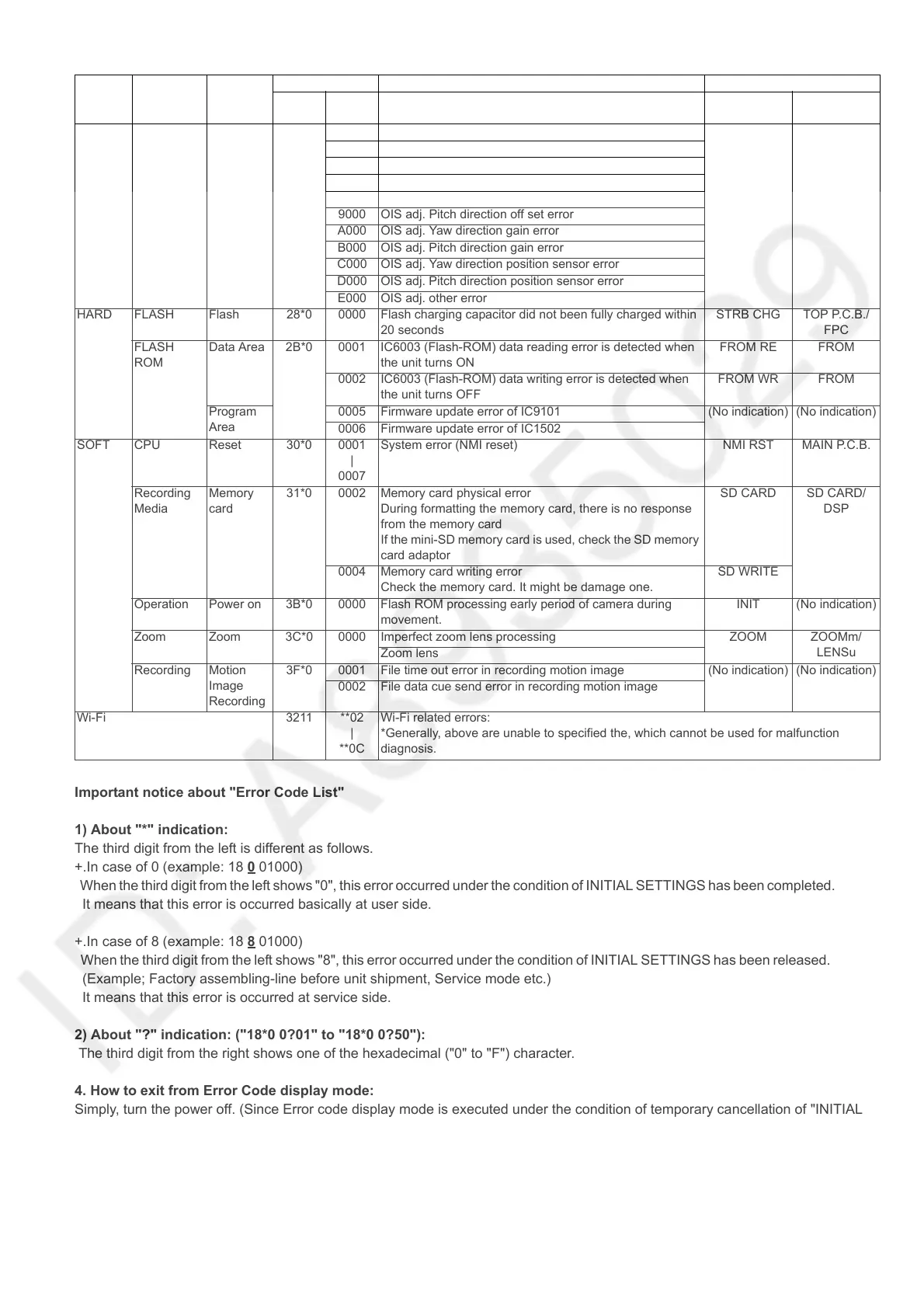
Important notice about "Error Code List"
1) About "*" indication:
The third digit from the left is different as follows.
+.In case of 0 (example: 18 0
01000)
When the third digit from the left shows "0", this error occurred under the condition of INITIAL SETTINGS has been completed.
It means that this error is occurred basically at user side.
+.In case of 8 (example: 18 8
01000)
When the third digit from the left shows "8", this error occurred under the condition of INITIAL SETTINGS has been released.
(Example; Factory assembling-line before unit shipment, Service mode etc.)
It means that this error is occurred at service side.
2) About "?" indication: ("18*0 0?01" to "18*0 0?50"):
The third digit from the right shows one of the hexadecimal ("0" to "F") character.
4. How to exit from Error Code display mode:
Simply, turn the power off. (Since Error code display mode is executed under the condition of temporary cancellation of "INITIAL
SETTINGS", it wake up with normal condition when turn off the power.)
Note:
The error code can not be initialized.
Adj.History OIS 1D*0 2000 OIS adj. Yaw direction amplitude error (small) OIS ADJ OIS ADJ
3000 OIS adj. Pitch direction amplitude error (small)
4000 OIS adj. Yaw direction amplitude error (large)
5000 OIS adj. Pitch direction amplitude error (large)
8000 OIS adj. Yaw direction off set error
9000 OIS adj. Pitch direction off set error
A000 OIS adj. Yaw direction gain error
B000 OIS adj. Pitch direction gain error
C000 OIS adj. Yaw direction position sensor error
D000 OIS adj. Pitch direction position sensor error
E000 OIS adj. other error
HARD FLASH Flash 28*0 0000 Flash charging capacitor did not been fully charged within
20 seconds
STRB CHG TOP P.C.B./
FPC
FLASH
ROM
Data Area 2B*0 0001 IC6003 (Flash-ROM) data reading error is detected when
the unit turns ON
FROM RE FROM
0002 IC6003 (Flash-ROM) data writing error is detected when
the unit turns OFF
FROM WR FROM
Program
Area
0005 Firmware update error of IC9101 (No indication) (No indication)
0006 Firmware update error of IC1502
SOFT CPU Reset 30*0 0001
|
0007
System error (NMI reset) NMI RST MAIN P.C.B.
Recording
Media
Memory
card
31*0 0002 Memory card physical error
During formatting the memory card, there is no response
from the memory card
If the mini-SD memory card is used, check the SD memory
card adaptor
SD CARD SD CARD/
DSP
0004 Memory card writing error
Check the memory card. It might be damage one.
SD WRITE
Operation Power on 3B*0 0000 Flash ROM processing early period of camera during
movement.
INIT (No indication)
Zoom Zoom 3C*0 0000 Imperfect zoom lens processing ZOOM ZOOMm/
LENSu
Zoom lens
Recording Motion
Image
Recording
3F*0 0001 File time out error in recording motion image (No indication) (No indication)
0002 File data cue send error in recording motion image
Wi-Fi 3211 **02
|
**0C
Wi-Fi related errors:
*Generally, above are unable to specified the, which cannot be used for malfunction
diagnosis.
Attribute Main item Sub item Error code Contents (Upper) Error Indication
High
4 bits
Low
4 bits
Check point (Lower) Detecting
device
Part/Circuit





 To Next Page