EasyManua.ls Logo

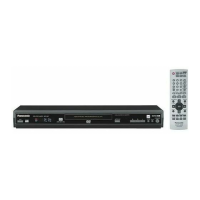
Panasonic DVD-S100 - User Manual

Panasonic DVD-S100
48 pages
Print Icon
To Next Page IconTo Next Page
Loading...
PP
RQTC0147-Y
Operating Instructions/Manuel d’utilisation
DVD/CD PLAYER/Lecteur DVD/CD
Model No./Modèle DVD-S100
Dear customer
Thank you for purchasing this product.
For optimum performance and safety, please read these instructions
carefully.
Before connecting, operating or adjusting this product, please read the
instructions completely. Please keep this manual for future reference.
Cher client
Nous vous remercions d’avoir arrêté votre choix sur cet appareil.
Pour en tirer un rendement optimal, lire attentivement le présent manuel.
Avant de raccorder, régler ou utiliser l’appareil, il est recommandé de lire
attentivement le manuel d’utilisation. Conserver ce manuel pour
consultation ultérieure.
If you have any questions about this product,
Pour toute information supplementaire sur cet
appareil,
[U.S.A.] Call: 1-800-211-PANA(7262)
[Canada]
Call/appelez-le: 1-800-561-5505
Region number
The player plays DVD-Video marked with labels containing the region
number “1” or “ALL”.
Code régional
Le lecteur prend en charge les disques DVD-Vidéo identifiés par le code
régional “1” ou par la mention “ALL.
§
For Canada only: The word “Participant” is used in place of the word “Partner”.
[U.S.A.]: The warranty can be found on page 22.
[Canada]: The warranty can be found on page 23.
La garantie se trouve à la page 44.
2
4
1
ALL
1
Referencia rápida en español ............................................ 45
This manual was printed with
soy based ink.
Ce manuel a été imprimé avec de
l’encre à base de soja.
As an ENERGY STAR Partner,
Panasonic has determined that
this product meets the
ENERGY STAR
guidelines for energy efficiency.
®
®
®
®
a
À titre de participant au programme
ENERGY STAR , Panasonic a
déterminé que cet appareil respecte les
directives
ENERGY STAR en matière
d’économie d’énergie.
RQTC0147-12.fm Page 1 Monday, July 23, 2007 6:13 PM


Table of Contents

Questions and Answers

  • G
    Greg LeeAug 11, 2025
    What to do if my Panasonic DVD-S100 has no operation?
    • C
      Cynthia BuchananAug 12, 2025
      If your Panasonic DVD Player is not working, it might be due to lightning, static electricity, or some other external factor. Try turning the unit off and then back on. Alternatively, turn it off, disconnect the AC power supply cord, and then reconnect it. If condensation has formed, wait 1 to 2 hours for it to evaporate. Also, check the connection and the power or input setting of the connected equipment. Ensure that the disc has something recorded on it. If all else fails, while stopped, press and hold [D] and [;] on the unit and then also press and hold [< OPEN/CLOSE] on the unit until “Initialized” disappears from the TV. Turn the unit off and on again. All settings will return to the default values. If the batteries are depleted, replace them with new ones.
  • B
    bmartinezAug 17, 2025
    Why Panasonic DVD-S100 DVD Player has no power?
    • R
      Richard GutierrezAug 17, 2025
      To resolve the issue of no power on your Panasonic DVD Player, ensure the AC power supply cord is securely inserted into the household AC outlet. Also, if “Auto Power Off” is set to “On”, the unit automatically switches to standby after approximately 30 minutes in the stop mode.
  • M
    Michael RamirezAug 23, 2025
    Why is the sound incorrect on my Panasonic DVD-S100?
    • M
      Makayla PattersonAug 23, 2025
      If the sound from your Panasonic DVD Player is incorrect, try setting “Advanced Surround” in the Audio Menu to “Off.” If you experience distortion with 2 channel or 5.1 channel AUDIO OUT connections, set “Attenuator” in the Audio Menu to “On.” Ensure that your speaker settings match those of the connected equipment. If the disc has restrictions on the method of audio output, refer to the disc’s jacket for more information. Try selecting “PCM” in “Dolby Digital” or “DTS Digital Surround” in the “Audio” menu. Reducing the number of connected devices or pressing [AUDIO ONLY] again might also help.
  • M
    Max MckinneyAug 29, 2025
    How to fix picture if it's incorrect on Panasonic DVD-S100?
    • C
      Cheyenne GambleAug 29, 2025
      If the picture from your Panasonic DVD Player is incorrect, first ensure that the unit is not connected through a video cassette recorder. You can try pressing and holding [CANCEL] until the picture displays correctly to return the settings to “480i” or “480p”. You may also need to change the “Source Select” in the Picture Menu, the “TV Aspect” in the “Video” menu, or adjust the zoom setting.
  • R
    raymondvelasquezSep 4, 2025
    What to do if cannot record to digital recording equipment on Panasonic DVD Player?
    • L
      Lisa TaylorSep 4, 2025
      If you cannot record to digital recording equipment with your Panasonic DVD Player (resulting in incorrect sound recorded), it might be because you cannot record WMA/MP3 files or DVDs that have protection preventing digital recording. Ensure that the following settings are made: “Advanced Surround: Off”, “PCM Digital Output: Up to 48 kHz”, and “Dolby Digital/DTS Digital Surround: PCM”.

Panasonic DVD-S100 Specifications

General IconGeneral
TypeDVD Player
Progressive ScanNo
Remote ControlYes
Audio FormatDolby Digital
Disc CompatibilityCD, CD-R/RW
Video D/A Converter10-bit
Audio D/A Converter24-bit
OutputsComposite video

Related product manuals