14
How to use
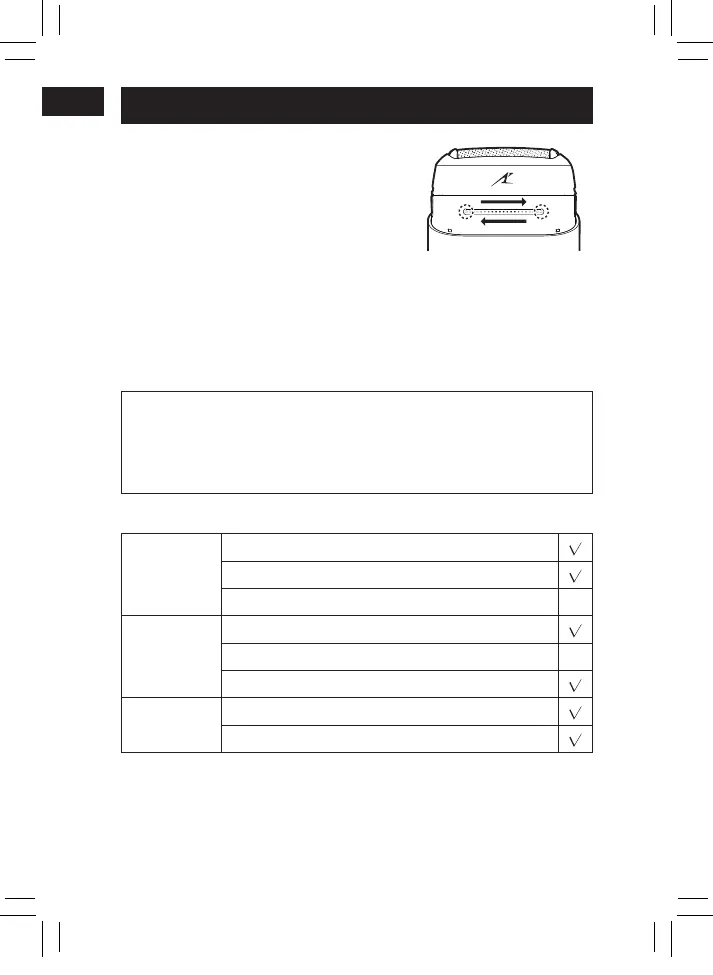
To power on/off:
Touch point A with a finger until the
white indicator lights on, slide your
finger from point A to point B, and stop
at point B for a moment.
You can also slide your finger from
point B to point A.
Tips for Use:
1. Finish your sliding within 1 second.
2. During sliding, do not allow other fingers to touch the area of
the power switch.
3. Wearing gloves or wet hands may affect the touch sensing
effect.
This product comes with a “shaving sensor”, which automatically
adjusts the shaving force depending on the beard thickness.
This product increases the shaving force in areas with dense
beard and reduces the force in areas with sparse beard to
reduce the burden on the skin.
■
The following can be used during wet shaving:
Shaving
agent
Shaving foam
Shaving gel
Shaving cream
×
Facial
cleanser
Cleansing foam (without facial scrub)
Cleansing foam (including facial scrub)
×
Cleansing soap
Bathing
soap
Liquid
Foam
PB023037 - ES-CM3A �����_(01EN)_12-20-23.indd 14 2023/12/20 11:42:32








 To Next Page