6 - ENGLISH
Attaching (continued)
The illustrations for this procedure use the
PT-RZ21K as an example.
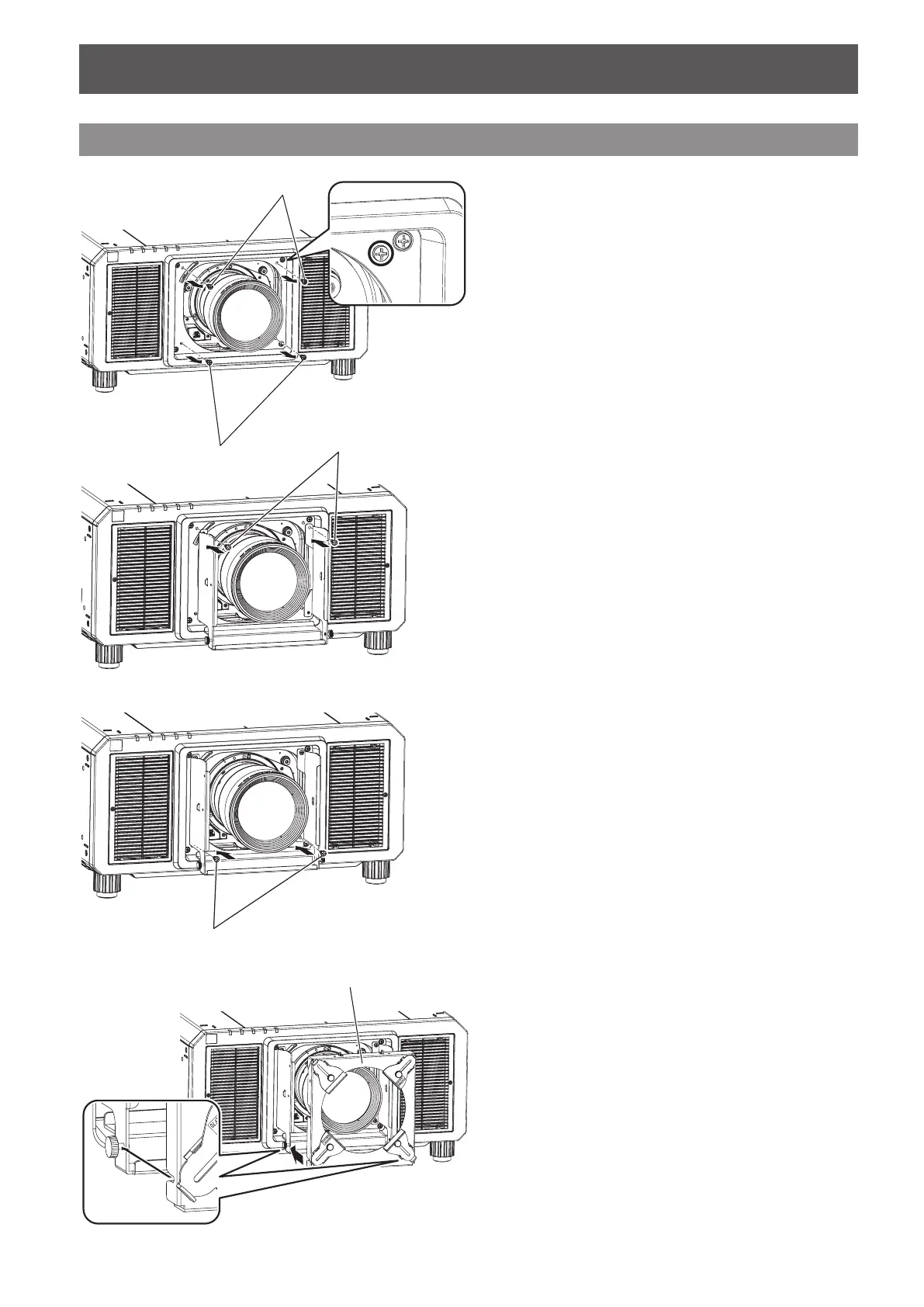
1) Of the screws that surround projection lens at
its four corners (two screws at each corner)
on the front of the projector, remove the inner
screws (four screws total).
z
For the following projectors, there is only one
screw at each corner surrounding the projection
lens. Remove the screws at each corner (four
screws total) for these projectors.
PT-RQ32K, PT-RZ31K, and PT-RS30K series
PT-RQ13K, PT-RZ12K, and PT-RS11K series
Screws
Screws
Attaching the Lens Fixing Attachment
2) Fix the upper part the lens xing attachment
mount bracket using two of the screws that
were removed in step 1.
4) Attach the lens xing attachment bracket to
the lens xing attachment mount bracket as
shown in the gure.
3) Fix the lower part of the lens xing
attachment mount bracket using the
remaining two screws.
Lens xing attachment
bracket
Screws
Screws








 To Next Page