5-37
FP-e (A: Available, N/A: Not available)
Register
No.
Name Descriptions
Read
-ing
Writ
-ing
DT9020
Not used -
DT9021
Not used -
N/A N/A
DT9022
Scan time (current
value)
Note)
The current scan time is stored here. Scan time
is calculated using the formula:
Scan time (ms) = stored data (decimal) x 0.1 ms
Example: K50 indicates 5 ms.
DT9023
Scan time
(minimum value)
Note)
The minimum scan time is stored here. Scan
time is calculated using the formula:
Scan time (ms) = stored data (decimal) x 0.1 ms
Example: K50 indicates 5 ms.
DT9024
Scan time
(maximum value)
Note)
The maximum scan time is stored here. The
scan time is calculated using the formula:
Scan time (ms) = stored data (decimal) x 0.1 ms
Example: K125 indicates 12.5 ms.
DT9025
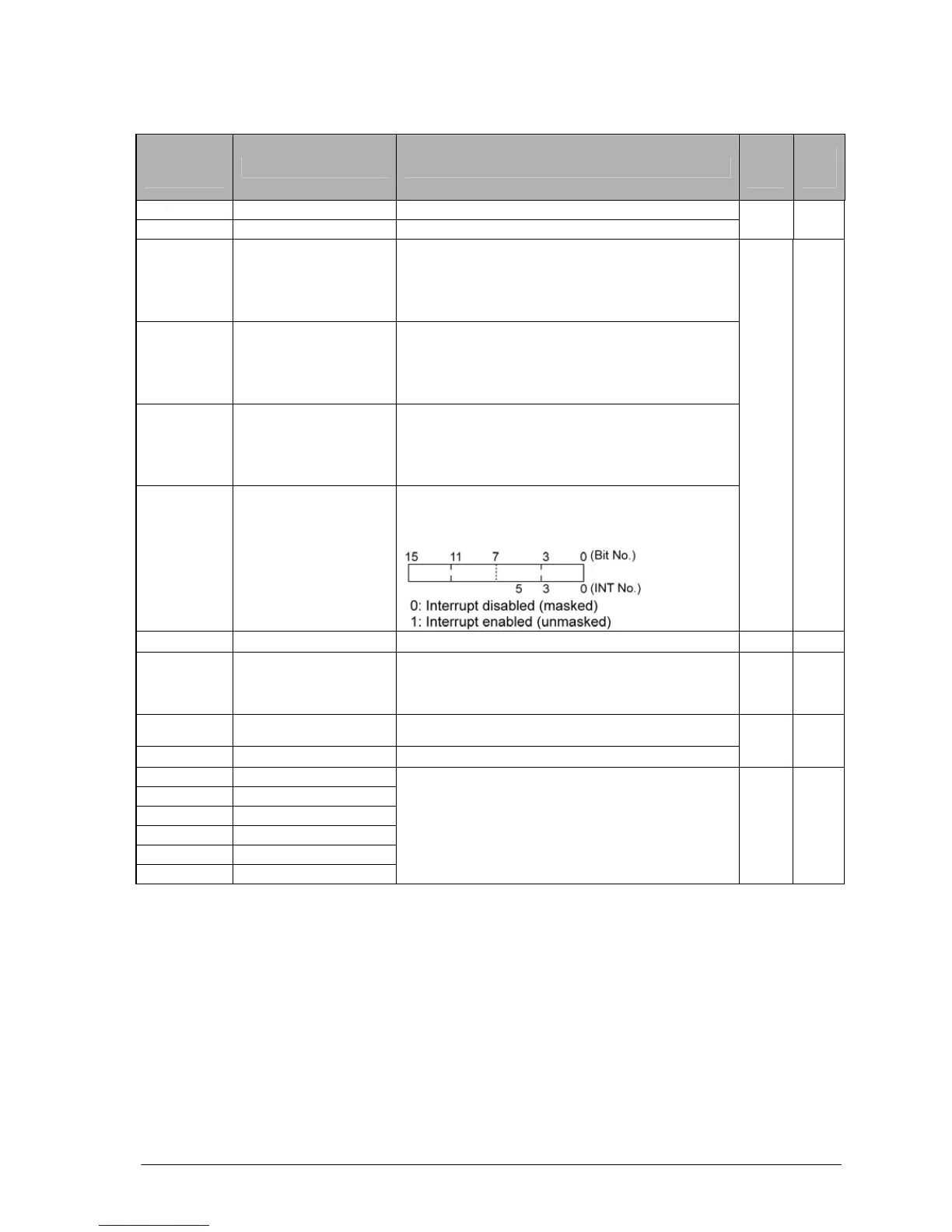
Mask condition
monitoring register
for interrupts
The mask conditions of interrupts using the
instruction can be stored here. Monitor using
binary display.
A N/A
DT9026 Not used - N/A N/A
DT9027
Periodical interrupt
interval (INT24)
The value set by the ICTL instruction is stored.
K0: periodical interrupt is not used.
K1 to K3000: 0.5ms to 1.5s or 10ms to 30s
A N/A
DT9028
Not used -
DT9029
Not used -
N/A N/A
DT9030 Message 0
DT9031 Message 1
DT9032 Message 2
DT9033 Message 3
DT9034 Message 4
DT9035 Message 5
The contents of the specified message (Data
lenght) are stored in these special data registers
when F149 (MSG) instruction is executed.
A N/A
Note) Scan time display is only possible in RUN mode and shows the operation cycle time. (in PROG
mode, the scan time for the operation is not displayed.) The maximum and minimum values are
cleared each time the mode is switched from RUN to PROG.





 To Next Page