5-186
FP2/FP2SH/FP3/FP10SH (A: Available, N/A: Not available)
Address
FP3
FP2/
FP2SH
FP10SH
Name Descriptions
Read
-ing
Writ-
ing
DT9123 DT90123 Not used -
DT9124 DT90124 Not used -
DT9125 DT90125 Not used -
N/A N/A
DT9126
(*Note)
DT90126
(*Note)
Forced on/off
operating station
display
This displays the unit number that has
executed forced on/off operation.
DT9127
(*Note)
DT90127
(*Note)
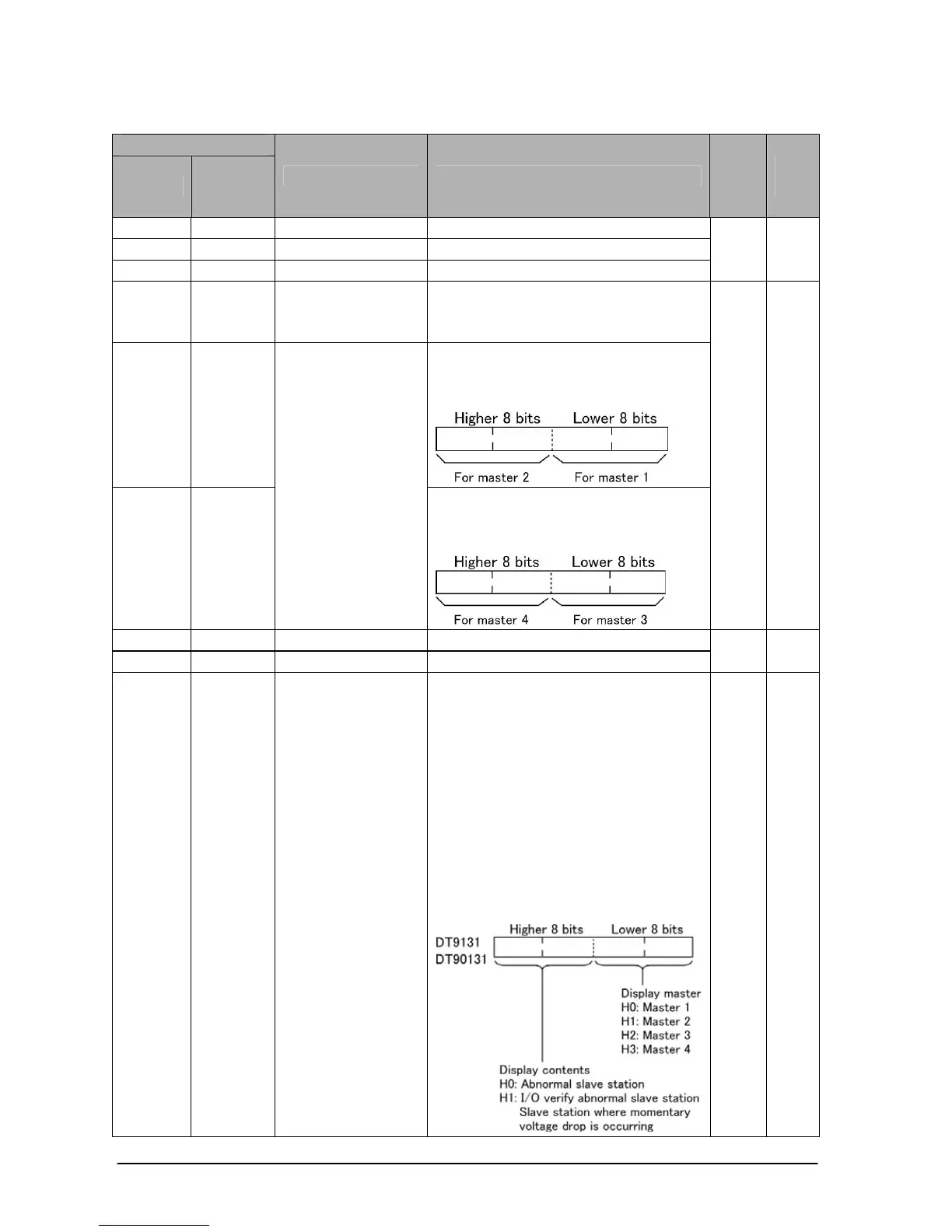
The number of times, which MEWNET-
F remote I/O service was performed by
each master, is stored.
DT9128
(*Note)
DT90128
(*Note)
MEWNET-F
system remote
I/O service time
The number of times, which MEWNET-
F remote I/O service was performed by
each master, is stored.
A N/A
DT9129 DT90129 Not used -
DT9130 DT90130 Not used -
N/A N/A
DT9131 DT90131
MEWNET-F
(remote I/O)
slave stations
abnormality
checking (for
selecting the
display contents
and master of
DT9132 to
DT9135/DT90132
to DT90135)
The contents displayed by DT9132 to
DT9135/DT90132 to DT90135 will
change depending on the contents of
stored in DT9131/DT90131. Use the
programming tools software to write
the settings for what you want to
display (this can also be done with the
F0 (MV) move instruction).
Set the code (H0 or H1) specifying the
display contents in the higher 8 bits
and set the code (H0 to H3) specifying
the display master in the lower 8 bits.
A N/A
Note) Used by the system.





 To Next Page