Basic Instructions
2 − 39
3
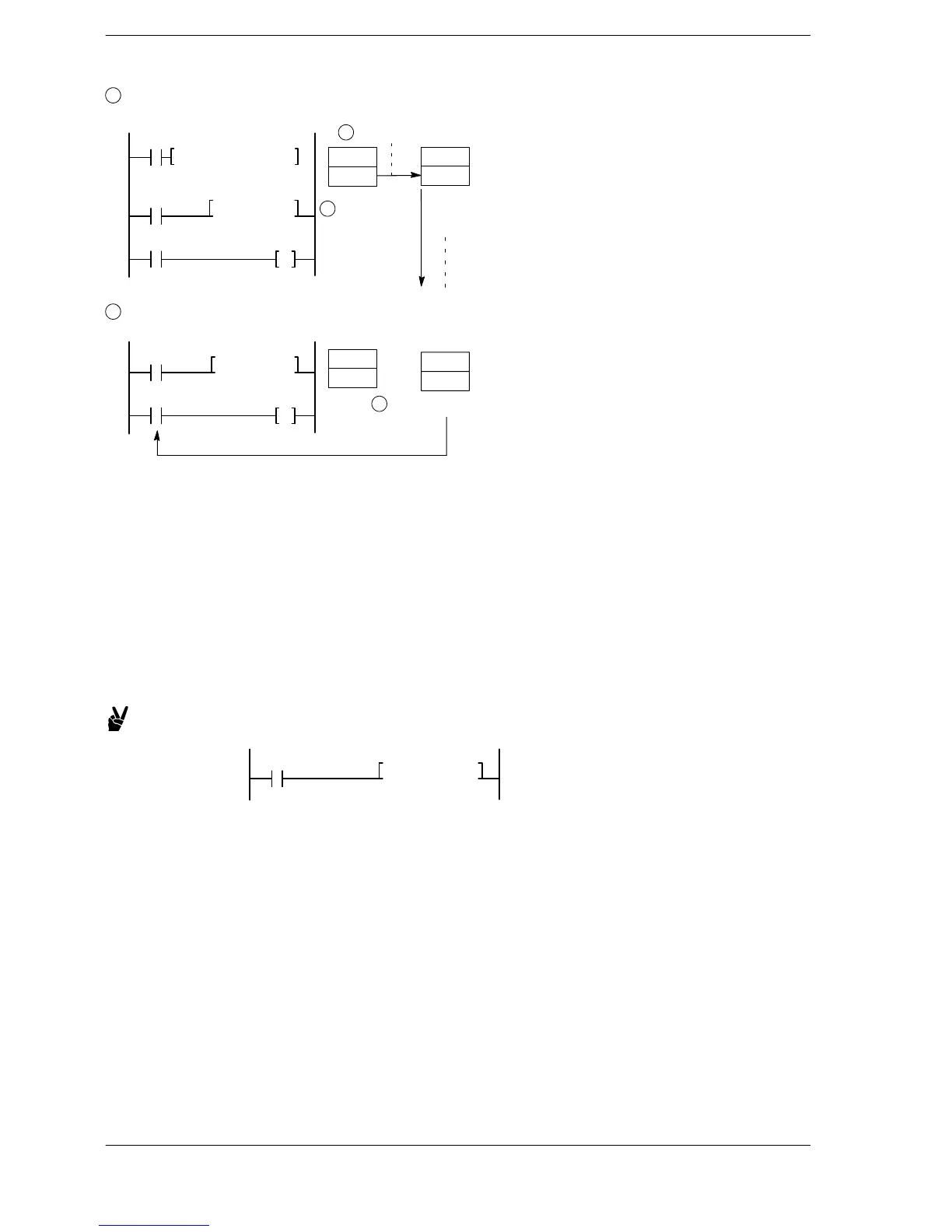
With each scan, the value in the elapsed value area EV decrements if the trigger (execution condition)
is on.
F0 MV, K30, SV5
X1
X0
T5
Y10
TML5, DT0
DT0
30
2
Transfer to EV area
EV5
30
29
28
27
3
Decrement
4
When the value in the elapsed value area EV reaches zero, the timer contact T with the same number
goes on.
EV5
0
4
Decrement operation ends
X1
T5 Y10
TML5, DT0
DT0
30
Important points when specifying a word memory area
Even if the value of the specified word memory area is changed during decrement operation, decrement
operation will continue using the value prior to the change. Timer operation using the new value will not begin
until the next time the execution condition changes from off to on.
There are both word memory area which reset (non-hold type) and do not reset (hold type) when the power is
turned off or the mode changed from RUN to PROG. If you need to retain the value written to a word memory
area when the power is turned on a second time, or after the mode is changed from RUN to PROG., use a
memory area which has been set for hold type with the system register.
When a word memory area is used for a set value, the memory area address and timer number can be
modified by index modification.
Example: Modifying a memory area address
X1
TML5, I2DT0
When I2 = K10, DT10 is used as the setting value area.
− Setting value area: DT10
− Elapsed value area: EV5
− Timer contact: T5












 To Next Page