Basic Instructions
2 − 93
Before inputting an interrupt program
1
Declare the contact point to be used as the interrupt input (trigger).
Select the contact point to be used as the interrupt input (trigger) and indicate it at system register 403.
Notes
If the high−speed counter/pulse catch is set, that contact
cannot be used as the interrupt input (trigger).
For the high speed counter−initiated interrupts and periodical
interrupts, it is not necessary to indicate the input (trigger)
contact.
2
Enable the execution of interrupt programs.
The default conditions are set with interrupt programs disabled. Enable the execution of interrupt
programs with the ICTL instruction.
Precaution when rewriting in RUN mode (for FP0/FP0R/FP−e/FPΣ/FP−X)
If the program is rewritten in the RUN mode, execution will be inhibited for all interrupt programs, and will have
to be enabled again after the rewriting has been completed in the RUN mode.
Use the R9034 (rewriting done flag in RUN) to enable the interrupt programs again automatically using the
ladder program. The R9034 is a special relay that turns on for only I scan after the completion of the rewriting
in the RUN mode.
Interrupt program execution
There are three types of interrupt.
1
Interrupt from the input contact
The interrupt occurs when the input specified at system register 403.
2
High−speed counter−initiated interrupt
When executing the high−speed counter instruction, the interrupt occurs when the high−speed
counter elapsed value equals the set target value.
3
Periodical interrupt (INT24)
The interrupt occurs in fixed time intervals. Set the time interval with the ICTL instruction.
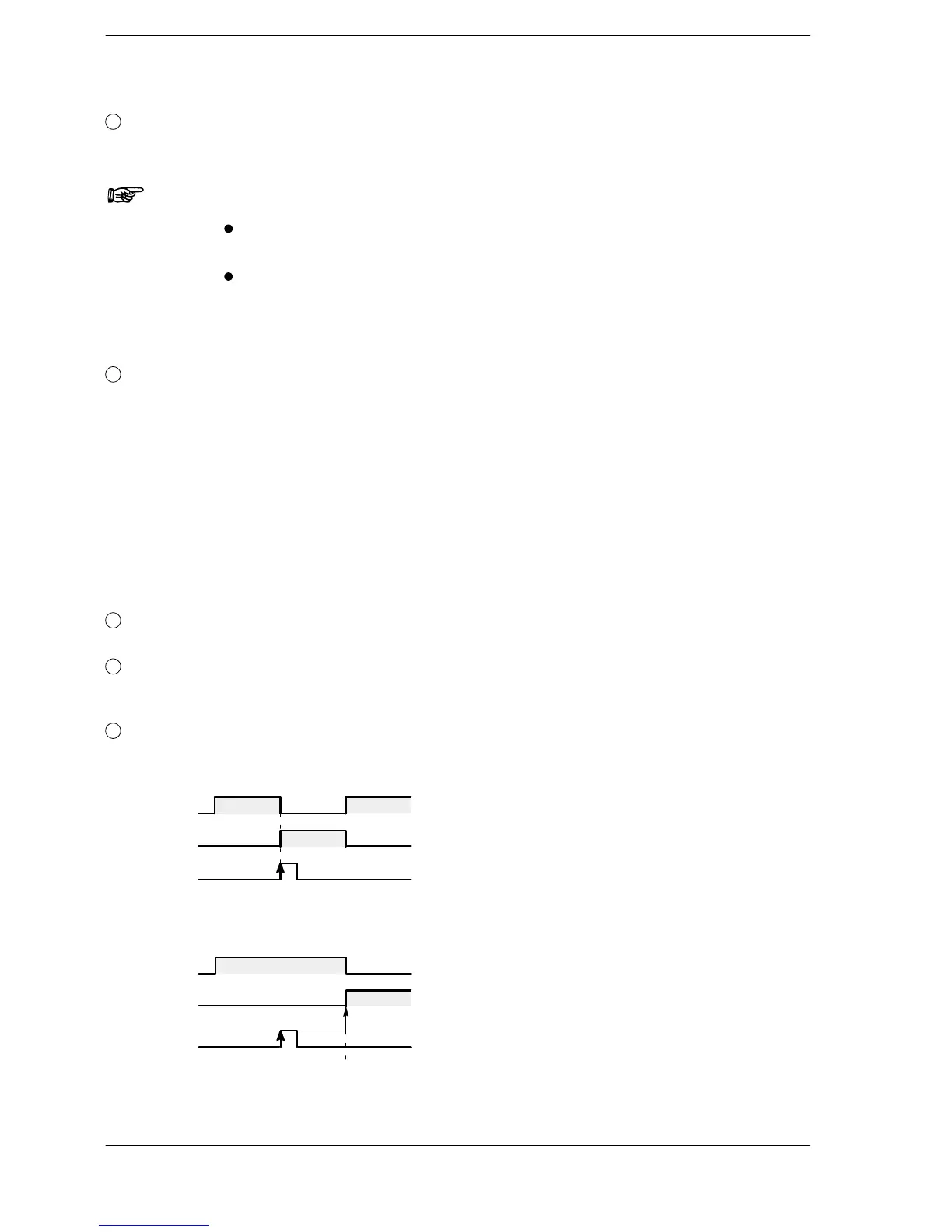
When the interrupt occurs, the interrupt program with the corresponding number is executed.
Main program
INT program
Interrupt input
on
off
Execution Execution
Execution
If interrupts are disabled, an interrupt will occur only at the point when interrupts are enabled with the ICTL
instruction.
Main program
INT program
Execution
Interrupt input
Enabled
on
off
Execution
FP0/FP0R/FP−e/FPΣ/FP−X





 To Next Page