High−level Instructions
3 − 322
Setting the reception buffer: System register 417 and 418
All areas of the data register are initially set for use as the reception buffer. To change the reception buffer, set
the starting area number in system register 417 and the size (number of words, Max. 1,024 words) in system
register 418.
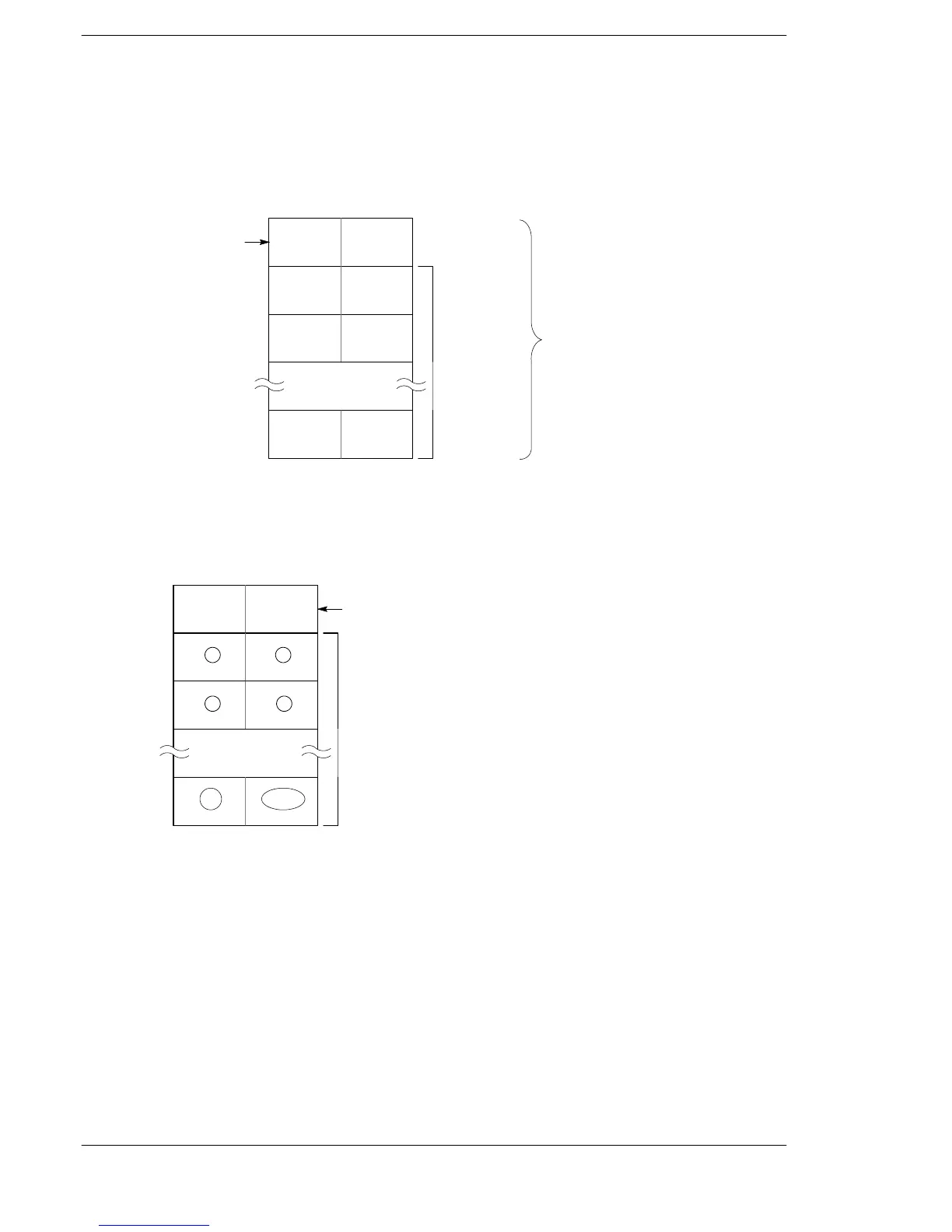
The reception buffer will be as follows:
Number of
bytes received
Area used
for storing
received
data
Number of words
specified in system
register 418
Starting area specified
in system register 417
Program and operation during reception
Data sent from the external device connected to the RS232C port will be stored in the data register areas set
as the reception buffer.
Word
(address) 0
Area used for
number of bytes
received
1
2
n
12
2n 2n−1
Area used for storing received data
(the circled numbers indicate the
storing order)
Reception buffer
34
Each time data is received, the amount of data received (number of bytes) is stored as a count in the leading
address of the reception buffer. The initial value is zero.
The data received is stored in order in the reception data storage area beginning from the lower byte of the
second word of the area.
FP0/FP−e





 To Next Page