High−level Instructions
3 − 321
Program
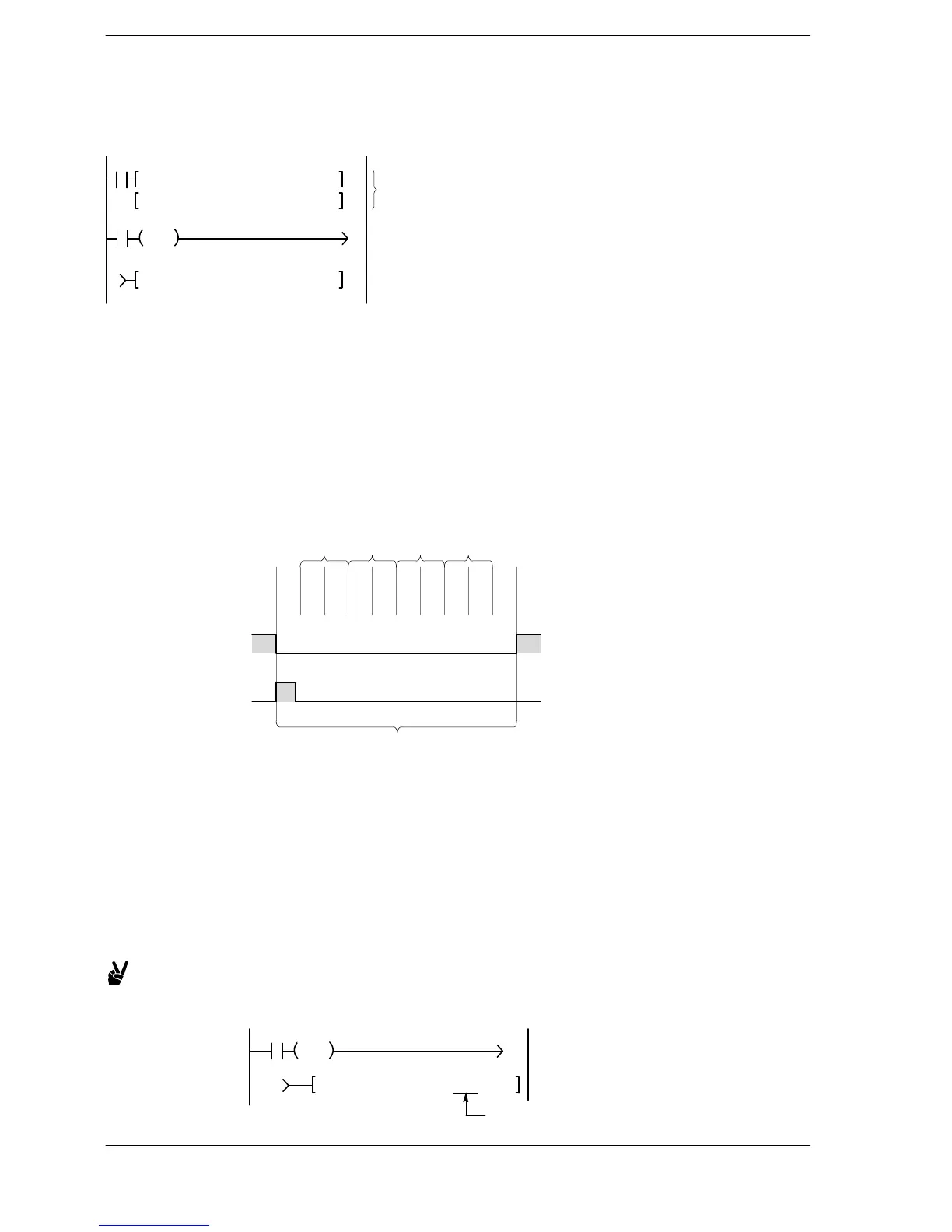
Select the starting address of the transmission data table with S and the number of transmission data bytes
with “n”.
R0
F1 DMV, H44434241, DT101
F1 DMV, H48474645, DT103
F144 TRNS, DT100, K 8
Write the transmission
data to the data table
Transmit the data in
the data table
R1
DF
1
1
Operation
If the execution condition (trigger) for the F144 (TRNS) instruction is on when sending completed flag
(R9039) goes on, operation will proceed as follows:
1) The “n” is preset in S (the number of bytes not yet transmitted). Furthermore, reception completed
flag (R9038) is turned off and the reception data number is cleared to zero.
2) The data in the data table is transmitted in order from the lower byte in S+1.
− As each byte is transmitted, the value in S (the number of bytes not yet transmitted) decrements by 1. *1
− During transmission, the sending completed flag (R9039) goes off.
− If the start code STX is set to “Yes” using system register 413, the start code will be automatically
added to the beginning of the data.
− The end code selected is automatically added to the end of the data.
ABCDEFGH(
C
R
)
DT101 DT102 DT103 DT104
Sending data
Number of bytes not
yet transmitted (DT100)
765432108
R9039
Trigger R1
During transmission (F144 (TRNS) instruction cannot be executed.)
F144 (TRNS)
execution
on
off
on
off
3) When the specified quantity of data has been transmitted, the value in S (the number of bytes not yet
transmitted) will be zero and the sending completed flag (R9039) will go on.
*1 When the FP0R is used as the FP0 (FP0 compatiblity mode), the number of transmitted bytes will be
set when the transmission starts, and it will not decrease until the completion. It will be cleared to 0
when the transmission completes.
Transmission without an end code
Specify the number of transmission bytes with a negative number.
Set the end code to “Note” for transmission and reception.
Example:
Program for transmitting 8 bytes of data without an end code
R0
DF
1
1
F144 TRNS, DT100, K−8
Set to K−8.
FP0/FP−e





 To Next Page