6 Troubleshooting
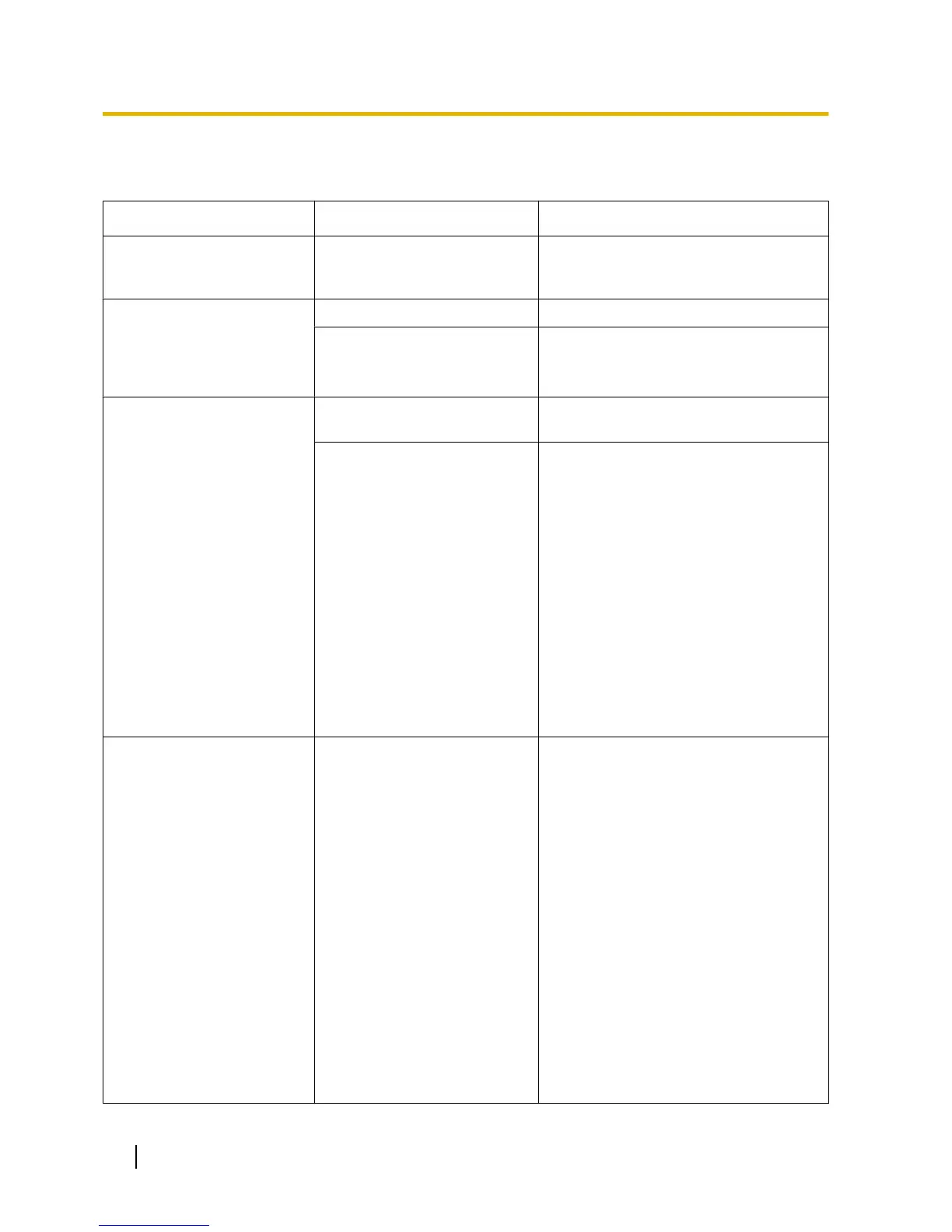
PROBLEM PROBABLE CAUSE SOLUTION
• The
repeater does not turn
on.
• The AC adaptor is not
connected properly.
• Make sure that the AC adaptor is
properly connected to both the
repeater and the AC outlet.
• The repeater cannot be
registered in Easy
Registration mode. (The
process keeps repeating
automatically.)
• The CS is out of range. • Move the repeater closer to the CS.
• The CS is not turned on. • Confirm that the CS is on.
• The repeater cannot be
registered in Manual
Registration mode. (The
process keeps repeating
automatically.)
• The destination repeater is
not turned on.
• Confirm
that the destination repeater is
on.
• The selected ID does not
match the ID of the
destination repeater.
• Follow the procedure below to change
the selected ID.
1. Check the ID of the destination
repeater in ID Confirmation mode
(refer to "ID Confirmation/
Verification Tone Mode
").
2. Enter Manual Registration mode
by pressing and holding down the
PROGRAM button of the repeater
for 5 seconds while the repeater’s
STATUS LED is flashing red, and
releasing it.
3. Select the ID that matches the
destination repeater in manual
registration again (refer to "Manual
Registration").
• The repeater’s STATUS
LED and RSSI/ID LED
flash green and red
alternately (alarm
indication).
• The ID of the repeater is the
same as the ID of another
repeater (including cascade
configuration
repeaters) that
is registered to the same CS.
• Follow the procedure below to change
the ID of the repeater.
1. Press the PROGRAM button to
cancel the alarm indication of the
repeater.
The repeater will enter ID
Confirmation mode.
2. Check the IDs of the repeater and
the
other repeater that is registered
to the same CS, in ID Confirmation
mode (refer to "ID Confirmation/
Verification Tone Mode").
3. Enter ID Modification mode by
pressing and holding down the
PROGRAM button of the repeater
for 5 seconds and releasing it.
4. Change the ID of the repeater so as
not to overlap with the ID of the
other repeater in ID Modification
mode (refer to "ID Modification").
22 Installation Manual
6 Troubleshooting


 To Next Page