2. Preparation
19
For assistance, please visit http://www.panasonic.com/help
2 Preparation2For assistanc e, please visit http://ww w.panasonic.c om/helpConnecti ons and Setup
2.1 Connections
Caution:
L When you operate this product, the power outlet
should be near the product and easily
accessible.
Note:
L If any other device is connected to the same
telephone line, this unit may disturb the network
condition of the device.
Using surge protectors
L The warranty does not cover damage due to power
line surges or lightning. For additional protection, we
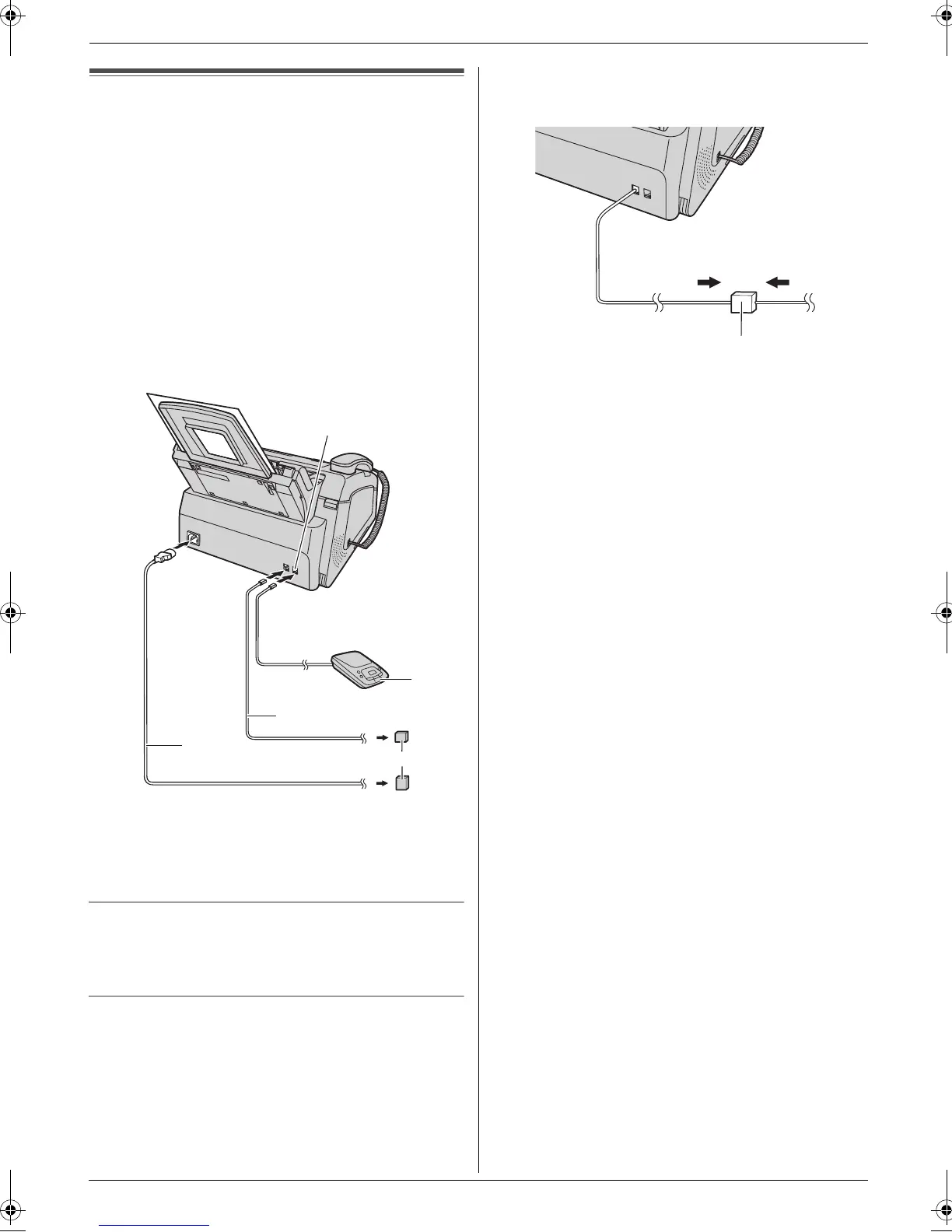
recommend using a surge protector (5).
If the unit shares a single telephone line with a DSL
service
L Fax transmission/reception may be disturbed, noise
interference may be heard during telephone
conversations, or Caller ID (page 27) may not
function properly. Please attach a DSL filter (6) to
the telephone line cord of the unit to prevent this. A
DSL filter may be provided by your DSL service
provider.
1 Telephone line cord
L Connect to a single telephone line jack (RJ11C).
2 Power cord
L Connect to the power outlet (120 V, 60 Hz).
3 [EXT] jack
L You can connect an answering machine (page
35) or a telephone. Remove the stopper if
attached.
4 Answering machine (not supplied)
1
2
3
4
5
6
FL421-PNQX3022ZA-OI-en.book Page 19 Thursday, July 29, 2010 9:35 AM





 To Next Page