This Manual: http://www.manuallib.com/file/2525964
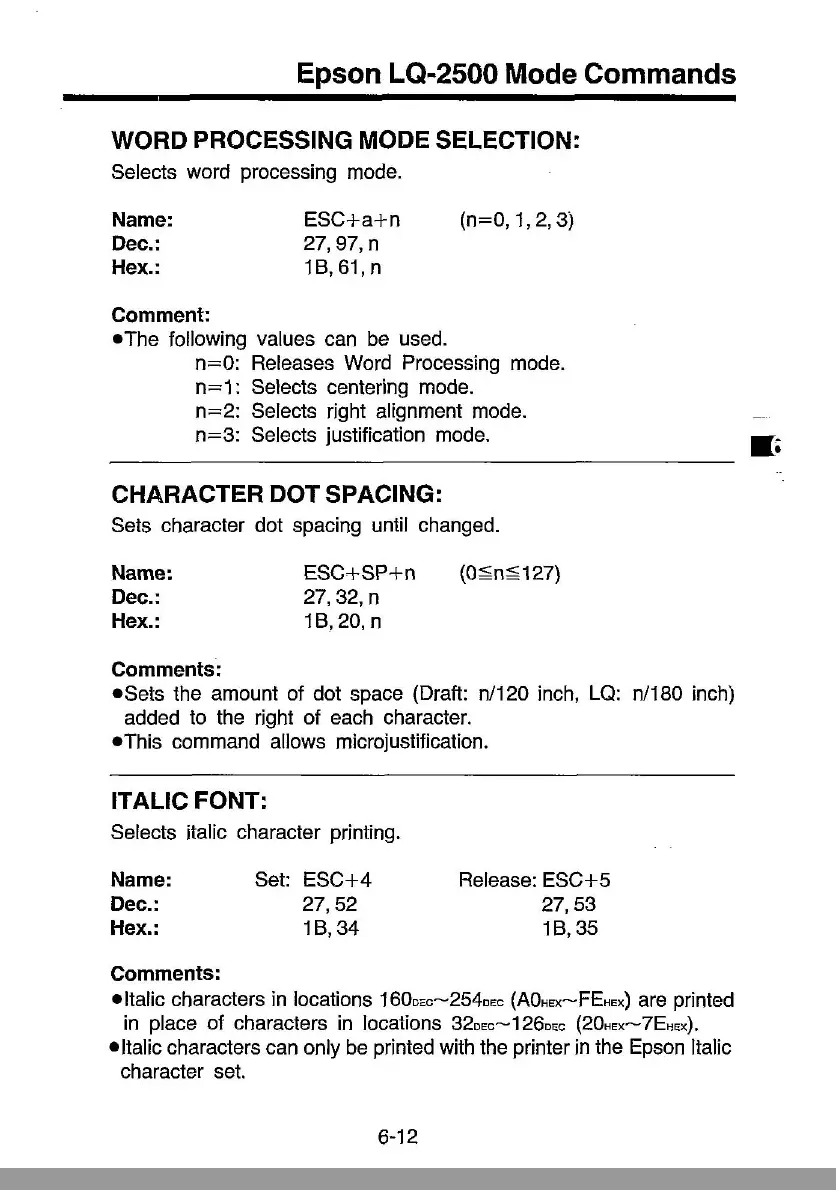
Epson LQ-2S00 Mode Commands
WORD PROCESSING MODE SELECTION:
Selects word processing mode.
Name:
Dec.:
Hex.:
Comment:
ESC+a+n
27,97, n
18,61, n
-The
following values can be used.
(n=O,
1,
2,
3)
n=O: Releases Word Processing mode.
n=1:
Selects centering mode.
n=2:
Selects right alignment mode.
n=3:
Selects justification mode.
CHARACTER DOT SPACING:
Sets character dot spacing until changed.
Name:
Dec.:
Hex.:
Comments:
ESC+SP+n
27,32,n
18,20, n
(0~n~127)
-Sets
the amount of dot space (Draft: n/120 inch,
LQ:
n/180 inch)
added to the right of each character.
-This
command allows microjustification.
ITALIC FONT:
Selects italic character printing.
Name:
Dec.:
Hex.:
Comments:
Set:
ESC+4
27,52
18,34
Release: ESC+5
27,53
18,35
-Italic characters
in
locations
1600<c-2540EC
(AOHEX-FEHEX)
are
printed
in place of characters in locations
320EC-1260EC
(20HEX-7EHEX).
-Italic characters can only
be
printed with the printer
in
the Epson Italic
character set.
6-12
••



 To Next Page