EasyManua.ls Logo

Panasonic KX-TG3821SX - User Manual

Panasonic KX-TG3821SX
56 pages
Print Icon
To Next Page IconTo Next Page
Loading...
Thank you for purchasing a Panasonic product.
Please read these operating instructions before using the unit and save them for
future reference.
This unit is compatible with Caller ID. You must subscribe to the appropriate service
offered by your service provider/telephone company.
Before initial use, see “Getting Started”
on page 9.
Please access our online customer survey:
http://panasonic.net/pcc/tel/q
2.4 GHz Digital Cordless Answering System
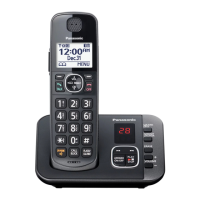
Model shown is KX-TG3711.
KX-TG3721BX/KX-TG3722BX
KX-TG3721SX/KX-TG3722SX
KX-TG3821BX
KX-TG3821JX/KX-TG3822JX
KX-TG3821SX
2.4 GHz Digital Cordless Phone
KX-TG3711BX/KX-TG3712B
X
KX-TG3719B
X
KX-TG3711SX/KX-TG3712S
X
KX-TG3811B
X
KX-TG3811J
X
KX-TG3811S
X
Model No.
Model No.
Operating Instructions
TG37xx38xxBX(e).book Page 1 Wednesday, June 8, 2011 2:08 PM

Questions and Answers

Summary

Important Information

For Your Safety

Crucial safety precautions to prevent injury and property damage.

Important Safety Instructions

Basic safety precautions to follow when using the product.

Getting Started

Connections and Initial Setup

Instructions for connecting the unit and initial setup steps.

Battery Installation and Charging

Steps for installing and charging the handset batteries.

Making;Answering Calls

Making Calls

Guides on how to make calls using the handset and speakerphone.

Dial Lock Operations & Power Back-up

Steps to turn dial lock on/off and power back-up function.

Calls During Power Failure

Instructions for making and answering calls during a power outage.

Phonebook

Phonebook Management (Adding, Editing, Erasing)

Allows making calls without manual dialing and steps to add, edit, and delete contacts.

Programming

Caller ID Service

Using Caller ID & Features

Explains using Caller ID, viewing call info, and missed calls.

Answering System

System Operation (On;Off, Call Screening)

Steps to activate/deactivate the system and listen to callers leaving messages.

Message Management & Remote Operation

Procedure to delete all messages and control system remotely.

Intercom;Locator

Error Messages

Display Message Troubleshooting

Lists common error messages and their causes/solutions.

Troubleshooting

General Use Problems

Solutions for common issues like no dial tone or handset not turning on.

Caller ID & Answering System Problems

Solutions for Caller ID display and answering system recording issues.

Summary

Important Information

For Your Safety

Crucial safety precautions to prevent injury and property damage.

Important Safety Instructions

Basic safety precautions to follow when using the product.

Getting Started

Connections and Initial Setup

Instructions for connecting the unit and initial setup steps.

Battery Installation and Charging

Steps for installing and charging the handset batteries.

Making;Answering Calls

Making Calls

Guides on how to make calls using the handset and speakerphone.

Dial Lock Operations & Power Back-up

Steps to turn dial lock on/off and power back-up function.

Calls During Power Failure

Instructions for making and answering calls during a power outage.

Phonebook

Phonebook Management (Adding, Editing, Erasing)

Allows making calls without manual dialing and steps to add, edit, and delete contacts.

Programming

Caller ID Service

Using Caller ID & Features

Explains using Caller ID, viewing call info, and missed calls.

Answering System

System Operation (On;Off, Call Screening)

Steps to activate/deactivate the system and listen to callers leaving messages.

Message Management & Remote Operation

Procedure to delete all messages and control system remotely.

Intercom;Locator

Error Messages

Display Message Troubleshooting

Lists common error messages and their causes/solutions.

Troubleshooting

General Use Problems

Solutions for common issues like no dial tone or handset not turning on.

Caller ID & Answering System Problems

Solutions for Caller ID display and answering system recording issues.

Panasonic KX-TG3821SX Specifications

General IconGeneral
TypeCordless Phone
Number of Handsets1
Caller IDYes
Talk Time10 hours
Standby Time144 hours
Display1.8 inch LCD
SpeakerphoneYes
Answering MachineNo
Call WaitingYes
Backlit DisplayYes
RedialYes
Power SourceAC Adapter
Battery TypeNi-MH
RangeUp to 50 meters indoors / 300 meters outdoors
IntercomYes
Phonebook Capacity50 entries

Related product manuals