EasyManua.ls Logo

Panasonic KX-TG3612BX - User Manual

Panasonic KX-TG3612BX
32 pages
Print Icon
To Next Page IconTo Next Page
Loading...
Thank you for purchasing a Panasonic product.
This unit is compatible with Caller ID. You must subscribe to the appropriate
service offered by your service provider/telephone company.
Please read these operating instructions before using the unit and save
them for future reference.
Charge the batteries for about 7 hours before initial use.
Operating Instructions
2.4 GHz Digital Cordless Phone
Model No. KX-TG3611BX
Model No. KX-TG3612BX
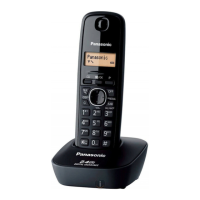
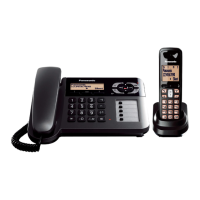
Model shown is KX-TG3611.
TG361xBX(e).book Page 1 Friday, February 6, 2009 11:40 PM

Questions and Answers

Summary

Operating Instructions Overview

Product Identification and Initial Use

Identifies models KX-TG3611BX/KX-TG3612BX and notes on charging.

Introduction to Your Phone

Model Composition and Included Accessories

Details the phone's components and accessories provided.

Important Safety Guidelines

Electrical Safety and Installation Precautions

Covers safe power connection, installation, and operating rules.

RF Energy and Medical Devices

Advises users with medical devices about potential RF interference.

Safety, Battery, and Performance Tips

Proper Battery Handling and Charging

Guidelines for safe battery use, charging, and potential hazards.

Optimizing Phone Placement and Environment

Recommendations for base unit location and environmental conditions.

Product Care, Disposal, and Specifications

Cleaning, Product Transfer, and Disposal

Instructions for cleaning, transferring, and disposing of the product.

Key Technical Specifications

Summary of the phone's technical attributes and operating conditions.

Getting Started: Basic Setup

Connecting the Base Unit to Power and Line

Step-by-step guide for physical connections.

Installing and Charging Handset Batteries

Instructions for battery insertion and initial charging.

Getting Started: Setup Details and Notes

Connection Notes and Power Failure Advice

Important considerations for AC adaptor use and power outage preparedness.

Battery Level Indicators and Performance Factors

Understanding battery status and factors affecting usage time.

Getting Started: Device Controls Overview

Handset Control Buttons and Functions

Detailed explanation of handset buttons and navigation keys.

Base Unit Identification and Features

Identifying key components of the base unit.

Getting Started: Display and Initial Settings

Understanding Handset Display Information

Explains the meaning of various items shown on the handset display.

Configuring Dialing Mode and Date;Time

Setting up the phone for pulse or tone dialing and setting the current date and time.

Making and Receiving Calls

Basic Call Procedures: Dialing and Answering

Instructions for initiating, receiving, and using speakerphone.

Redial, Call Erasure, and Auto-Talk

Features for recalling numbers, clearing lists, and automatic answering.

In-Call Features and Call Waiting

Using Hold, Mute, and Adjusting Volume

Functions to manage calls during conversation, including volume control.

Handling Call Waiting and Using Flash

Managing incoming calls while on an active call and using the flash button for PBX features.

Advanced Call Features and Security

Temporary Tone Dialing and Clarity Booster

Using temporary tone dialing and enhancing sound clarity.

Setting Up and Using Dial Lock

How to enable dial lock for call restriction and its implications.

Phonebook: Adding and Finding Contacts

Adding New Phonebook Entries and Correcting Mistakes

Step-by-step guide to adding contacts and fixing errors.

Searching and Scrolling Through the Phonebook

Methods to locate specific entries by scrolling or searching.

Phonebook: Editing and Chain Dialing

Editing and Erasing Existing Phonebook Entries

Procedures for modifying or deleting contacts from the phonebook.

Chain Dialing for Service Access

Utilizing the phonebook for dialing access numbers or PINs for services.

Programming Phone Settings

Overview of Programmable Features

Introduction to customizing phone functions via menus.

Navigating the Menu System for Settings

Instructions on how to use the display menus to select and change settings.

Programming Phone Settings: Direct Commands

Using Feature Codes for Quick Programming

Detailed instructions on using direct command codes to access features.

Programming Phone Settings: System Options

Additional Features and System Settings

Lists more programmable options and system configurations.

Special Programming Functions

Setting Night Mode for Uninterrupted Sleep

How to configure the handset to silence outside calls during specific times.

Configuring Alarm Settings and Sounds

Instructions for setting alarms, choosing tones, and melodies.

Caller ID Service Features

Understanding Caller ID Display and Missed Calls

Explains how caller information is displayed and how missed calls are handled.

Ringer ID and Caller List Overview

Customizing ringers based on caller and viewing the call history list.

Caller ID Service: Managing Call Records

Editing, Erasing, and Saving Caller Information

Procedures for modifying numbers, deleting records, and saving to the phonebook.

Intercom, Locator, and Call Transfer

Making and Receiving Intercom Calls

Guide to internal communication between handsets.

Handset Locator and Transferring Calls

Functions for finding a handset and transferring external calls.

Useful Information: Wall Mounting

Base Unit and Charger Mounting Guide

Instructions and diagrams for wall-mounting the phone components.

Useful Information: Error Messages

Understanding and Resolving Display Errors

Lists common error messages and their causes and solutions.

Troubleshooting: General Operational Issues

Resolving Unit Not Working or No Dial Tone

Solutions for common problems like the unit being unresponsive or lacking a dial tone.

Addressing Programming and Battery Recharge Problems

Troubleshooting steps for programming errors and battery charging issues.

Troubleshooting: Call Quality and Performance

Fixing Call Audio Issues and Ringing Problems

Solutions for noise, audio cuts, and the handset not ringing.

Troubleshooting Call Making Failures

Resolving issues that prevent making calls, such as dial lock or distance problems.

Troubleshooting: Caller ID Functionality

Resolving Caller Information Display Issues

Solutions for problems with caller ID not displaying or showing late.

Addressing Interference and Time Synchronization

Troubleshooting interference and time display discrepancies.

Troubleshooting: Handset Registration

Resolving Handset Registration and Communication Errors

Steps to re-register handsets or fix unstable communication.

Troubleshooting: Security and Damage

Recovering Forgotten Dial Lock Passwords

Procedures for bypassing the dial lock if the password is lost.

Handling Liquid Damage to the Unit

Instructions for managing units exposed to liquids.

Summary

Operating Instructions Overview

Product Identification and Initial Use

Identifies models KX-TG3611BX/KX-TG3612BX and notes on charging.

Introduction to Your Phone

Model Composition and Included Accessories

Details the phone's components and accessories provided.

Important Safety Guidelines

Electrical Safety and Installation Precautions

Covers safe power connection, installation, and operating rules.

RF Energy and Medical Devices

Advises users with medical devices about potential RF interference.

Safety, Battery, and Performance Tips

Proper Battery Handling and Charging

Guidelines for safe battery use, charging, and potential hazards.

Optimizing Phone Placement and Environment

Recommendations for base unit location and environmental conditions.

Product Care, Disposal, and Specifications

Cleaning, Product Transfer, and Disposal

Instructions for cleaning, transferring, and disposing of the product.

Key Technical Specifications

Summary of the phone's technical attributes and operating conditions.

Getting Started: Basic Setup

Connecting the Base Unit to Power and Line

Step-by-step guide for physical connections.

Installing and Charging Handset Batteries

Instructions for battery insertion and initial charging.

Getting Started: Setup Details and Notes

Connection Notes and Power Failure Advice

Important considerations for AC adaptor use and power outage preparedness.

Battery Level Indicators and Performance Factors

Understanding battery status and factors affecting usage time.

Getting Started: Device Controls Overview

Handset Control Buttons and Functions

Detailed explanation of handset buttons and navigation keys.

Base Unit Identification and Features

Identifying key components of the base unit.

Getting Started: Display and Initial Settings

Understanding Handset Display Information

Explains the meaning of various items shown on the handset display.

Configuring Dialing Mode and Date;Time

Setting up the phone for pulse or tone dialing and setting the current date and time.

Making and Receiving Calls

Basic Call Procedures: Dialing and Answering

Instructions for initiating, receiving, and using speakerphone.

Redial, Call Erasure, and Auto-Talk

Features for recalling numbers, clearing lists, and automatic answering.

In-Call Features and Call Waiting

Using Hold, Mute, and Adjusting Volume

Functions to manage calls during conversation, including volume control.

Handling Call Waiting and Using Flash

Managing incoming calls while on an active call and using the flash button for PBX features.

Advanced Call Features and Security

Temporary Tone Dialing and Clarity Booster

Using temporary tone dialing and enhancing sound clarity.

Setting Up and Using Dial Lock

How to enable dial lock for call restriction and its implications.

Phonebook: Adding and Finding Contacts

Adding New Phonebook Entries and Correcting Mistakes

Step-by-step guide to adding contacts and fixing errors.

Searching and Scrolling Through the Phonebook

Methods to locate specific entries by scrolling or searching.

Phonebook: Editing and Chain Dialing

Editing and Erasing Existing Phonebook Entries

Procedures for modifying or deleting contacts from the phonebook.

Chain Dialing for Service Access

Utilizing the phonebook for dialing access numbers or PINs for services.

Programming Phone Settings

Overview of Programmable Features

Introduction to customizing phone functions via menus.

Navigating the Menu System for Settings

Instructions on how to use the display menus to select and change settings.

Programming Phone Settings: Direct Commands

Using Feature Codes for Quick Programming

Detailed instructions on using direct command codes to access features.

Programming Phone Settings: System Options

Additional Features and System Settings

Lists more programmable options and system configurations.

Special Programming Functions

Setting Night Mode for Uninterrupted Sleep

How to configure the handset to silence outside calls during specific times.

Configuring Alarm Settings and Sounds

Instructions for setting alarms, choosing tones, and melodies.

Caller ID Service Features

Understanding Caller ID Display and Missed Calls

Explains how caller information is displayed and how missed calls are handled.

Ringer ID and Caller List Overview

Customizing ringers based on caller and viewing the call history list.

Caller ID Service: Managing Call Records

Editing, Erasing, and Saving Caller Information

Procedures for modifying numbers, deleting records, and saving to the phonebook.

Intercom, Locator, and Call Transfer

Making and Receiving Intercom Calls

Guide to internal communication between handsets.

Handset Locator and Transferring Calls

Functions for finding a handset and transferring external calls.

Useful Information: Wall Mounting

Base Unit and Charger Mounting Guide

Instructions and diagrams for wall-mounting the phone components.

Useful Information: Error Messages

Understanding and Resolving Display Errors

Lists common error messages and their causes and solutions.

Troubleshooting: General Operational Issues

Resolving Unit Not Working or No Dial Tone

Solutions for common problems like the unit being unresponsive or lacking a dial tone.

Addressing Programming and Battery Recharge Problems

Troubleshooting steps for programming errors and battery charging issues.

Troubleshooting: Call Quality and Performance

Fixing Call Audio Issues and Ringing Problems

Solutions for noise, audio cuts, and the handset not ringing.

Troubleshooting Call Making Failures

Resolving issues that prevent making calls, such as dial lock or distance problems.

Troubleshooting: Caller ID Functionality

Resolving Caller Information Display Issues

Solutions for problems with caller ID not displaying or showing late.

Addressing Interference and Time Synchronization

Troubleshooting interference and time display discrepancies.

Troubleshooting: Handset Registration

Resolving Handset Registration and Communication Errors

Steps to re-register handsets or fix unstable communication.

Troubleshooting: Security and Damage

Recovering Forgotten Dial Lock Passwords

Procedures for bypassing the dial lock if the password is lost.

Handling Liquid Damage to the Unit

Instructions for managing units exposed to liquids.

Panasonic KX-TG3612BX Specifications

General IconGeneral
TypeCordless Telephone
Number of Handsets2
Caller IDYes
Phonebook Capacity50
Talk Time10 hours
DisplayLCD
Ringer VolumeAdjustable
Battery TypeNi-MH
Handset LocatorYes
Call WaitingYes
SpeakerphoneYes
Answering MachineNo
Power SourceAC Adapter
Range300 meters
Redial Memory10 numbers
IntercomYes

Related product manuals