EasyManua.ls Logo

Panasonic KX-TG3683 - User Manual

Panasonic KX-TG3683
64 pages
Print Icon
To Next Page IconTo Next Page
Loading...
Operating Instructions
Cordless Telephone with Digital Answering Machine
Model No.
KX-TGL430
KX-TGL432
KX-TGL433
KX-TG3683
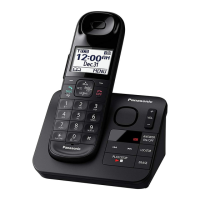
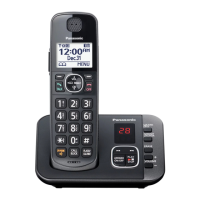
Model shown is KX-TGL430.
Before initial use, see “Getting Started”
on page 9.
Thank you for purchasing a Panasonic product.
Please read these operating instructions before using the unit and save them for
future reference.
Consulte “Guía Rápida Española”, página 54.
For assistance, visit our Web site: http://shop.panasonic.com/support for
customers in the U.S.A.
Please register your product: http://shop.panasonic.com/support
TGL43x(en)_1117_ver041.pdf 1 2015/11/17 16:08:01
Question and Answer IconNeed help?

Do you have a question about the Panasonic KX-TG3683 and is the answer not in the manual?

Summary

Important Information

For Your Safety

Crucial safety precautions to prevent injury and property loss.

Operating Safeguards

Precautions for safe operation, including cleaning and disassembly.

Important Safety Instructions

General safety guidelines to follow when using the product.

Battery Information

Details on recommended batteries, handling, and charging precautions.

Getting Started

Setting Up Connections

Step-by-step guide for connecting the base unit and charger.

Battery Installation

Instructions for correctly installing batteries in the handset.

Product Controls

Overview of handset and base unit controls and their functions.

Making and Answering Calls

Call Block

Call Block Functionality

How to block calls and add numbers to the block list.

Programming Features

Baby Monitor Setup

Guidelines for using the baby monitor feature and adjusting sensitivity.

Caller ID Service

Using Caller ID Service

Overview of Caller ID compatibility and requirements.

Answering System

Answering System Overview

Basic functions and memory capacity of the answering system.

Listening to Messages

How to play, skip, repeat, and erase recorded messages.

Remote Operation

Accessing and controlling the answering system remotely.

Useful Information

Error Messages and Solutions

Troubleshooting common error messages displayed by the unit.

General Troubleshooting

Solutions for common problems with the handset, base unit, and calls.

Summary

Important Information

For Your Safety

Crucial safety precautions to prevent injury and property loss.

Operating Safeguards

Precautions for safe operation, including cleaning and disassembly.

Important Safety Instructions

General safety guidelines to follow when using the product.

Battery Information

Details on recommended batteries, handling, and charging precautions.

Getting Started

Setting Up Connections

Step-by-step guide for connecting the base unit and charger.

Battery Installation

Instructions for correctly installing batteries in the handset.

Product Controls

Overview of handset and base unit controls and their functions.

Making and Answering Calls

Call Block

Call Block Functionality

How to block calls and add numbers to the block list.

Programming Features

Baby Monitor Setup

Guidelines for using the baby monitor feature and adjusting sensitivity.

Caller ID Service

Using Caller ID Service

Overview of Caller ID compatibility and requirements.

Answering System

Answering System Overview

Basic functions and memory capacity of the answering system.

Listening to Messages

How to play, skip, repeat, and erase recorded messages.

Remote Operation

Accessing and controlling the answering system remotely.

Useful Information

Error Messages and Solutions

Troubleshooting common error messages displayed by the unit.

General Troubleshooting

Solutions for common problems with the handset, base unit, and calls.

Panasonic KX-TG3683 Specifications

General IconGeneral
TypeCordless Telephone
Number of Handsets3
Caller IDYes
DECT TechnologyYes
DisplayLCD
Frequency1.9 GHz
Handsets SupportedUp to 6
SpeakerphoneYes
RangeUp to 1000 feet
Call WaitingYes
IntercomYes
ExpandableYes
Answering MachineNo
Power SourceAC Adapter
Standby TimeUp to 7 days
Battery TypeNi-MH
Phonebook Capacity50

Related product manuals