EasyManua.ls Logo

Panasonic KX-TG3680 - User Manual

Panasonic KX-TG3680
64 pages
Print Icon
To Next Page IconTo Next Page
Loading...
Operating Instructions
Cordless Telephone with Digital Answering Machine
Model No.
KX-TGL430
KX-TG3680
KX-TGL432
KX-TGL433
KX-TG3683
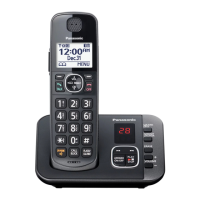
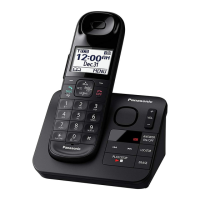
Model shown is KX-TGL430.
Before initial use, see “Getting Started”
on page 9.
Thank you for purchasing a Panasonic product.
Please read these operating instructions before using the unit and save them for
future reference.
Consulte “Guía Rápida Española”, página 54.
For assistance, visit our Web site: http://shop.panasonic.com/support for
customers in the U.S.A.
Please register your product: http://shop.panasonic.com/support
TGL43x(en)_0603_ver101.pdf 1 2016/06/03 17:30:17
Question and Answer IconNeed help?

Do you have a question about the Panasonic KX-TG3680 and is the answer not in the manual?

Summary

Operating Instructions

Cordless Telephone with Digital Answering Machine

Manual for operating a Panasonic cordless telephone with a digital answering machine.

Important Information

For Your Safety

Crucial safety precautions to prevent severe injury, loss of life, or property damage during product use.

Installation and Location

Guidelines for safely installing and choosing appropriate locations for the telephone equipment.

Operating Safeguards

Precautions for safe operation, including cleaning, disassembly, and handling of liquids.

Battery

Instructions and recommendations for using and handling rechargeable batteries for the handset.

Important Safety Instructions

Essential safety precautions to follow when using the telephone product to reduce risks.

Specifications

Technical specifications of the cordless telephone system, including standard, frequency, and power details.

Getting Started

Setting Up

Step-by-step guide for connecting the base unit and charger, and installing batteries.

Connections

Detailed instructions for connecting the AC adaptor and telephone line cord to the base unit.

Charger

Instructions for connecting the AC adaptor to the charger unit.

Battery Installation

Guidance on correctly installing rechargeable batteries into the handset.

Battery Charging

Instructions on how to charge the handset batteries and indicators for charging status.

Controls

Handset Controls

Details the function of each button on the telephone handset.

Base Unit Controls

Details the function of each button on the telephone base unit.

Display Icons

Recording Your Greeting Message

Making;Answering Calls

Making Calls

Step-by-step instructions on how to initiate a phone call using the handset.

Answering Calls

How to answer an incoming call using the handset or speakerphone.

Redialing

Making a Call Using the Redial List

Procedure to redial a previously called number from the redial list.

Useful Features During a Call

Intercom

Making an Intercom Call

Steps to initiate a call to another handset or use voice paging.

Answering an Intercom Call

How to respond when another handset pages you.

Call Block

Call Block

How to disconnect current calls and add numbers to a block list to prevent future calls.

Storing Unwanted Callers

Methods for blocking specific numbers, ranges, or unknown callers.

Phonebook

Adding Phonebook Entries

Step-by-step guide to add names and phone numbers to the phonebook.

Finding and Calling from a Phonebook Entry

Methods to locate and initiate calls to entries stored in the phonebook.

Speed Dial

How to assign phone numbers to the handset's dial keys for quick dialing.

Adding Phone Numbers to Speed Dial Keys

Methods to assign numbers to speed dial keys either manually or from the phonebook.

Programming

Menu List Navigation

Explains how to access features using menu navigation or direct command codes.

Alarm Settings Management

How to set up and manage alarm functions, including time, memo, and snooze options.

Baby Monitor Setup and Operation

Enables listening to another room remotely, with options for automatic calling and setup.

Handset Registration and Deregistration

Steps to pair new handsets or remove existing ones from the base unit.

Caller ID Service

Using Caller ID Service

Prerequisites and basic functionality of the Caller ID service.

Viewing the Caller List and Calling Back

How to view the list of received calls and initiate a callback.

Answering System

Answering System

Overview of the answering system's functionality for recording calls and playing messages.

Turning the Answering System On;Off

Instructions for activating and deactivating the answering system on both the base unit and handset.

Greeting Message

Options for playing either a personal or pre-recorded greeting message to callers.

Recording Your Greeting Message

Step-by-step guide to record a custom greeting message.

Listening to Messages

General guidance on accessing and managing recorded messages.

New Message Alert by a Call

Feature that notifies you of new messages via a phone call.

Storing a Phone Number to Which the Unit Makes an Alert Call

How to configure a phone number for the unit to call when new messages are recorded.

Activating;Inactivating the Remote Access Code to Play Messages

Controls whether a remote access code is required to listen to messages remotely.

Remote Operation

How to remotely control the answering system using a touch-tone phone.

Remote Access Code

Information about the 3-digit code used to access the answering system remotely.

Turning On the Answering System Remotely

How to remotely turn the answering system on using a touch-tone phone.

Answering System Settings

Configuration options for the answering system's behavior.

Voicemail Service and Setup

Wall Mounting Instructions

Error Messages and Solutions

Troubleshooting Common Issues

General Use Troubleshooting

Solutions for problems with handset, base unit, menu display, and battery recharge.

Caller ID and Talking Caller ID Troubleshooting

Answering System and Voicemail Issues

Liquid Damage Handling and Precautions

FCC Compliance and Regulations

FCC RF Exposure and TIA-1083 Standard

Appendix

Limited Warranty (U.S.A.)

Details the limited warranty coverage, terms, and conditions for products purchased in the USA.

IMPORTANT! Troubleshooting Checklist

Summary

Operating Instructions

Cordless Telephone with Digital Answering Machine

Manual for operating a Panasonic cordless telephone with a digital answering machine.

Important Information

For Your Safety

Crucial safety precautions to prevent severe injury, loss of life, or property damage during product use.

Installation and Location

Guidelines for safely installing and choosing appropriate locations for the telephone equipment.

Operating Safeguards

Precautions for safe operation, including cleaning, disassembly, and handling of liquids.

Battery

Instructions and recommendations for using and handling rechargeable batteries for the handset.

Important Safety Instructions

Essential safety precautions to follow when using the telephone product to reduce risks.

Specifications

Technical specifications of the cordless telephone system, including standard, frequency, and power details.

Getting Started

Setting Up

Step-by-step guide for connecting the base unit and charger, and installing batteries.

Connections

Detailed instructions for connecting the AC adaptor and telephone line cord to the base unit.

Charger

Instructions for connecting the AC adaptor to the charger unit.

Battery Installation

Guidance on correctly installing rechargeable batteries into the handset.

Battery Charging

Instructions on how to charge the handset batteries and indicators for charging status.

Controls

Handset Controls

Details the function of each button on the telephone handset.

Base Unit Controls

Details the function of each button on the telephone base unit.

Display Icons

Recording Your Greeting Message

Making;Answering Calls

Making Calls

Step-by-step instructions on how to initiate a phone call using the handset.

Answering Calls

How to answer an incoming call using the handset or speakerphone.

Redialing

Making a Call Using the Redial List

Procedure to redial a previously called number from the redial list.

Useful Features During a Call

Intercom

Making an Intercom Call

Steps to initiate a call to another handset or use voice paging.

Answering an Intercom Call

How to respond when another handset pages you.

Call Block

Call Block

How to disconnect current calls and add numbers to a block list to prevent future calls.

Storing Unwanted Callers

Methods for blocking specific numbers, ranges, or unknown callers.

Phonebook

Adding Phonebook Entries

Step-by-step guide to add names and phone numbers to the phonebook.

Finding and Calling from a Phonebook Entry

Methods to locate and initiate calls to entries stored in the phonebook.

Speed Dial

How to assign phone numbers to the handset's dial keys for quick dialing.

Adding Phone Numbers to Speed Dial Keys

Methods to assign numbers to speed dial keys either manually or from the phonebook.

Programming

Menu List Navigation

Explains how to access features using menu navigation or direct command codes.

Alarm Settings Management

How to set up and manage alarm functions, including time, memo, and snooze options.

Baby Monitor Setup and Operation

Enables listening to another room remotely, with options for automatic calling and setup.

Handset Registration and Deregistration

Steps to pair new handsets or remove existing ones from the base unit.

Caller ID Service

Using Caller ID Service

Prerequisites and basic functionality of the Caller ID service.

Viewing the Caller List and Calling Back

How to view the list of received calls and initiate a callback.

Answering System

Answering System

Overview of the answering system's functionality for recording calls and playing messages.

Turning the Answering System On;Off

Instructions for activating and deactivating the answering system on both the base unit and handset.

Greeting Message

Options for playing either a personal or pre-recorded greeting message to callers.

Recording Your Greeting Message

Step-by-step guide to record a custom greeting message.

Listening to Messages

General guidance on accessing and managing recorded messages.

New Message Alert by a Call

Feature that notifies you of new messages via a phone call.

Storing a Phone Number to Which the Unit Makes an Alert Call

How to configure a phone number for the unit to call when new messages are recorded.

Activating;Inactivating the Remote Access Code to Play Messages

Controls whether a remote access code is required to listen to messages remotely.

Remote Operation

How to remotely control the answering system using a touch-tone phone.

Remote Access Code

Information about the 3-digit code used to access the answering system remotely.

Turning On the Answering System Remotely

How to remotely turn the answering system on using a touch-tone phone.

Answering System Settings

Configuration options for the answering system's behavior.

Voicemail Service and Setup

Wall Mounting Instructions

Error Messages and Solutions

Troubleshooting Common Issues

General Use Troubleshooting

Solutions for problems with handset, base unit, menu display, and battery recharge.

Caller ID and Talking Caller ID Troubleshooting

Answering System and Voicemail Issues

Liquid Damage Handling and Precautions

FCC Compliance and Regulations

FCC RF Exposure and TIA-1083 Standard

Appendix

Limited Warranty (U.S.A.)

Details the limited warranty coverage, terms, and conditions for products purchased in the USA.

IMPORTANT! Troubleshooting Checklist

Panasonic KX-TG3680 Specifications

General IconGeneral
Number of Handsets1
Caller IDYes
Answering MachineYes
DisplayLCD
SpeakerphoneYes
Phonebook Entries50
Battery TypeNi-MH
Call WaitingYes
IntercomYes
Answering Machine (Digital)Yes
Backlit DisplayYes

Related product manuals