EasyManua.ls Logo

Panasonic KX-TG3711BX - User Manual

Panasonic KX-TG3711BX
56 pages
Print Icon
To Next Page IconTo Next Page
Loading...
Thank you for purchasing a Panasonic product.
Please read these operating instructions before using the unit and save them for
future reference.
This unit is compatible with Caller ID. You must subscribe to the appropriate service
offered by your service provider/telephone company.
Before initial use, see “Getting Started”
on page 9.
Please access our online customer survey:
http://panasonic.net/pcc/tel/q
2.4 GHz Digital Cordless Answering System
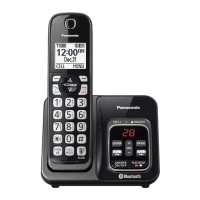
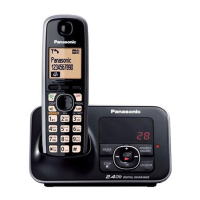
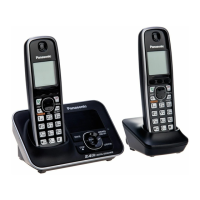
Model shown is KX-TG3711.
KX-TG3721BX/KX-TG3722BX
KX-TG3721SX/KX-TG3722SX
KX-TG3821BX
KX-TG3821JX/KX-TG3822JX
KX-TG3821SX
2.4 GHz Digital Cordless Phone
KX-TG3711BX/KX-TG3712B
X
KX-TG3719B
X
KX-TG3711SX/KX-TG3712S
X
KX-TG3811B
X
KX-TG3811J
X
KX-TG3811S
X
Model No.
Model No.
Operating Instructions
TG37xx38xxBX(e).book Page 1 Wednesday, June 8, 2011 2:08 PM

Questions and Answers

Summary

Introduction and Model Details

Model Composition

Details the different model numbers and their configurations, including base unit and handset part numbers.

Feature Differences

Compares key features across different series of the phone models, such as answering system and display.

Important Information and Safety

For Your Safety

Critical warnings and instructions to prevent injury, electric shock, and property damage during use.

Battery Handling and Safety

Instructions for safe handling, charging, and disposal of rechargeable batteries to prevent hazards.

Getting Started and Initial Setup

Setting Up Connections

Step-by-step guide on connecting the base unit to power and telephone lines correctly.

Handset and Base Unit Controls

Identifies handset and base unit buttons and guides initial setup and operation.

Initial Settings Guide

Overview of how to access and configure initial settings like display language and date/time.

Call Management and Phonebook

Making and Answering Calls

How to initiate and answer calls using the handset and base unit, including speakerphone use.

Phonebook Management

Adding, finding, editing, and copying contacts in the phonebook for easy calling.

Caller ID Service Usage

How to view caller information, manage the caller list, and use call waiting features.

Answering System and Programming

Programming Settings Overview

Explains methods to access and program various unit settings via menus or command codes.

Answering System Operations

Turning the system on/off, managing messages, recording greetings, and call screening.

Remote Operation of Answering System

How to access and control the answering system from an external phone using remote commands.

Troubleshooting and Maintenance

Error Messages and Solutions

Lists common error messages and their corresponding causes and solutions for quick resolution.

Troubleshooting Call and Battery Issues

Solutions for problems like noise, no ring, call connection issues, and battery recharge problems.

Handset Registration and Deregistration

Steps to pair a new handset with the base unit and how to remove a handset from the list.

Summary

Introduction and Model Details

Model Composition

Details the different model numbers and their configurations, including base unit and handset part numbers.

Feature Differences

Compares key features across different series of the phone models, such as answering system and display.

Important Information and Safety

For Your Safety

Critical warnings and instructions to prevent injury, electric shock, and property damage during use.

Battery Handling and Safety

Instructions for safe handling, charging, and disposal of rechargeable batteries to prevent hazards.

Getting Started and Initial Setup

Setting Up Connections

Step-by-step guide on connecting the base unit to power and telephone lines correctly.

Handset and Base Unit Controls

Identifies handset and base unit buttons and guides initial setup and operation.

Initial Settings Guide

Overview of how to access and configure initial settings like display language and date/time.

Call Management and Phonebook

Making and Answering Calls

How to initiate and answer calls using the handset and base unit, including speakerphone use.

Phonebook Management

Adding, finding, editing, and copying contacts in the phonebook for easy calling.

Caller ID Service Usage

How to view caller information, manage the caller list, and use call waiting features.

Answering System and Programming

Programming Settings Overview

Explains methods to access and program various unit settings via menus or command codes.

Answering System Operations

Turning the system on/off, managing messages, recording greetings, and call screening.

Remote Operation of Answering System

How to access and control the answering system from an external phone using remote commands.

Troubleshooting and Maintenance

Error Messages and Solutions

Lists common error messages and their corresponding causes and solutions for quick resolution.

Troubleshooting Call and Battery Issues

Solutions for problems like noise, no ring, call connection issues, and battery recharge problems.

Handset Registration and Deregistration

Steps to pair a new handset with the base unit and how to remove a handset from the list.

Panasonic KX-TG3711BX Specifications

General IconGeneral
TypeCordless Telephone
Number of Handsets1
Caller IDYes
Talk Time10 hours
DisplayLCD
Frequency1.9 GHz
DECTYes
GAP compatibleYes
Answering machineNo
Call WaitingYes
SpeakerphoneYes
Backlit DisplayYes
RedialYes
Power SourceAC adapter
Phonebook Memory50 names
Battery typeNi-MH
RangeUp to 300 meters outdoors, 50 meters indoors
ExpandableUp to 6 handsets
Ringtones10
Standby Time (Days)7
IntercomYes (Handset to Handset)

Related product manuals