EasyManua.ls Logo

Panasonic KX-TG3412BX - User Manual

Panasonic KX-TG3412BX
28 pages
Print Icon
To Next Page IconTo Next Page
Loading...
Thank you for purchasing a Panasonic product.
Please read these operating instructions before using the unit and save them for
future reference.
This unit is compatible with Caller ID. You must subscribe to the appropriate service
offered by your service provider/telephone company.
Before initial use, see “Getting Started”
on page 8.
Please access our online customer survey:
http://panasonic.net/pcc/tel/q
Operating Instructions
2.4 GHz Digital Cordless Phone
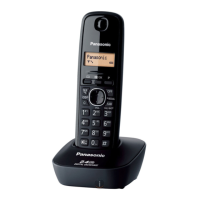
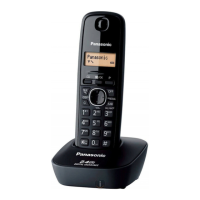
Model shown is KX-TG3411.
KX-TG3412BX
KX-TG3411SX
Model No.
KX-TG3411BX
KX-TG3419BX
TG341xBX(e).book Page 1 Thursday, March 3, 2011 1:47 PM

Questions and Answers

Summary

Introduction

Model Composition

Details the different model numbers and their base unit/handset configurations.

Accessory Information

Lists the supplied accessories with their part numbers and quantities.

Additional;Replacement Accessories

Information on how to obtain additional or replacement accessories like batteries.

Important Information

Safety Precautions

Covers warnings, operating safeguards, medical considerations, and installation safety.

Battery Information

Provides recommendations and safety guidelines for using and handling batteries.

Performance and Environment

Offers tips for best performance and discusses environmental factors affecting operation.

Routine Care and Specifications

Details cleaning instructions and provides technical specifications for the product.

Getting Started

Setup and Connections

Step-by-step guide for initial installation, connecting the AC adaptor and phone line.

Battery Installation and Charging

Instructions on how to install batteries and notes on the charging process.

Handset Controls and Display

An overview of the buttons and icons found on the handset and base unit.

Initial Settings

Guide for configuring dialing mode, date, and time settings.

Making;Answering Calls

Making Calls

Steps for dialing numbers, using the redial list, and inserting pauses.

Answering Calls

Instructions on how to answer calls, use auto talk, and adjust ringer volume.

Useful Features During a Call

Call Handling Features

Explains how to use Hold, Flash, Call Waiting, and Temporary Tone Dialing.

Call Share

Details on how to join an existing outside call.

Phonebook

Managing Phonebook Entries

Instructions for adding, editing, and erasing phonebook entries.

Finding and Calling Contacts

How to scroll through, search by character, and call contacts from the phonebook.

Chain Dial

Functionality to dial phone numbers from the phonebook while on an active call.

Programming

Programmable Settings

Overview of how to customize unit features through the display menus.

Programming Menus

Guidance on navigating menus to program various settings like ringer and contrast.

Caller ID Service

Using Caller ID Service

How to activate and utilize Caller ID features like call display and missed calls.

Caller List Management

Viewing the caller list, calling back, and managing area codes for dialing.

Storing Caller Information to Phonebook

Instructions on how to save incoming call information directly into the phonebook.

Voice Mail Service

Voice Mail Service Overview

Explanation of the automatic answering service offered by the service provider.

Intercom;Locator

Intercom Functions

Steps for making and answering intercom calls between handsets.

Handset Locator

Guide on how to use the paging function to find a misplaced handset.

Call Transfer and Conference

Instructions for transferring calls and establishing conference calls.

Useful Information

Error Messages

Explanations of various error messages that may appear on the display.

Troubleshooting

Solutions for general problems like no power, no dial tone, and unit not working.

Battery Recharge Issues

Troubleshooting steps for issues related to battery charging and operation time.

Call and Intercom Problems

Solutions for problems during making/answering calls and intercom usage.

Caller ID Issues

Troubleshooting steps for problems with Caller ID information display.

Liquid Damage

Instructions on handling the unit if it is exposed to moisture or liquid.

Registering a Handset

Step-by-step guide to register a new or existing handset to the base unit.

Wall Mounting

Instructions and diagrams for mounting the base unit and charger on a wall.

Summary

Introduction

Model Composition

Details the different model numbers and their base unit/handset configurations.

Accessory Information

Lists the supplied accessories with their part numbers and quantities.

Additional;Replacement Accessories

Information on how to obtain additional or replacement accessories like batteries.

Important Information

Safety Precautions

Covers warnings, operating safeguards, medical considerations, and installation safety.

Battery Information

Provides recommendations and safety guidelines for using and handling batteries.

Performance and Environment

Offers tips for best performance and discusses environmental factors affecting operation.

Routine Care and Specifications

Details cleaning instructions and provides technical specifications for the product.

Getting Started

Setup and Connections

Step-by-step guide for initial installation, connecting the AC adaptor and phone line.

Battery Installation and Charging

Instructions on how to install batteries and notes on the charging process.

Handset Controls and Display

An overview of the buttons and icons found on the handset and base unit.

Initial Settings

Guide for configuring dialing mode, date, and time settings.

Making;Answering Calls

Making Calls

Steps for dialing numbers, using the redial list, and inserting pauses.

Answering Calls

Instructions on how to answer calls, use auto talk, and adjust ringer volume.

Useful Features During a Call

Call Handling Features

Explains how to use Hold, Flash, Call Waiting, and Temporary Tone Dialing.

Call Share

Details on how to join an existing outside call.

Phonebook

Managing Phonebook Entries

Instructions for adding, editing, and erasing phonebook entries.

Finding and Calling Contacts

How to scroll through, search by character, and call contacts from the phonebook.

Chain Dial

Functionality to dial phone numbers from the phonebook while on an active call.

Programming

Programmable Settings

Overview of how to customize unit features through the display menus.

Programming Menus

Guidance on navigating menus to program various settings like ringer and contrast.

Caller ID Service

Using Caller ID Service

How to activate and utilize Caller ID features like call display and missed calls.

Caller List Management

Viewing the caller list, calling back, and managing area codes for dialing.

Storing Caller Information to Phonebook

Instructions on how to save incoming call information directly into the phonebook.

Voice Mail Service

Voice Mail Service Overview

Explanation of the automatic answering service offered by the service provider.

Intercom;Locator

Intercom Functions

Steps for making and answering intercom calls between handsets.

Handset Locator

Guide on how to use the paging function to find a misplaced handset.

Call Transfer and Conference

Instructions for transferring calls and establishing conference calls.

Useful Information

Error Messages

Explanations of various error messages that may appear on the display.

Troubleshooting

Solutions for general problems like no power, no dial tone, and unit not working.

Battery Recharge Issues

Troubleshooting steps for issues related to battery charging and operation time.

Call and Intercom Problems

Solutions for problems during making/answering calls and intercom usage.

Caller ID Issues

Troubleshooting steps for problems with Caller ID information display.

Liquid Damage

Instructions on handling the unit if it is exposed to moisture or liquid.

Registering a Handset

Step-by-step guide to register a new or existing handset to the base unit.

Wall Mounting

Instructions and diagrams for mounting the base unit and charger on a wall.

Panasonic KX-TG3412BX Specifications

General IconGeneral
BrandPanasonic
ModelKX-TG3412BX
TypeCordless Telephone
Frequency1.9 GHz
Number of Handsets2
Caller IDYes
Talk TimeUp to 10 hours
SpeakerphoneYes
DisplayLCD
Wall MountableYes
Call WaitingYes
IntercomYes
Answering MachineNo
Power SourceAC Adapter
Phonebook Capacity50 entries
RangeUp to 50m indoor / 300m outdoor
Battery TypeNi-MH

Related product manuals