Getting Started
9
For assistance, please visit http://www.panasonic.com/help
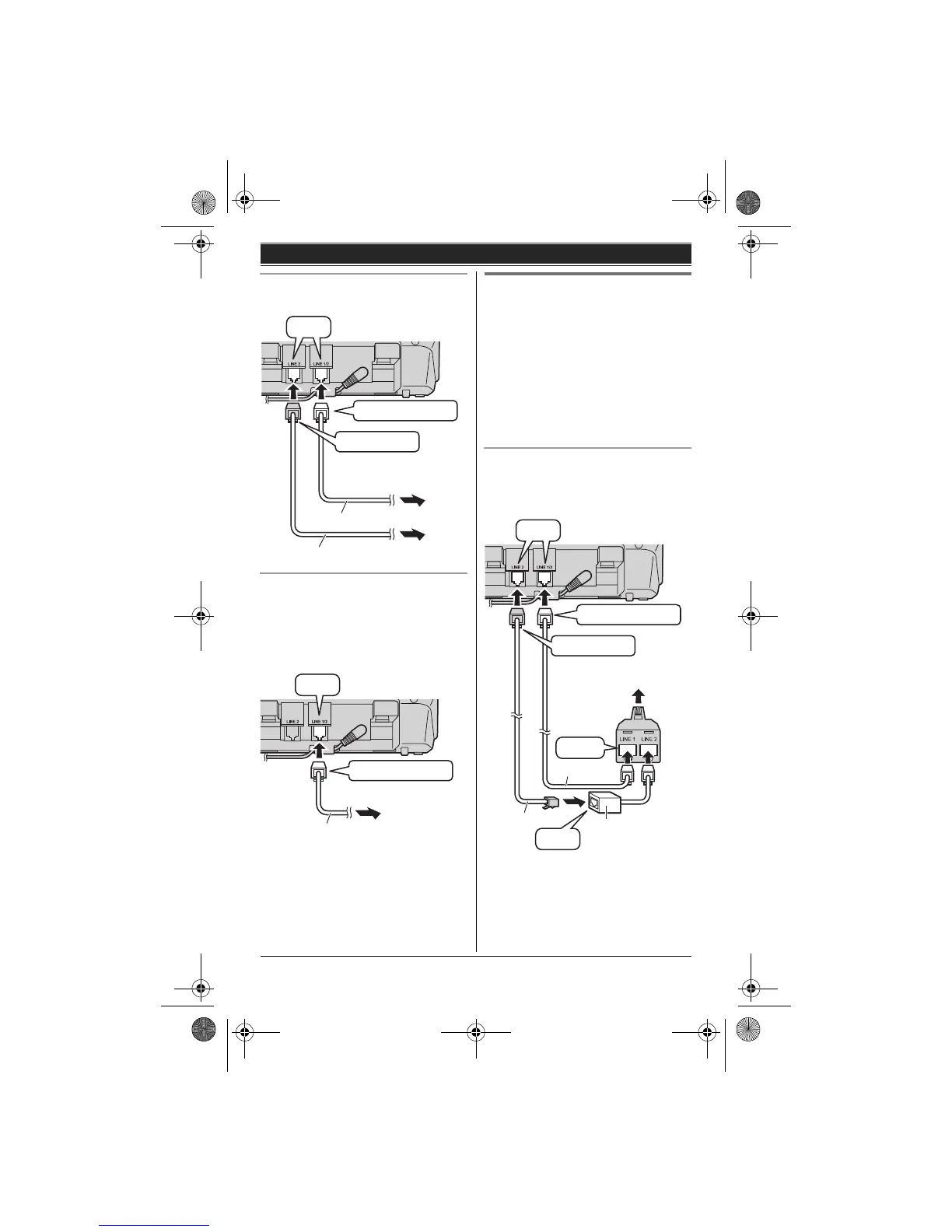
To connect to 2 single-line telephone
jacks
If you use the unit as a single-line
telephone only
Be sure to connect the telephone line
cord to LINE 1/2. Change the line
selection mode from “Auto” to “Line1”
(page 14).
Note:
L “Check tel line 2” is displayed
on the unit. To erase it, see page 39.
If you subscribe to a
DSL/ADSL service
Please attach a DSL/ADSL filter (contact
your DSL/ADSL provider) to the
telephone line between the base unit
and the telephone line jack in the event
of the following:
– noise is heard during conversations.
– Caller ID features do not function
properly.
To connect to a 2-line telephone jack
For this connection, please purchase a
Panasonic 2-line splitter (page 4).
Example: DSL/ADSL line is line 2
*DSL/ADSL filter (not supplied) is
required if you have DSL/ADSL service.
Line 2
Line 1
To single-line
telephone jacks (RJ11C)
“GREEN” plug
“Transparent” plug
“Click”
4-wire cord
2-wire cord
To single-line
telephone jack
(RJ11C)
“Transparent” plug
“Click”
2-wire cord
“Click”
DSL/ADSL filter*
“Click”
“Transparent” plug
To 2-line telephone jack
(RJ14C)
2-wire cord
4-wire cord
2-line
splitter
“GREEN” plug
“Click”
TG9321(e).book Page 9 Friday, May 28, 2010 4:34 PM







 To Next Page