EasyManua.ls Logo

Panasonic KX-TG9322T - User Manual

Panasonic KX-TG9322T
56 pages
Print Icon
To Next Page IconTo Next Page
Loading...
Thank you for purchasing a Panasonic product.
Please read these operating instructions before using the unit and save
them for future reference.
This unit is compatible with Caller ID. You must subscribe to the appropriate
service offered by your service provider/telephone company.
For assistance, visit our Web site: http://www.panasonic.com/help for
customers in the U.S.A. or Puerto Rico.
Before initial use, see “Getting
Started” on page 8.
Consulte “Guía Rápida Española”, página 47.
Please register your product: http://www.panasonic.com/prodreg
Operating Instructions
Expandable Digital Cordless Phone
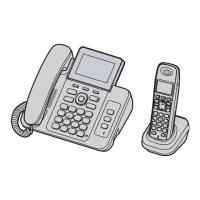
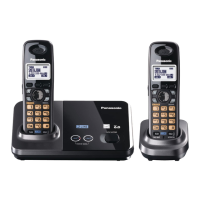
Model shown is KX-TG9321.
Model No.
KX-TG9321
KX-TG9322
TG9321(e).book Page 1 Friday, May 28, 2010 4:34 PM

Questions and Answers

  • S
    Sandra AllenAug 20, 2025
    How to fix no dial tone on Panasonic KX-TG9322T?
    • D
      Daniel AustinAug 20, 2025
      If you cannot hear a dial tone on your Panasonic Cordless Telephone, ensure that the base unit’s AC adapter and telephone line cord are properly connected. If you're using a splitter, remove it and connect the unit directly to the wall jack to see if that resolves the issue. If a working telephone operates properly when connected to the same line, the unit may need repair.
  • L
    Laurie VasquezAug 22, 2025
    Why does my Panasonic KX-TG9322T not ring?
    • K
      Kimberly PotterAug 22, 2025
      If your Panasonic Cordless Telephone handset does not ring, check if the ringer volume is turned off and adjust it accordingly. Also, check if night mode is turned on and turn it off if needed.
  • A
    ahodgesAug 25, 2025
    What to do if Panasonic KX-TG9322T Cordless Telephone does not work?
    • T
      Tasha WattsAug 25, 2025
      If your Panasonic Cordless Telephone is not working, ensure the batteries are installed correctly and fully charged. Check all connections and try unplugging the base unit’s AC adapter to reset the unit. Also, confirm that the handset is registered to the base unit.
  • S
    Shawn HillAug 26, 2025
    What to do if Panasonic Cordless Telephone handset does not turn on?
    • D
      Dustin AllenAug 26, 2025
      If your Panasonic Cordless Telephone handset does not turn on even after installing charged batteries, place the handset on the base unit or charger to turn it on.
  • A
    Angela BennettAug 28, 2025
    Why has time on Panasonic KX-TG9322T shifted?
    • D
      David AllenAug 28, 2025
      If the time on your Panasonic Cordless Telephone has shifted, it may be due to incorrect time information from incoming Caller ID. Set the time adjustment to “Manual” (off).
  • K
    Kimberly CampbellAug 29, 2025
    What to do if 'w' is flashing on Panasonic Cordless Telephone?
    • A
      Adrian NewmanAug 30, 2025
      If the 'w' indicator is flashing on your Panasonic Cordless Telephone, it could mean that the handset is too far from the base unit. Try moving closer. Also, ensure that the base unit’s AC adapter is properly connected. If the problem persists, the handset may not be registered to the base unit, so you should register it.
  • M
    mriveraAug 31, 2025
    What does it mean when the indicator on Panasonic KX-TG9322T Cordless Telephone base unit flashes?
    • M
      Michelle LynnAug 31, 2025
      If the indicator on the base unit of your Panasonic Cordless Telephone is flashing, it indicates that there are new voice mail messages. Listen to the new voice mail messages to stop the flashing.
  • P
    Pamela NewtonSep 2, 2025
    Why I cannot make a call on Panasonic KX-TG9322T?
    • W
      Wayne AllenSep 2, 2025
      If you cannot make calls with your Panasonic Cordless Telephone, the dialing mode may be set incorrectly. Change the setting. Also, ensure that the handset is not too far from the base unit.
  • B
    Bryan OwensSep 4, 2025
    Why is caller information not displayed on my Panasonic Cordless Telephone?
    • D
      David HallSep 4, 2025
      If you are experiencing issues with caller information not being displayed on your Panasonic Cordless Telephone, ensure that you subscribe to Caller ID service. If you are already subscribed, check the connections and remove any additional telephone equipment that might be interfering. If you use DSL/ADSL service, try connecting a DSL/ADSL filter.
  • D
    Dana PerrySep 6, 2025
    Why is caller information displayed late on my Panasonic KX-TG9322T?
    • B
      Brianna BlakeSep 6, 2025
      If caller information is displayed late on your Panasonic Cordless Telephone, it may be due to your service provider displaying the information at the 2nd ring or later. Also, try moving closer to the base unit.

Summary

Important Information

Safety Warnings and Precautions

Crucial safety guidelines for using the phone to prevent injury or damage.

Battery Handling and Best Performance

Proper battery care, safety, and tips for optimal phone performance.

Getting Started

Initial Setup and Connections

Guide to connecting the AC adapter and telephone line cord.

Battery Installation and Charging

Steps for inserting batteries and charging the handset.

Making and Answering Calls

Making Calls and Using Speakerphone

How to dial numbers, redial, and use the speakerphone feature.

Phonebook Management

Adding and Organizing Contacts

How to enter names, numbers, and assign them to groups.

Programming Features

Direct Command Programming

Using specific codes for quick access to programming options.

Caller ID Service

Using Caller ID and Phonebook Integration

How Caller ID works and displays information, including phonebook matches.

Voice Mail Service

Voice Mail Setup and Notifications

Storing access numbers and configuring tone detection for new messages.

Intercom and Locator Functions

Useful Information

Troubleshooting Common Issues

Addressing problems with handset operation, connectivity, and sound.

Appendix

Warranty Information and Exclusions

Details about the product's warranty coverage, terms, and limitations.

Troubleshooting and Important Notes

Product Not Working Properly

Basic steps to resolve issues when the product is not functioning.

Panasonic KX-TG9322T Specifications

General IconGeneral
Colorblack metallic
Speakerphoneyes
Expandableyes
Paging Locatoryes
Volume Controlyes
Intercomyes
Incoming Lines2
New Message Indicatoryes
Caller IDyes
Call Waitingyes
Answering Systemyes
Flash Functionyes
Caller ID Memory99 gigabytes
Phone Book Memory100 gigabytes
Handsetsyes
Expansion Base Stations6
Expansion Handsets2, 6
Backlit Keypadyes
Keypad Locationhandset
Bluetoothno
Remote Accessyes
Frequencydect 6.0 digital
Weight and Dimensions IconWeight and Dimensions
Depth10 inches
Height3 inches
Width7 inches
Net Weight80 ounces

Related product manuals