Getting Started
8
For assistance, please visit http://www.panasonic.com/help
Setting up
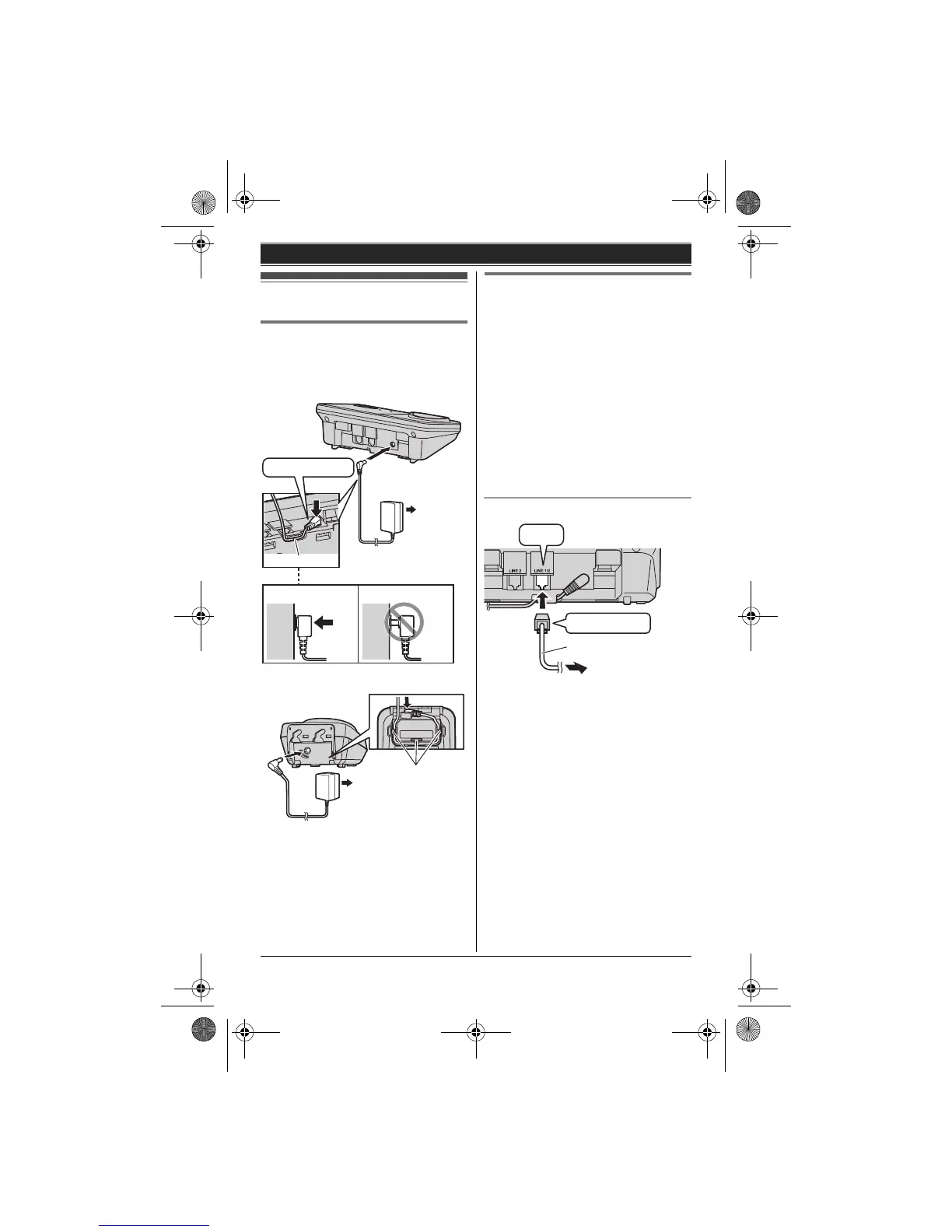
Connecting the AC adaptor
L Use only the supplied Panasonic AC
adaptor PQLV219.
■ Base unit
■ Charger
Connecting the telephone line
cord
Refer to one of the following methods
depending on your situation:
– To connect to a 2-line telephone jack:
page 8
– To connect to 2 single-line telephone
jacks: page 9
– If you use the unit as a single-line
telephone only: page 9
Connect the telephone line cord until it
clicks into the base unit and telephone
line jack.
To connect to a 2-line telephone jack
Hook
Press plug firmly.
Correct Wrong
(120 V AC, 60 Hz)
(120 V AC, 60 Hz)
Hooks
4-wire cord
To 2-line telephone
jack (RJ14C)
“GREEN” plug
“Click”
TG9321(e).book Page 8 Friday, May 28, 2010 4:34 PM







 To Next Page