EasyManua.ls Logo

Panasonic KX-TG9371 - User Manual

Panasonic KX-TG9371
8 pages
Print Icon
To Next Page IconTo Next Page
Loading...
PNQW1009ZA DM1207PN0
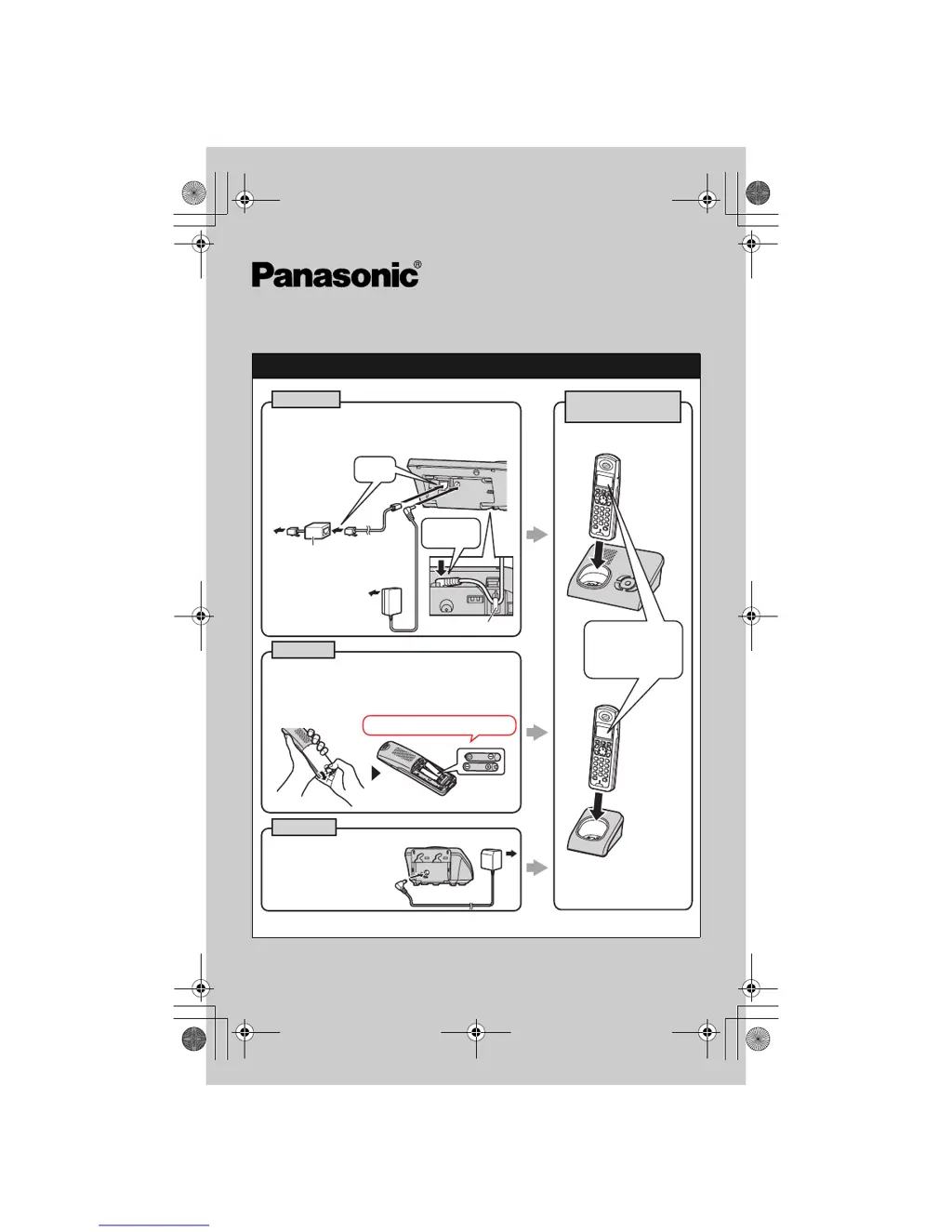
Setting up
*1 KX-TG9372
CHARGE FOR
ABOUT 7 HOURS
Handset
Charger
*1
(120 V AC, 60 Hz)
Confirm
Charging is
displayed.
L Use only the supplied
Panasonic AC adaptor
PQLV209.
Base unit
L Use only the supplied Panasonic AC
adaptor PQLV207.
L Use only the supplied telephone line cord.
(120 V AC, 60 Hz)
To single-line
telephone jack
(RJ11C)
DSL/ADSL filter
(For DSL/ADSL
service users)
“Click”
Hook
Press plug
firmly.
Rechargeable Ni-MH ONLY
L USE ONLY Ni-MH batteries AAA (R03) size.
L
Do NOT use Alkaline/Manganese/Ni-Cd batteries.
L Ensure correct polarities (S, T) when
installing the batteries.
Model No. KX-TG9371
KX-TG9372
Quick Guide
TG9361_QG(e).fm Page 1 Wednesday, December 26, 2007 7:26 PM

Questions and Answers

  • D
    duranaprilSep 23, 2025
    What to do if liquid entered Panasonic Answering Machine handset/base unit?
    • E
      elliscarolineSep 23, 2025
      If liquid or moisture has entered your Panasonic Answering Machine handset/base unit, disconnect the AC adapter and telephone line cord from the base unit. Remove the batteries from the handset and leave to dry for at least 3 days. After the handset/base unit are completely dry, reconnect the AC adapter and telephone line cord. Insert the batteries and charge fully before use.
  • M
    Monique JimenezAug 23, 2025
    How to fix Panasonic Answering Machine if I cannot operate it remotely?
    • K
      Kent ThompsonAug 23, 2025
      If you are having trouble operating your Panasonic Answering Machine remotely: * Make sure you are entering the correct remote access code. If you forgot it, store a new one. * Press each key firmly. * Ensure the answering system is turned on. * If you are using a rotary/pulse telephone, try again using a touch-tone phone.
  • J
    Jaime HallAug 25, 2025
    Why Panasonic KX-TG9371 Answering Machine handset and/or base unit does not ring?
    • J
      Judith GardnerAug 26, 2025
      If your Panasonic Answering Machine handset or base unit is not ringing, check these: * Adjust the ringer volume; it may be turned off. * If night mode is turned on, turn it off.
  • D
    Dana CortezAug 27, 2025
    Why I cannot make a call on my Panasonic KX-TG9371?
    • K
      Kelly Nelson DVMAug 27, 2025
      If you cannot make a call on your Panasonic Answering Machine: * The dialing mode may be set incorrectly, change the setting. * The handset may be too far from the base unit, move closer and try again.
  • M
    Mary KiddAug 27, 2025
    How to fix a Panasonic KX-TG9371 Answering Machine that does not work?
    • R
      Ronald HicksAug 27, 2025
      If your Panasonic Answering Machine is not working, here are a few things to check: * Ensure the batteries are correctly installed. * Fully charge the batteries. * Check all connections. * Try resetting the unit by unplugging the AC adapter, then reconnecting it. * Make sure the handset is registered to the base unit.
  • A
    Alicia HuffSep 17, 2025
    Why is the time on my Panasonic KX-TG9371 Answering Machine shifted?
    • H
      holly97Sep 17, 2025
      If the time on your Panasonic Answering Machine is shifted, it may be due to incorrect time information from incoming Caller ID. Set the time adjustment to off.
  • J
    Jennifer GraySep 14, 2025
    Why are caller list/incoming phone numbers not edited automatically on my Panasonic KX-TG9371?
    • M
      markleonardSep 14, 2025
      If the caller list or incoming phone numbers are not being edited automatically on your Panasonic Answering Machine: * Ensure the Caller ID number auto edit feature is turned on. * You may need to call back the edited number to activate Caller ID number auto edit.
  • D
    David BushSep 15, 2025
    Why I cannot dial the phone number edited in the caller list on my Panasonic Answering Machine?
    • J
      Jerry WilsonSep 16, 2025
      If you cannot dial the phone number edited in the caller list on your Panasonic Answering Machine, the phone number you dialed might have been edited incorrectly (for example, the long distance “1” or the area code is missing). Edit the phone number with another pattern.
  • D
    Daniel AndradeSep 6, 2025
    Why is caller information not announced on my Panasonic KX-TG9371 Answering Machine?
    • C
      Charles MeadowsSep 6, 2025
      If caller information is not being announced on your Panasonic Answering Machine: * Check if the handset or base unit’s ringer volume is turned off and adjust it. * Ensure the Talking Caller ID feature is turned on. * The number of rings for the answering system may be set to “2” or “Toll saver”. Select a different setting. * If the base unit and another handset are having an intercom call, your handset will not announce caller information.
  • E
    Emily MillerSep 3, 2025
    What does it mean when the indicator on the Panasonic KX-TG9371 handset flashes slowly?
    • S
      Scott MoralesSep 3, 2025
      If the indicator on your Panasonic Answering Machine handset flashes slowly, it could mean: * New messages have been recorded. Listen to the new messages. * New voice mail messages have been recorded. Listen to the new voice mail messages.

Panasonic KX-TG9371 Specifications

General IconGeneral
BrandPanasonic
ModelKX-TG9371
Answering SystemDigital
Maximum Recording Time18 minutes
Number of Handsets1
Expandable up to6 handsets
SpeakerphoneYes
Caller IDYes
Call Waiting Caller IDYes
DECT 6.0 TechnologyYes
IntercomYes
Backlit DisplayYes
Frequency1.9 GHz
DisplayLCD
RangeUp to 1000 feet
Phonebook Capacity50
TypeCordless Phone with Answering System

Related product manuals