EasyManua.ls Logo

Panasonic KX-TG9391 - User Manual

Panasonic KX-TG9391
60 pages
Print Icon
To Next Page IconTo Next Page
Loading...
This unit is compatible with Caller ID. You must subscribe to the appropriate service offered
by your service provider/telephone company.
Please read these operating instructions before using the unit and save them for future
reference.
For assistance, visit our website:
http://www.panasonic.com/help for customers in the U.S.A. or Puerto Rico.
Charge the batteries for about 7 hours before initial use.
Operating Instructions
Expandable Digital Corded/Cordless
Answering System
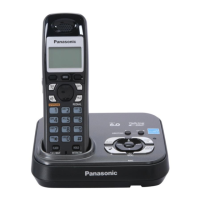
Model No. KX-TG9391
with 2 Handsets
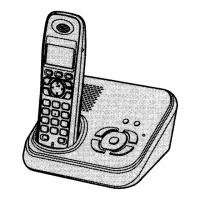
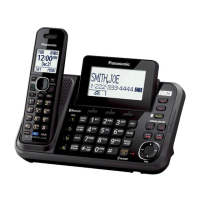
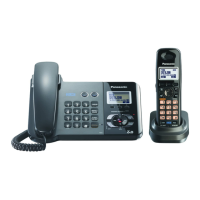
Model shown is KX-TG9391.
Model No. KX-TG9392
TG9391.book Page 1 Tuesday, July 8, 2008 8:01 AM

Other manuals for Panasonic KX-TG9391

Questions and Answers

  • X
    xedwardsSep 23, 2025
    What to do if liquid entered my Panasonic Answering Machine?
    • D
      Debra FrazierSep 23, 2025
      If liquid or moisture has entered your Panasonic Answering Machine, disconnect the AC adapter and telephone line cord from the base unit. Remove the batteries from the handset and leave it to dry for at least 3 days. Reconnect the AC adapter and telephone line cord after drying. Insert the batteries and charge fully before use.
  • I
    iarcherAug 23, 2025
    What to do if I cannot operate my Panasonic KX-TG9391 Answering Machine remotely?
    • D
      dannyperezAug 23, 2025
      If you cannot operate the answering system remotely on your Panasonic Answering Machine, check these items: * You may be entering the wrong remote access code. If so, store a new remote access code. * Ensure you press each key firmly. * The answering system may be turned off. Turn it on. * You may be using a rotary/pulse telephone. Try again using a touch-tone phone.
  • M
    michaelrichardsAug 25, 2025
    How to fix a Panasonic KX-TG9391 that does not work?
    • M
      marissalopezAug 25, 2025
      If your Panasonic Answering Machine doesn't work, there are several things you can check: * Ensure the batteries are correctly installed. * Fully charge the batteries. * Verify all connections are secure. * Try resetting the unit by unplugging the AC adapter, then reconnecting it. * Make sure the handset is registered to the base unit.
  • D
    Debra ReevesAug 26, 2025
    What to do if I cannot hear a dial tone on my Panasonic Answering Machine?
    • J
      James MyersAug 27, 2025
      If you cannot hear a dial tone on your Panasonic Answering Machine, try the following: * Check that the AC adapter and telephone line cord are properly connected to the base unit. * If you're using a splitter, remove it and connect the unit directly to the wall jack to see if the splitter is the problem. * Disconnect the unit from the telephone line and connect a known working telephone. If the working phone works, the answering machine may need repair; if not, contact your service provider.
  • K
    Kenneth SanchezAug 27, 2025
    Why is w flashing on my Panasonic Answering Machine?
    • H
      hburkeAug 27, 2025
      If your Panasonic Answering Machine displays a flashing 'w', it could indicate a few issues: * The handset may not be registered to the base unit; you may need to register it. * The handset might be too far from the base unit; try moving closer. * The base unit's AC adapter might not be connected; check the connections. * There may be electrical interference; try repositioning the base unit and handset away from interference sources.
  • J
    Joshua ThomasSep 18, 2025
    Why I cannot operate the answering system on my Panasonic KX-TG9391?
    • R
      Rickey StokesSep 18, 2025
      If you cannot operate the answering system on your Panasonic Answering Machine, it could be because: * Someone else is using the unit. Wait for them to finish. * A caller is leaving a message. Wait for the caller to finish. * The handset is too far from the base unit. Move closer.
  • W
    William WallaceSep 15, 2025
    Why is the time shifted on my Panasonic KX-TG9391 Answering Machine?
    • A
      Andrew CastroSep 15, 2025
      If the time on your Panasonic Answering Machine is shifted, it could be due to incorrect time information from incoming Caller ID. Set the time adjustment to “Manual” (off).
  • A
    Adam WilliamsSep 16, 2025
    Why doesn't my Panasonic KX-TG9391 Answering Machine display the 2nd caller's information during a call?
    • A
      Andrew PorterSep 16, 2025
      If the 2nd caller’s information is not displayed during an outside call on your Panasonic Answering Machine, you must subscribe to Caller ID, call waiting, or Call Waiting Caller ID (CWID) with your service provider. You may need to contact them again to activate the specific service.
  • A
    Adam BlackburnSep 6, 2025
    Why is caller information displayed late on my Panasonic KX-TG9391 Answering Machine?
    • M
      msummersSep 6, 2025
      If the caller information is displayed late on your Panasonic Answering Machine, it could be due to: * Your service provider may send the caller’s information at the 2nd ring or later. * The handset may be too far from the base unit. Move closer.
  • L
    Logan DoyleSep 3, 2025
    What to do if my Panasonic KX-TG9391 Answering Machine still flashes after fully charging the batteries?
    • D
      David HendersonSep 3, 2025
      If you have fully charged the batteries of your Panasonic Answering Machine, but it still flashes 3 or displays 4, try these steps: * Clean the charge contacts and charge again. * It may be time to replace the batteries.

Summary

Introduction

Product Information

Details about the Panasonic phone model, its features, and specifications.

Accessory Information

Lists supplied accessories and optional items for the phone system.

System Capabilities

Describes the phone system's capacity for lines and simultaneous call handling.

Safety Instructions

Crucial warnings and guidelines for safe operation, handling, and medical considerations.

Preparation

Controls Overview

Identifies and explains the buttons and indicators on the base unit and handset.

Display and Indicators

Explains the meaning of icons and indicators on the base unit and handset displays.

Connections and Setup

Guides on connecting AC adaptors, handsets, and telephone lines.

Battery Management

Instructions for battery installation, replacement, and charging procedures.

Initial Unit Setup

Covers setting display language, voice guidance, and dialing mode.

Date, Time, and Line Settings

Instructions for setting the date/time and configuring line selection modes.

Making;Answering Calls

Making Calls

Procedures for initiating calls using the base unit and handset.

Answering Calls

Steps to answer incoming calls on the base unit and handset.

Useful Call Features

Explains features like Hold, Mute, Flash, Call Waiting, and Temporary Tone Dialing.

Call Sharing and Privacy

Details on joining calls and preventing unauthorized access to conversations.

Phonebook

Phonebook Basics and Adding Entries

How to use the phonebook, add names, numbers, and assign groups.

Finding, Editing, and Erasing Entries

Methods to search, modify, and delete phonebook contacts.

Chain Dial and Copying Entries

Using chain dial for stored numbers and copying entries between units.

Programming

Programmable Settings Overview

Introduction to customizing phone system features via menus and commands.

Programming via Display Menus

Step-by-step guide to setting features using the display menus.

Programming Using Direct Commands

Instructions for programming features using specific code sequences.

Special Settings (Night Mode, Alarm)

Configuration of night mode schedules and alarm functions.

Registering and Deregistering Units

Procedures for adding or removing handsets from the base unit.

Caller ID Service

Using Caller ID Service

How to subscribe and utilize Caller ID features for incoming calls.

Caller ID Features and List Management

Explains caller display, list viewing, editing, erasing, and storing information.

Caller ID Auto Edit Feature

Automatic formatting of caller numbers based on edited entries.

Answering System

Answering System Overview

Description of the answering system's function, memory, and basic operation.

Greeting Message Management

How to record, play back, and erase greeting messages for callers.

Message Playback and Operation

Procedures for listening to messages, calling back, and operating the system during playback.

Remote Operation and Settings

Guides on remote access, commands, voice guidance, and system settings.

Voice Mail Service

Voice Mail Service Details

Information on using provider-based voice mail services.

VM Tone Detection

Configuration for detecting voice mail tones from the service provider.

Intercom;Locator

Intercom Functionality

How to make, answer, and manage intercom calls between units.

Transferring and Conference Calls

Procedures for transferring calls and setting up conference calls.

Handset Locator

How to page a misplaced handset to find its location.

Useful Information

Accessory Installation and Options

Guides for wall mounting the charger, attaching belt clips, and using optional headsets.

Error Messages

Explains common display messages and their potential solutions.

Troubleshooting Common Issues

Solutions for problems related to general use, settings, and basic operation.

FCC and Other Information

Regulatory compliance details, including FCC rules and RF exposure guidelines.

Customer Service and Support

Contact information for product support, parts, and accessory purchases.

Warranty Information

Details on the limited warranty coverage, terms, and service procedures.

Panasonic KX-TG9391 Specifications

General IconGeneral
BrandPanasonic
ModelKX-TG9391
CategoryAnswering Machine
LanguageEnglish

Related product manuals