EasyManua.ls Logo

Panasonic KX-TGA230B - User Manual

Panasonic KX-TGA230B
9 pages
Print Icon
To Next Page IconTo Next Page
Loading...
Order No. PQLV3001728 (Black)
Order No. ~QLV~OO~7~W (White)
AG Adaptor Order No. PQLVZ (KILN?)
0 l%ux%Et Cs3ver.................. . ..* ~~ . . . . . . . . one
rder No. FQKKl 0131 Z3 (Black)
rder No. IT&X1 013122 (White)
Power Outlet
(AC 120 v, 60 l-k)
&BE ONLY WITW Fanasonic AC ADAPTOR PQLVI? (order No. PQLV2Z).
@ihe AG adaptor must remain connected at all times. (It is normal for the adaptor ts feel
warm during use.)
Insert the jittery into the handset as shown, ~at~h~n~ the correct polarity (0). Press
the battery down until it fits securely into the ~~ffl~~~~~nt (@I)~ Close the cover.
Printerl in lJSA
-l-
SO702-1072

Other manuals for Panasonic KX-TGA230B

Question and Answer IconNeed help?

Do you have a question about the Panasonic KX-TGA230B and is the answer not in the manual?

Summary

Installation

Connecting the AC adaptor

Connects the AC adapter to the power outlet for operation.

Installing the battery

Inserts the battery into the handset, matching polarity and securing it.

Charging the battery

Handset battery information

Details operating time for the handset battery after a full charge.

Belt Clip

Registration

Optional Headset

Connecting the headset

Plugs a headset into the handset for hands-free conversations.

Wall Mounting

FCC and Other Information

Customer Services Directory

Accessory Purchases

Contact information for ordering replacement accessories.

Service in Puerto Rico

Contact details for obtaining service in Puerto Rico.

Limited Warranty

Limited Warranty Coverage

Specifies what the warranty covers, including repair or replacement options.

Mail-In Service

Instructions on how to pack and send the product for warranty service.

Limited Warranty Limits And Exclusions

Details what is not covered by the limited warranty, like misuse or wear.

Overview

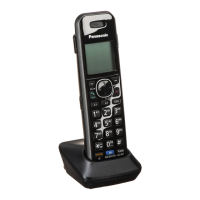
This document describes the Panasonic KX-TGA230B/KX-TGA230W, a 2.4GHz expandable cordless handset designed as an optional accessory for the KX-TG2352W/KX-TG2382B base units. This manual focuses on the initial setup and basic operation of the handset.

Function Description:

The KX-TGA230B/KX-TGA230W is a cordless telephone handset that allows users to make and receive calls when registered to a compatible Panasonic base unit. It provides mobility within the range of the base unit and supports hands-free communication through an optional headset. The handset is designed for easy installation and user-friendly operation.

Important Technical Specifications:

  • Frequency: 2.4GHz
  • Power Source: The handset uses a rechargeable battery (N4HHGMB00001, HHR-P103). The charger unit requires an AC adaptor (PQLV2Z, PQLV2) for power, operating at 120V, 60Hz.
  • Battery Life (Fully Charged Panasonic Battery):
    • While in use (TALK): Up to 4 hours
    • While not in use (Standby): Up to 7 days
  • Charging Time: Approximately 15 hours for initial use.
  • Headset Compatibility: Panasonic KX-TCA88 headset.
  • Wall Mounting: The charger unit is wall-mountable, with specific dimensions for screw placement (2.45 cm or 15/16").
  • FCC Compliance: The device complies with Part 15 of the FCC Rules, ensuring it does not cause harmful interference and accepts received interference. It is hearing aid compatible as defined by 47 CFR Section 68.316.
  • Environmental Conditions: The unit should not be exposed to rain or any type of moisture. Operating near 2.4GHz electrical appliances may cause interference.

Usage Features:

  • Expandable System: The handset is an optional addition to the KX-TG2352W/KX-TG2382B base units, allowing for system expansion.
  • Easy Installation: The manual provides clear steps for connecting the AC adaptor to the charger, installing the battery into the handset, and registering the handset to the base unit.
  • Battery Charging Indicator: The CHARGE indicator on the charger lights up, a beep sounds, and "Charging" is displayed on the handset during charging.
  • Low Battery Warning: The handset displays "Recharge," flashes "[]" on the display, or beeps intermittently when the battery is low. If fully discharged, it displays "Charge for 15h."
  • Handset Registration: The handset must be registered to the base unit (KX-TG2352W/KX-TG2382B). Only one handset can be registered at a time, and the process should be completed within 1 minute. The base unit has a "HANDSET LOCATOR ALL" button for initiating registration.
  • Belt Clip: A belt clip is included for convenient carrying on a belt or pocket.
  • Headset Jack: The handset features a headset jack, allowing for hands-free phone conversations with a compatible headset (Panasonic KX-TCA88).
  • Wall Mountable Charger: The charger unit can be wall-mounted to save space.
  • Emergency Programming: When programming emergency numbers, users are advised to remain on the line to explain the reason for the call and perform test calls during off-peak hours.

Maintenance Features:

  • Battery Care: The manual advises against disposing of batteries in fire, opening or mutilating them, and shorting them with conductive materials. It also specifies charging only with the provided or identified battery and adaptor.
  • Charge Contact Cleaning: The charge contacts of both the handset and charger should be cleaned with a soft, dry cloth once a month, or more frequently if exposed to grease, dust, or high humidity, to ensure proper charging.
  • AC Adaptor Connection: The AC adaptor must remain connected at all times. It is normal for the adaptor to feel warm during use.
  • Recycling: The nickel metal hydride battery is recyclable. Users are encouraged to call 1-800-8-BATTERY for recycling information.
  • FCC RF Exposure Compliance: To comply with FCC RF exposure requirements, the handset should be carried with the specific belt-clip provided. Other non-tested body-worn accessories should be avoided.
  • Interference Avoidance: Users are advised to reorient or relocate the receiving antenna, increase separation between equipment and receiver, connect equipment to different circuits, or consult a technician to correct interference. Moving away from 2.4GHz electrical appliances can also help.

Panasonic KX-TGA230B Specifications

General IconGeneral
BrandPanasonic
ModelKX-TGA230B
CategoryTelephone
LanguageEnglish

Related product manuals