EasyManua.ls Logo

Panasonic KX-TGP500 - User Manual

Panasonic KX-TGP500
67 pages
Print Icon
To Next Page IconTo Next Page
Loading...
Thank you for purchasing a Panasonic product.
You can configure some of the features of this unit through the Web user interface. See
“Programming through the Web user interface”, page 41.
Please read this guide before using the unit and save it for future reference.
Document Version: 2010-08
SIP Cordless Phone
B02
Model No. KX-TGP500
T02
Model No. KX-TGP550
User Guide
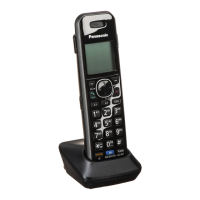
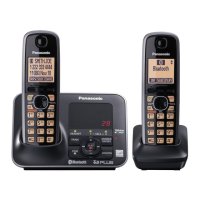
Model shown is KX-TGP500.
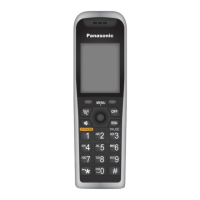
Model shown is KX-TGP550.
VoIPon www.voipon.co.uk sales@voipon.co.uk Tel: +44 (0)1245 808195 Fax: +44 (0)1245 808299

Table of Contents

Other manuals for Panasonic KX-TGP500

Questions and Answers

  • E
    edward06Sep 7, 2025
    What to do if I cannot register a handset to the base unit of my Panasonic Cordless Telephone?
    • M
      Mary ParkSep 8, 2025
      If you cannot register a handset to the base unit of your Panasonic Cordless Telephone, it might be because the maximum number of handsets (6) is already registered. Cancel unused handset registrations from the base unit. Also, make sure you are entering the correct PIN. If you forget your PIN, contact your phone system dealer. Ensure that the handset and base unit are away from other electrical appliances.
  • T
    Tracy McdowellAug 25, 2025
    Why does my Panasonic Telephone handset beep and/or flash?
    • M
      Melissa JonesAug 25, 2025
      If your Panasonic Telephone handset beeps and/or flashes, it means the battery charge is low. You should fully charge the batteries.
  • P
    pearsonelizabethAug 25, 2025
    What to do if my Panasonic KX-TGP500 is not ringing?
    • C
      Cindy MitchellAug 26, 2025
      If your Panasonic Telephone handset is not ringing, the ringer volume may be turned off. Adjust the ringer volume. Call forward, Do not disturb, or Block anonymous calls may have been programmed by your administrator.
  • S
    steven98Sep 17, 2025
    Why is the STATUS indicator flashing amber on my Panasonic Cordless Telephone?
    • J
      Joshua HardySep 17, 2025
      If the STATUS indicator on your Panasonic Cordless Telephone base unit continues flashing amber, it might be an IP address issue. Check the base unit’s IP address via Handset: {MENU} (centre of joystick) i {5}{0}{1}. Contact your administrator to change the base unit’s static IP address if necessary and to check your network device connections. You can also try resetting all equipment: modem, router, hub, base unit, and computer, turning them back on one at a time in that order. If you still have issues, contact your administrator to check for connection issues in your area.
  • E
    Emily YoderSep 23, 2025
    What causes noise, interrupted sound, or delayed sound during a conversation on my Panasonic Cordless Telephone?
    • A
      Alyssa MunozSep 23, 2025
      Noise, interrupted sound, or delayed sound during a conversation on your Panasonic Cordless Telephone may be caused by someone using a computer connected to the same network as the unit. Also, confirm the speed of your Internet connection; the unit requires 100 kbps for each upstream and downstream.
  • S
    shane75Sep 12, 2025
    Why is the STATUS indicator on my Panasonic Telephone lit in amber even when the Ethernet cable is connected?
    • D
      Dylan TerrellSep 12, 2025
      If the STATUS indicator lights in amber although the Ethernet cable is connected properly, the base unit’s IP address may conflict with the IP addresses of other devices on your local network. Check the base unit’s static IP address.
  • J
    Julie BrownSep 3, 2025
    What to do if I fully charged the batteries, but my Panasonic Telephone still flashes or displays 0?
    • S
      Sean WrightSep 3, 2025
      If you have fully charged the batteries, but your Panasonic Telephone still flashes or displays 0, clean the charge contacts and charge again. It also may be time to replace the batteries.
  • K
    Kenneth MorganSep 3, 2025
    Why I cannot register a handset to the Panasonic KX-TGP500 base unit?
    • P
      Paula LeonardSep 3, 2025
      If you cannot register a handset to the base unit, the maximum number of handsets (6) may already be registered. Cancel unused handset registrations from the base unit. You may have entered the wrong PIN. Place the handset and the base unit away from other electrical appliances.
  • A
    April Garza DVMSep 23, 2025
    Why is the STATUS indicator lit in amber even though the Ethernet cable is connected properly to my Panasonic Cordless Telephone?
    • K
      Karen RamosSep 23, 2025
      If the STATUS indicator is lit in amber even though the Ethernet cable is connected properly to your Panasonic Cordless Telephone, the base unit’s IP address may conflict with the IP addresses of other devices on your local network. Check the base unit’s static IP address and the IP addresses of the other devices on your local network. If necessary, change the base unit’s static IP address.
  • H
    Holly GuerreroAug 29, 2025
    What to do if my Panasonic Cordless Telephone does not work?
    • S
      Sonya HaasAug 29, 2025
      If your Panasonic Cordless Telephone is not working, ensure the batteries are correctly installed and fully charged. Also, check all connections. Try resetting the unit by unplugging the AC adapter, then reconnecting it. If it still fails, the handset may need to be registered to the base unit.

Summary

Introduction

Model Composition and Features

Details models, components, and feature differences between KX-TGP500 and KX-TGP550.

System Operation and Expansion

Instructions for emergency calls, accessories, and expanding the phone system with additional handsets.

Important Information

Disposal and Recycling Guidance

Guidance on disposing of electrical equipment and batteries responsibly according to regulations.

Getting Started

Device Controls, Indicators, and Display

Explains handset/base unit controls, indicators, display items, and menu icons.

Initial Setup and System Status

Guide to initial setup procedures and checking VoIP server line status.

Making and Answering Calls (Handset)

Basic Call Operations

Step-by-step instructions for making, answering, and redialing calls using the handset.

Call Management Features

Covers Hold, Mute, Call Waiting, and making second calls during an active call.

Advanced Call Handling

Procedures for transferring and conferencing calls to other parties.

Making and Answering Calls (Base Unit)

Base Unit Call Operations

Instructions for making, answering, and redialing calls using the base unit.

Base Unit Call Management

Covers Hold, Call Waiting, Transferring, and Conferencing calls on the base unit.

Phonebook (Handset)

Managing Phonebook Entries

Adding, finding, calling, and editing contacts in the handset phonebook.

Advanced Phonebook Functions

Erasing entries, using speed dial, and copying/exporting phonebook data.

Phonebook (Base Unit)

Managing Base Unit Phonebook

Adding, finding, calling, and editing contacts for the base unit.

Advanced Base Unit Phonebook Functions

Erasing, speed dial, and copying/exporting phonebook data for the base unit.

Programming Features (Handset)

Accessing Programmable Settings

Overview of methods to program handset features via menus or direct commands.

Call Forwarding and Rejection Features

Configuring Call Forward, Do Not Disturb, Block Anonymous, and Incoming Call Barring.

System and Security Settings

Changing base PIN, handset name, date/time, and updating software.

Programming Features (Base Unit)

Accessing Base Unit Programmable Settings

Overview of methods to program base unit features via menus or direct commands.

Base Unit Call Forwarding and Rejection

Configuring Call Forward, Do Not Disturb, Block Anonymous, and Incoming Call Barring for the base unit.

Base Unit System Settings

Changing base PIN, date/time, and updating software for the base unit.

Programming via Web Interface

Activating and Using Embedded Web

Steps to activate and use the web interface for configuration.

Registering Units

Handset Registration and Management

Procedures for registering, deregistering, and operating additional units.

Special Features

Caller ID and Call History Management

Using Caller ID service, viewing the caller list, and managing entries.

Voice Mail and Message Alerts

Information on voice mail service and setting message alerts.

Intercom Features

Handset-to-Handset Intercom

Making, answering, and transferring intercom calls between handsets.

Handset;Base Unit Intercom and Monitoring

Intercom between handset/base unit, auto intercom, and room monitoring.

Handset Locator

Paging a misplaced handset to locate it.

Useful Information

Character Entry and Input Modes

Explains how to enter text and characters using dial keys and entry modes.

Mounting and Installation

Guidance on wall mounting the charger and base unit.

Troubleshooting and Error Resolution

Lists common errors, troubleshooting steps, and solutions for various problems.

Specifications

Open Source Software

Index

Panasonic KX-TGP500 Specifications

General IconGeneral
Wireless TechnologyDECT
Frequency1.9 GHz
Base Station Handsets Supported6
Simultaneous Calls3
Protocols SupportedSIP
Caller IDYes
Call WaitingYes
Conference CallingYes
VoicemailYes
Handset SpeakerphoneYes
PowerAC Adapter
NetworkEthernet
PoEYes
Headset Jack2.5mm
CodecsG.711, G.729
DisplayLCD
RangeUp to 300 meters outdoors, 50 meters indoors

Related product manuals