EasyManua.ls Logo

Panasonic KX-TG7621 - User Manual

Panasonic KX-TG7621
100 pages
Print Icon
To Next Page IconTo Next Page
Loading...
Operating Instructions
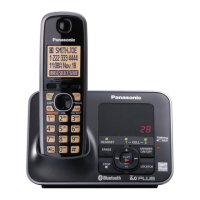
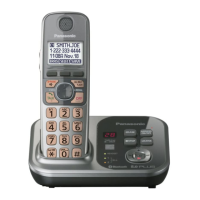
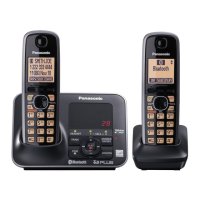
Model shown is KX-TG7622.
Link-to-Cell Cellular Convergence Solution
Model No. KX-TG7622
KX-TG7623
KX-TG7624
KX-TG7642
KX-TG7643
KX-TG7644
KX-TG7645
Before initial use, see“Getting
Started”onpage 11.
Thank you for purchasing a Panasonic product.
Please read these operating instructions before using the unit and save
them for future reference.
Consulte Guía Rápida Española.
This unit is compatible with Caller ID. You must subscribe to the appropriate
service offered by your service provider/telephone company.
For assistance, visit our Web site: http://www.panasonic.com/help for
customers in the U.S.A. or Puerto Rico.
Please register your product: http://www.panasonic.com/prodreg
KX-TG7621
KX-TG7622
KX-TG7623
KX-TG7624
KX-TG7641
KX-TG7642
KX-TG7643
KX-TG7644
KX-TG7645

Table of Contents

Questions and Answers

  • W
    William TaylorAug 19, 2025
    What to do if my Panasonic KX-TG7621 unit does not work?
    • T
      tharperAug 19, 2025
      If your Panasonic Telephone is not working, there are several things you can check: * Ensure that the batteries are correctly installed. * Make sure the batteries are fully charged. * Verify all connections are secure. * Try resetting the unit by unplugging the AC adapter, then reconnecting it. * Confirm that the handset is registered to the base unit.
  • J
    James MurphyAug 21, 2025
    Why is my Panasonic KX-TG7621 Telephone handset beeping and/or flashing?
    • D
      Daniel FisherAug 21, 2025
      If your Panasonic Telephone handset is beeping and/or flashing, it likely means the battery charge is low. Fully charge the batteries to resolve this issue.
  • Y
    Yolanda HughesAug 23, 2025
    Why is my Panasonic KX-TG7621 Telephone not recording new messages?
    • N
      Nicole EdwardsAug 23, 2025
      If your Panasonic Telephone is not recording new messages, consider these possible causes: * The answering system might be turned off. Turn it on. * The message memory could be full. Erase unnecessary messages. * The recording time may be set to “Greeting only”. Change the setting. * If you subscribe to a voice mail service, messages are recorded by your service provider. Change the unit’s number of rings setting or contact your service provider.
  • A
    aligaryAug 26, 2025
    Why can't I register a handset to a Panasonic KX-TG7621 base unit?
    • M
      Mrs. Lisa JordanAug 26, 2025
      If you cannot register a handset to a Panasonic Telephone base unit, it might be because the maximum number of handsets (6) is already registered. Cancel unused handset registrations from the base unit to resolve this.
  • T
    Todd MckinneyAug 28, 2025
    Why can't I hear a dial tone on my Panasonic Telephone?
    • D
      Damon Stone MDAug 28, 2025
      If you cannot hear a dial tone on your Panasonic Telephone, check the following: * Ensure the base unit’s AC adapter is properly connected. * Verify that the CELL 1 or CELL 2 indicator lights are green. * Confirm the telephone line cord is properly connected. If these steps don't resolve the issue, disconnect the base unit and connect the line to a known working telephone. If that phone works, your unit may need repair.
  • N
    Nicole MartinezAug 30, 2025
    What to do if my Panasonic KX-TG7621 still flashes after fully charging the batteries?
    • A
      Adam MartinezAug 30, 2025
      If you've fully charged the batteries of your Panasonic Telephone but the handset still flashes, displays a battery icon, or has a short operating time, try cleaning the battery ends and charge contacts with a dry cloth. If the problem persists, it may be time to replace the batteries.
  • E
    Edward NovakSep 2, 2025
    Why can't I connect my cellular phone to the Panasonic KX-TG7621 Telephone base unit?
    • E
      Erica MillerSep 2, 2025
      If you cannot connect a cellular phone to the Panasonic Telephone base unit: * Ensure that your cellular phone is turned on. * Confirm that your cellular phone is within the base unit range. Depending on wireless environment, there may be a delay. You can connect to the base unit manually. Also, make sure the cellular phone has been registered to the base unit.
  • J
    Jasmine WilsonSep 4, 2025
    Why can't I register a cellular phone to the Panasonic Telephone base unit?
    • S
      stewartemilySep 4, 2025
      If you cannot register a cellular phone to the Panasonic Telephone base unit, check the following: * Confirm that your cellular phone supports the hands-free profile (HFP) specification. * Ensure that the Bluetooth feature of your cellular phone is turned on. * Try turning off and on your cellular phone, as the Bluetooth technology may not be functioning normally. * If your cellular phone is already connected to another Bluetooth device, turn it off or disconnect it. * Some cellular phones may require you to enter the base unit PIN to register. Confirm you entered the correct PIN.
  • J
    Jamie TerrellSep 6, 2025
    Why can't I connect my headset to the Panasonic KX-TG7621 base unit?
    • J
      Julie SpencerSep 6, 2025
      If you are unable to connect your headset to the Panasonic Telephone base unit, please check the following: * Ensure your headset is turned on. * If the headset is connected to another Bluetooth device, disconnect it first. * If someone is using a cellular line, you cannot connect the headset. * Make sure the headset has been registered to the base unit.
  • M
    Mark PerezSep 8, 2025
    What does it mean when the indicator on my Panasonic KX-TG7621 handset flashes slowly?
    • S
      Stacey DiazSep 8, 2025
      If the indicator on your Panasonic Telephone handset flashes slowly, it means new messages or voice mail messages have been recorded. Listen to the new messages or voice mail messages.

Summary

Introduction

Model Composition

Details the different series and models available for the phone system.

Accessory Information

Lists supplied accessories for each model and their quantities.

Expanding Your Phone System

Introduces optional handsets and their features for system expansion.

Important Information

Safety Precautions

Crucial safety warnings to prevent injury and property loss during operation.

Operating Safeguards and Environment

Guidelines for safe operation, performance, and environmental considerations.

Getting Started

Initial Setup and Connections

Guides on connecting the base unit, charger, and phone line for setup.

Battery Installation and Charging

Instructions for installing and charging the handset batteries correctly.

Handset Controls Overview

Identifies buttons, indicators, and key features of the handset.

Initial Settings and Language Configuration

Guides through setting the display language, date, and time for the unit.

Link to Cell Feature

Link to Cell Overview

Explains connecting cellular phones to the base unit for enhanced call management.

Registering a Cellular Phone

Step-by-step instructions for pairing a cellular phone with the base unit.

Link to Cell Settings

Configuration options for managing cellular calls and ringtones.

Making and Answering Calls (Handset)

Making Cellular and Landline Calls

Procedures for initiating cellular and landline calls using the handset.

Call Handling Features

Details on using Pause, answering calls, and auto-talk functionality.

Hold and Mute Functions

Instructions for putting calls on hold and muting the microphone during conversations.

Transferring Cellular Calls

Guides on transferring calls between handset and cellular phone.

Making and Answering Calls (Base Unit)

Base Unit Call Operations

Procedures for making cellular and landline calls from the base unit.

Base Unit Answering and Call Features

Instructions for answering calls and using hold/mute on the base unit.

Call Waiting and Transferring Calls

Using call waiting features and transferring calls involving cellular phones.

Shared Phonebook Management

Shared Phonebook Overview and Entry

Explains the shared phonebook and how to add new entries.

Phonebook Search and Grouping

Methods for searching and organizing contacts within the phonebook.

Editing and Erasing Phonebook Entries

Instructions for modifying and deleting contacts from the phonebook.

Programming Unit Settings

Programmable Settings Overview

Explains customization options via display menus and direct commands.

Using Direct Commands for Programming

Instructions for accessing settings using specific code sequences.

Special Programming Features

Alarm and Silent Mode Setup

How to set alarms and configure silent mode for each handset.

Handset Naming and Call Blocking

Customizing handset names and blocking unwanted calls.

Registering and Deregistering Devices

Procedures for adding and removing handsets or other devices.

Caller ID Service

Understanding Caller ID Service

Explains requirements and features of the Caller ID service.

Caller List and Ringer ID

Viewing call history and assigning custom ringtones to contacts.

Managing Caller Information

Steps for erasing caller data and storing information in the phonebook.

Using Bluetooth Devices

Phonebook Transfer from Cellular Phone

How to copy phonebook entries from a cellular phone to the unit.

Bluetooth Wireless Headset Usage

Guides on registering, connecting, and using a Bluetooth headset.

Answering System for Landline

Answering System Overview and Setup

Explains the answering system's functions and how to turn it on/off.

Call Screening and Greeting Messages

How to listen to callers and manage greeting messages.

Message Playback and Recording

Instructions for playing back messages and recording custom greetings.

Remote Operation and Voice Memos

How to operate the system remotely and record voice memos.

Voice Mail Service for Landline

Voice Mail Service Overview and Access Number

Explains voice mail service and how to store the access number.

Intercom and Locator Functions

Intercom Call Operations

Instructions for making and answering intercom calls between units.

Handset Locator and Call Transfer

How to find a misplaced handset and transfer calls.

Useful Information

Wall Mounting Instructions

Guides on securely mounting the base unit on a wall.

Error Messages and Troubleshooting

Lists common error messages and provides solutions for device issues.

Troubleshooting Device Operation

Solutions for problems with handset power, unit functionality, and battery recharge.

Caller ID and Talking Caller ID Troubleshooting

Solutions for issues with Caller ID display, announcement, and auto-editing.

Appendix

Customer Services and Support

Contact information and web resources for customer assistance and inquiries.

Limited Warranty Coverage and Service

Details the warranty period, coverage, and required procedures for repairs.

Warranty Limitations and Exclusions

Specifies conditions and damages not covered under the product's limited warranty.

Panasonic KX-TG7621 Specifications

General IconGeneral
BrandPanasonic
ModelKX-TG7621
CategoryTelephone
LanguageEnglish

Related product manuals