Connections
R Us
e only the supplied Panasonic AC
adaptor PNLV226.
R If you do not connect the telephone
line cord and use only cellular lines,
set the cellular line only mode to use
this unit more conveniently
(page 22).
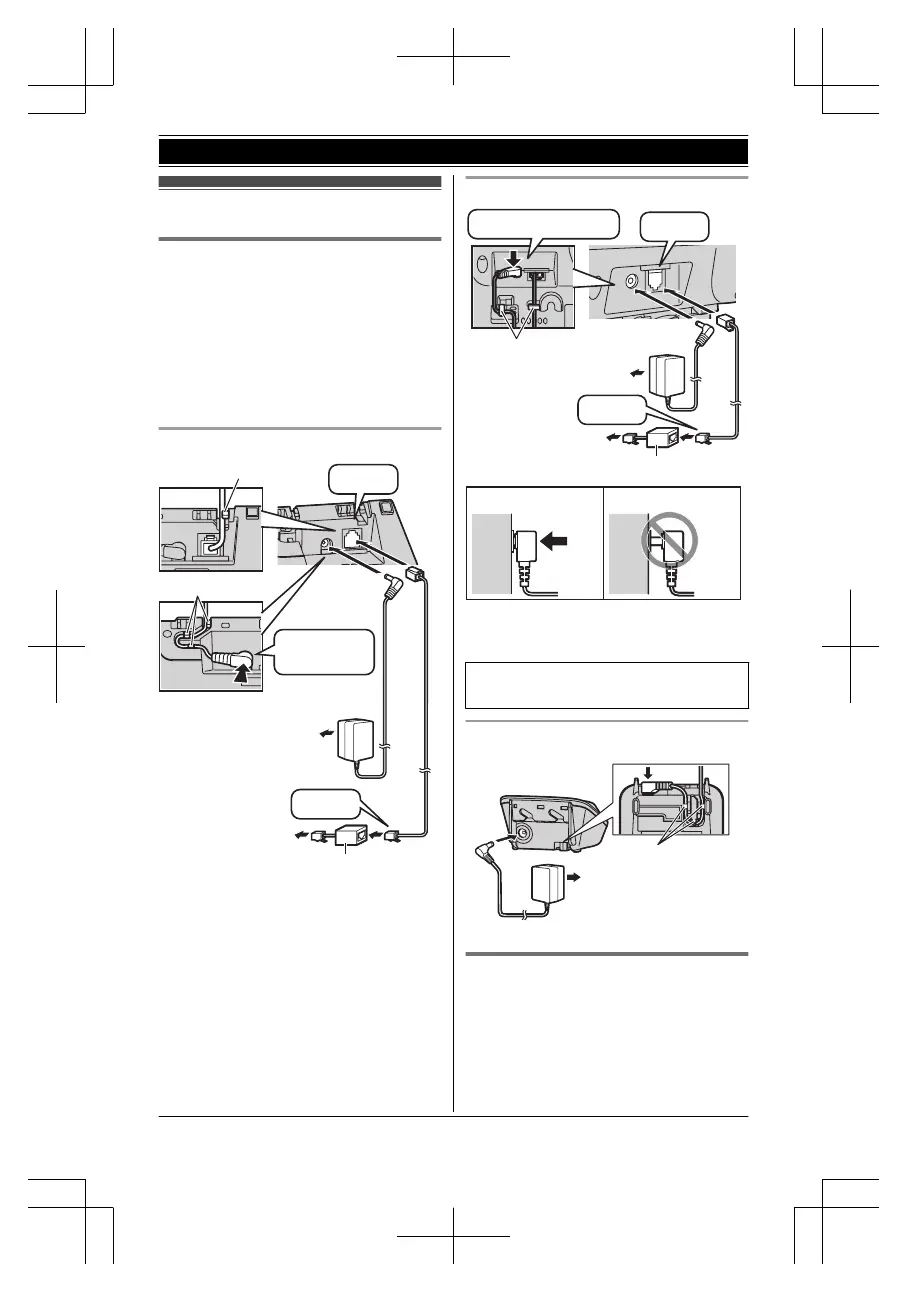
Base unit (KX-TG7621 series: page 4)
DSL/ADSL filter*
Hook
Hooks
“Click”
Press plug
firmly.
(120 V AC, 60 Hz)
To single-line
telephone jack
(RJ11C)
“Click”
Base unit (KX-TG7641 series: page 4)
DSL/ADSL filter*
“Click”
Press plug firmly.
(120 V AC, 60 Hz)
To single-line
telephone jack
(RJ11C)
“Click”
Correct Wrong
Hooks
*DSL/ADSL filter (not supplied) is
re
quired if you have DSL/ADSL service.
R When the date and time setting is
d
isplayed, seepage 18.
Charger
Battery installation
R USE ONLY Ni-MH batteries AAA
(R03) size.
R Do NOT use Alkaline/Manganese/
Ni-Cd batteries.
For assistance, please visit http://www.panasonic.com/help
11
Getting Started





 To Next Page