EasyManua.ls Logo

Panasonic KX-TGF853 - User Manual

Panasonic KX-TGF853
76 pages
Print Icon
To Next Page IconTo Next Page
Loading...
Operating Instructions
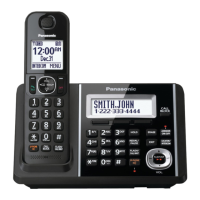
Corded/Cordless Telephone with Digital Answering Machine
Model No.
KX-TGF850
KX-TGF852
KX-TGF853
KX-TG173SK
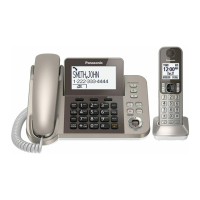
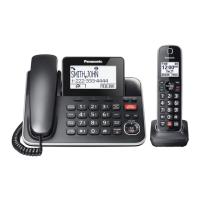
Model shown is KX-TGF850.
Before initial use, see “Getting Started” on
page 9.
Thank you for purchasing a Panasonic product.
Please read these operating instructions before using the unit and save them for future
reference.
Consulte “Guía Rápida Española”, página 65.
For assistance, visit our Web site: http://shop.panasonic.com/support for customers in the
U.S.A.
Please register your product: http://shop.panasonic.com/support

Questions and Answers

  • D
    David ThomasSep 15, 2025
    Why does my Panasonic Telephone make an error sound when I press some keys on base unit?
    • M
      masonstevenSep 16, 2025
      If you hear an error sound when pressing keys on your Panasonic telephone base unit, it means automated call block is being screened. Try again later.
  • C
    Colleen AdamsAug 25, 2025
    What to do if my Panasonic KX-TGF853 Telephone is not working?
    • C
      cooknicholasAug 25, 2025
      If your Panasonic telephone is not working, first ensure the batteries are installed correctly. Next, fully charge the batteries. Check all connections to make sure they are secure. Try resetting the unit by unplugging the base unit’s AC adapter and then reconnecting it. Finally, ensure the handset is registered to the base unit; if not, register the handset.
  • D
    David RichardsAug 25, 2025
    What to do if my Panasonic Telephone handset beeps and/or flashes?
    • M
      Marcus MooreAug 26, 2025
      If your Panasonic telephone handset beeps and/or flashes, it indicates that the battery charge is low. Fully charge the batteries to resolve this issue.
  • L
    Linda NelsonAug 26, 2025
    Why is my Panasonic KX-TGF853 Telephone beeping?
    • X
      xramosAug 26, 2025
      The base unit might be beeping because new messages have been recorded. To stop the beeping, listen to the new messages.
  • B
    Brandon BellSep 16, 2025
    What to do if I fully charged the batteries, but still flashes, is displayed, or the operating time seems to be shorter on my Panasonic Telephone?
    • W
      william63Sep 17, 2025
      If you've fully charged the batteries on your Panasonic telephone, but it still flashes, displays , or the operating time seems shorter, clean the battery ends and the charge contacts with a dry cloth and charge again. If the problem persists, it is time to replace the batteries.
  • H
    hgarciaSep 23, 2025
    What to do if I cannot hear a dial tone on my Panasonic KX-TGF853 Telephone?
    • J
      Jennifer LiSep 23, 2025
      If you cannot hear a dial tone, check that the base unit’s AC adaptor and telephone line cord are properly connected. If the connections are correct, disconnect the base unit from the telephone line and connect the line to a known working telephone. If the working telephone operates properly, contact our service personnel to have the unit repaired. If the working telephone does not operate properly, contact your phone service provider.
  • K
    Kristen ElliottSep 8, 2025
    Why is my Panasonic Telephone not emitting the specified number of rings?
    • B
      Brandon BatesSep 8, 2025
      The number of rings on your Panasonic telephone might decrease by 1 from the specified number if the first ring is turned off, automated call block is set to “Block”, or answer by voice command is set to “On”.
  • J
    Julie GreenSep 9, 2025
    How to fix Panasonic KX-TGF853 when it does not work during a power failure?
    • D
      Darlene HarrisSep 9, 2025
      To ensure your Panasonic telephone works during a power failure, insert 2 AAA (R03) batteries (not supplied) into the base unit to power it temporarily. Note that the base unit display will be blank if the saving mode is “On”.
  • J
    John PachecoSep 2, 2025
    Why can't I register a handset to a base unit on my Panasonic KX-TGF853?
    • T
      Taylor MartinSep 3, 2025
      If you cannot register a handset to a base unit on your Panasonic telephone, the maximum number of handsets (6) is already registered to the base unit. Cancel unused handset registrations from the base unit.
  • A
    Anna GarciaAug 31, 2025
    How to fix Panasonic KX-TGF853 when I cannot make a call?
    • E
      Emily SmithAug 31, 2025
      If you cannot make a call on your Panasonic telephone, the dialing mode may be set incorrectly. Change the setting.

Summary

Important Information

For Your Safety

Essential safety precautions to prevent injury and property loss.

Important Safety Instructions

Basic safety precautions to reduce fire, electric shock, and injury risks.

Specifications

Technical details including standard, frequency, power, and operating conditions.

Getting Started

Connections

Step-by-step guide for connecting the base unit, charger, and handset.

Controls

Identifies buttons and features on the handset and base unit.

Making;Answering Calls

Making Calls

Instructions for making calls using the handset, base unit, or redial list.

Answering Calls

How to answer incoming calls using the handset or base unit.

Answer by Voice Command

Intercom

Call Block

Using the [Call Block] Button

Disconnecting calls and adding numbers to the block list.

Enhanced Call Block

Automated Call Block

Feature to screen calls by prompting callers for an access code.

Telemarketing Call Block

Screening telemarketing calls by asking callers to announce their names.

Phonebook

Programming

Menu List

Overview of menu navigation and direct command codes for programming features.

Caller ID Service

Using Caller ID Service

Overview of Caller ID compatibility and requirements.

Talking Caller ID

Feature that announces caller information audibly.

Answering System

Turning the Answering System On;Off

How to activate or deactivate the answering system.

Listening to Messages

Instructions for playing, skipping, and managing recorded messages.

Remote Operation

Accessing the answering system remotely using a touch-tone phone.

Answering System Settings

Configuration options for call screening, ring count, and recording time.

Useful Information

Troubleshooting

General troubleshooting steps for common operational problems.

Appendix

Limited Warranty

Details of the product's limited warranty coverage for US customers.

Limited Warranty Limits and Exclusions

Explains what is covered and not covered by the warranty, and liability limitations.

Panasonic KX-TGF853 Specifications

General IconGeneral
BrandPanasonic
ModelKX-TGF853
CategoryTelephone
LanguageEnglish

Related product manuals