EasyManua.ls Logo

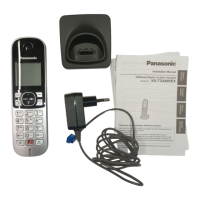
Panasonic KX-TGA680 - User Manual

Panasonic KX-TGA680
11 pages
Print Icon
To Next Page IconTo Next Page
Loading...
PanasoniC
Installation Manual
Additional
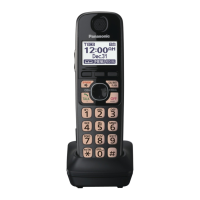
Digital Cordless Handset
Model No. KX-TGA680
DECT
6.0
Thank
you
for
purchasing a Panasonic product.
This unit is an additional handset compatible with the following series
of
Panasonic Digital Cordless Phone:
KX-TG6841 /KX-TG7841 /KX-TG7871
(The corresponding models are subject to change without notice.)
You must register this handset with your base unit before it can be used. This
installation manual describes only the steps needed to register and begin
using the handset. Please read the base unit's operating instructions for
further details.
Please read this installation manual before using the unit and save it for future
reference.
For assistance, visit our Web site:
http://www.panasonic.com/help
for customers
in
the U.S.A. or Puerto Rico.
Panasonic Corporation
of
North
America
One Panasonic
Way,
Secaucus, New Jersey 07094
© Panasonic System Networks Co., Ltd. 2012
*PNQX5772ZA*
Printed
in
China
PNQX5772ZA PP1212MGO (E)

Questions and Answers

  • M
    Michelle OrozcoSep 14, 2025
    Why can't I have a conversation using the headset with my Panasonic Telephone Accessories?
    • J
      Jonathan HuffmanSep 14, 2025
      If you cannot have a conversation using the headset with your Panasonic Telephone Accessories, your Bluetooth headset may not be paired. Pair it. Also, turn your headset off, then turn it on and try again.
  • A
    Ashley ParkAug 25, 2025
    Why does my Panasonic Telephone Accessories unit not work?
    • T
      Theresa LynnAug 25, 2025
      If your Panasonic Telephone Accessories unit isn't working, there are several things to check: * Ensure the batteries are correctly installed. * Make sure the batteries are fully charged. * Verify all connections are secure. * Try resetting the unit by unplugging the AC adapter, then reconnecting it. * Confirm the handset is registered to the base unit.
  • H
    Holly WatsonAug 25, 2025
    Why can't I hear a dial tone on my Panasonic Telephone Accessories?
    • D
      Dr. Reginald ScottAug 26, 2025
      If you cannot hear a dial tone on your Panasonic Telephone Accessories, make sure that the CELL 1 or CELL 2 indicator lights up. Also, check that the base unit’s AC adaptor or telephone line cord is properly connected. If the issue persists, disconnect the base unit from the telephone line and connect the line to a known working telephone. If the working telephone operates properly, contact our service personnel to have the unit repaired. If the working telephone does not operate properly, contact your service provider/telephone company.
  • T
    Taylor WilliamsAug 26, 2025
    What to do if I cannot make or answer cellular calls with my Panasonic Telephone Accessories?
    • E
      Edward MackAug 26, 2025
      If you cannot make or answer cellular calls with your Panasonic Telephone Accessories, ensure that the CELL 1 or CELL 2 indicator lights up and that the cellular phone is connected to the base unit. Also, only one active Bluetooth connection is possible at a time. The cellular phone might also be in use separately from your system.
  • D
    Dwayne SandovalSep 14, 2025
    Why is noise heard during a call on the headset with my Panasonic Telephone Accessories?
    • S
      Sharon ClarkSep 14, 2025
      If noise is heard during a call on the headset with your Panasonic Telephone Accessories, a Bluetooth headset can communicate with the base unit within a range of approximately 10 m (33 feet). The connection may be subject to interference from obstructions such as walls or electronic devices. Move closer to the base unit.
  • J
    Jeff AndersonSep 23, 2025
    I cannot switch cellular calls from the unit to the cellular phone on my Panasonic Telephone Accessories, why?
    • C
      chad50Sep 23, 2025
      Your cellular phone may not support this feature. Refer to the operating instructions of your cellular phone.
  • S
    Stephen MontgomerySep 7, 2025
    Why is caller information displayed or announced late on my Panasonic Telephone Accessories?
    • D
      Danielle WoodSep 7, 2025
      Depending on your service provider/telephone company, your Panasonic Telephone Accessories unit may display or announce the caller’s information at the 2nd ring or later. Also, move closer to the base unit.
  • E
    eric83Sep 8, 2025
    Why is caller information not announced on my Panasonic Telephone Accessories?
    • A
      Ashley DonaldsonSep 8, 2025
      If caller information is not announced on your Panasonic Telephone Accessories, check that the ringer volume for landline and cellular line is not turned off. The Talking Caller ID feature may be turned off, so turn it on. Also, the ring as cell mode may be set to “On (without Talking CID)”, so change the mode. If the number of rings for the answering system is set to “2 rings” or “Toll saver”, select a different setting.
  • F
    fmillerSep 23, 2025
    What can I do if liquid entered the handset/base unit of my Panasonic Telephone Accessories?
    • C
      Christine MooreSep 23, 2025
      If liquid or other form of moisture has entered the handset/base unit of your Panasonic Telephone Accessories, disconnect the AC adaptor and telephone line cord from the base unit. Remove the batteries from the handset and leave to dry for at least 3 days. After the handset/base unit are completely dry, reconnect the AC adaptor and telephone line cord. Insert the batteries and charge fully before use. If the unit does not work properly, contact an authorized service center.
  • M
    Maureen JonesAug 31, 2025
    Why can't I pair a cellular phone to my Panasonic Telephone Accessories base unit?
    • S
      Samantha TownsendAug 31, 2025
      If you're having trouble pairing a cellular phone to your Panasonic Telephone Accessories base unit, first confirm that your cellular phone supports the hands-free profile (HFP) specification. Also, ensure that the Bluetooth feature of your cellular phone is turned on. Try turning off and on your cellular phone. If your cellular phone is already connected to another Bluetooth device, turn it off or disconnect it from your cellular phone. Some cellular phones may require you to enter the base unit PIN to pairing, confirm that you entered the correct PIN.

Panasonic KX-TGA680 Specifications

General IconGeneral
BrandPanasonic
ModelKX-TGA680
CategoryHandsets
LanguageEnglish

Related product manuals