EasyManua.ls Logo

Panasonic KX-TGA685EX - User Manual

Panasonic KX-TGA685EX
60 pages
Print Icon
To Next Page IconTo Next Page
Loading...
Installation Manual
Additional Digital Cordless Handset
Model No. KX-TGA685EX
Thank you for purchasing a Panasonic product.
This unit is an additional handset compatible with the following series of
Panasonic Digital Cordless Phone:
– KX-TG6851/KX-TG6861
(The corresponding models are subject to change without notice.)
You must register this handset with your base unit before it can be used.
This installation manual describes only the steps needed to register and
begin using the handset. Please read the base unit’s operating instructions
for further details.
Please read this installation manual before using the unit and save it for
future reference.
KX-TGA685EX(7Languages)_0921_ver020.pdf 1 9/21/2020 9:32:46 AM
Italiano/
Nederlands
Français/
Deutsch
English/
Português
Español/
Useful Information
Question and Answer IconNeed help?

Do you have a question about the Panasonic KX-TGA685EX and is the answer not in the manual?

Summary

Accessory Information

Supplied Accessories

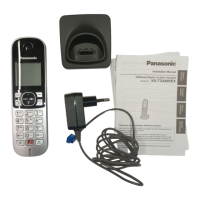
Lists items included with the product like charger, AC adaptor, batteries, and handset cover.

Setting Up

Connections

Instructions for connecting the AC adaptor to the unit and the power outlet.

Battery Installation and Charging

Guides for installing batteries, selecting language, and charging the handset for initial use.

Handset Setup and Operation

Display Language Selection

Steps to select the desired language for the handset display after initial setup.

Registering Handset to Base Unit

Detailed steps for pairing the additional handset with the base unit for operation.

Safety Precautions

Power Connection Safety

Warnings and precautions for proper AC adaptor and power outlet connection to prevent hazards.

Installation and Location Safety

Advice on product placement, AC outlet accessibility, and avoiding moisture.

Battery Safety

Guidelines for using correct rechargeable batteries and handling them safely.

Important Safety and General Information

Important Safety Instructions

Essential precautions to reduce risks of fire, electric shock, and injury during product use.

Routine Care and Maintenance

Instructions on how to clean and maintain the product's exterior surface.

Product Disposal and Return Notice

Information on erasing personal data before disposal and handling product returns.

Disposal of Old Equipment and Batteries

Guidelines for disposing of used electrical products and batteries according to regulations.
Useful Information

Summary

Accessory Information

Supplied Accessories

Lists items included with the product like charger, AC adaptor, batteries, and handset cover.

Setting Up

Connections

Instructions for connecting the AC adaptor to the unit and the power outlet.

Battery Installation and Charging

Guides for installing batteries, selecting language, and charging the handset for initial use.

Handset Setup and Operation

Display Language Selection

Steps to select the desired language for the handset display after initial setup.

Registering Handset to Base Unit

Detailed steps for pairing the additional handset with the base unit for operation.

Safety Precautions

Power Connection Safety

Warnings and precautions for proper AC adaptor and power outlet connection to prevent hazards.

Installation and Location Safety

Advice on product placement, AC outlet accessibility, and avoiding moisture.

Battery Safety

Guidelines for using correct rechargeable batteries and handling them safely.

Important Safety and General Information

Important Safety Instructions

Essential precautions to reduce risks of fire, electric shock, and injury during product use.

Routine Care and Maintenance

Instructions on how to clean and maintain the product's exterior surface.

Product Disposal and Return Notice

Information on erasing personal data before disposal and handling product returns.

Disposal of Old Equipment and Batteries

Guidelines for disposing of used electrical products and batteries according to regulations.

Useful Information

Panasonic KX-TGA685EX Specifications

General IconGeneral
BrandPanasonic
ModelKX-TGA685EX
CategoryHandsets
LanguageEnglish

Related product manuals