EasyManua.ls Logo

Panasonic KX-TGC210 - User Manual

Panasonic KX-TGC210
56 pages
Print Icon
To Next Page IconTo Next Page
Loading...
Operating Instructions
Digital Cordless Phone
Model No.
KX-TGC210
KX-TGC212
KX-TGC213
Digital Cordless Answering System
Model No.
KX-TGC220
KX-TGC222
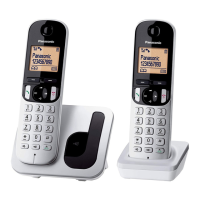
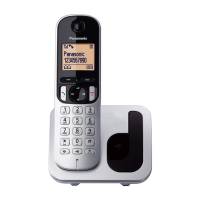
R Model shown is KX-TGC210.
Before initial use, see “Getting Started”
on page 9.
Thank you for purchasing a Panasonic product.
Please read these operating instructions before using the unit and save them for
future reference.
Consulte “Guía Rápida Española”, página 45.
For assistance, visit our Web site: http://www.panasonic.com/help for customers
in the U.S.A. or Puerto Rico.
Please register your product: http://www.panasonic.com/prodreg
TGC2xx(en_en)_1209_ver030.pdf 1 2013/12/09 11:46:09
Question and Answer IconNeed help?

Do you have a question about the Panasonic KX-TGC210 and is the answer not in the manual?

Summary

Important Information

For Your Safety

Provides critical safety precautions for using the product to prevent injury and property loss.

Important Safety Instructions

General safety precautions to reduce the risk of fire, electric shock, and injury.

Getting Started

Setting Up Connections

Step-by-step instructions for connecting the base unit, charger, and telephone line.

Battery Installation and Charging

Guides on installing batteries and charging the handset for initial use.

Making and Answering Calls

Making and Answering Calls

Procedures for initiating, receiving, and ending phone calls.

Phonebook

Adding, Editing, and Erasing Entries

Steps for managing contacts, including adding, editing, and deleting entries.

Programming

Caller ID Service

Using Caller ID Service

Overview of Caller ID compatibility and features, including caller information display.

Answering System

Answering System Features

Introduction to the answering system's capabilities, including memory and greeting options.

Remote Operation and Settings

How to access and control the answering system remotely and adjust settings.

Useful Information

Error Messages

Lists common error messages and their potential causes and solutions.

Troubleshooting

Guides for resolving common operational problems with the handset, base unit, and calls.

Summary

Important Information

For Your Safety

Provides critical safety precautions for using the product to prevent injury and property loss.

Important Safety Instructions

General safety precautions to reduce the risk of fire, electric shock, and injury.

Getting Started

Setting Up Connections

Step-by-step instructions for connecting the base unit, charger, and telephone line.

Battery Installation and Charging

Guides on installing batteries and charging the handset for initial use.

Making and Answering Calls

Making and Answering Calls

Procedures for initiating, receiving, and ending phone calls.

Phonebook

Adding, Editing, and Erasing Entries

Steps for managing contacts, including adding, editing, and deleting entries.

Programming

Caller ID Service

Using Caller ID Service

Overview of Caller ID compatibility and features, including caller information display.

Answering System

Answering System Features

Introduction to the answering system's capabilities, including memory and greeting options.

Remote Operation and Settings

How to access and control the answering system remotely and adjust settings.

Useful Information

Error Messages

Lists common error messages and their potential causes and solutions.

Troubleshooting

Guides for resolving common operational problems with the handset, base unit, and calls.

Panasonic KX-TGC210 Specifications

General IconGeneral
TypeDECT telephone
IntercomYes
Ringer typePolyphonic
Answering machineNo
Elderly phone-
Mounting typeDesk
Product colorBlack
Dialer locationHandset
Phonebook capacity50 entries
Redial list capacity5
Call list capacity phonebook30
Volume controlDigital
Backlight colorAmber
Display diagonal1.6 \
Display resolution103 x 65 pixels
Display number of lines1 lines
Display number of colorsMonochrome
Battery typeAAA
Standby time144 h
Battery technologyNickel-Metal Hydride (NiMH)
Battery recharge time7 h
Power consumption (typical)0.6 W
Number of batteries supported2
Number of handsets included1
Weight and Dimensions IconWeight and Dimensions
Base weight100 g
Handset weight130 g
Base dimensions107 x 96 x 77 mm
Handset dimensions (WxDxH)47 x 30 x 164 mm

Related product manuals