
 Need help?
Do you have a question about the Panasonic KX-TGC220E and is the answer not in the manual?
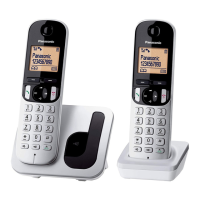
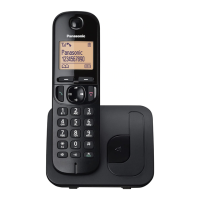
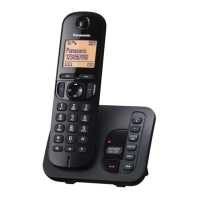
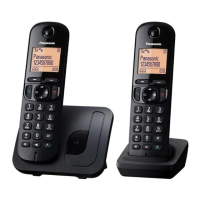
Details the different models and their configurations.
Lists supplied accessories and their quantities for different unit configurations.
Provides information on purchasing additional or replacement accessories.
Contact details for customer support and online accessory ordering.
Information on product design for U.K./Ireland networks and declaration of conformity.
Section to record purchase details for warranty and repair purposes.
Essential safety precautions to prevent injury, fire, and shock.
Guidelines for safe operation, cleaning, and maintenance.
Advice for users with medical devices regarding RF energy exposure.
Cautions for product installation and choosing a suitable location.
Additional basic safety precautions to reduce risks.
Instructions for safe use and handling of rechargeable batteries.
Tips for base unit placement and environmental factors for best performance.
Instructions for cleaning the product's outer surface.
Guidance on responsible disposal of used electronics and batteries.
Details the wireless standards (DECT, GAP) the product supports.
Specifies the operating frequency range of the device.
Indicates the radio frequency transmission power levels of the unit.
Details the required power input voltage and frequency.
Lists standby and maximum power consumption for base unit and charger.
Specifies the environmental conditions (temperature, humidity) for operation.
Step-by-step instructions for connecting the base unit and charger.
Detailed steps for connecting power and telephone lines to the base unit.
Instructions for connecting the AC adaptor to the charger unit.
Guide on how to correctly install the rechargeable batteries in the handset.
Instructions on how to charge the handset batteries and expected charging time.
Important notes regarding AC adaptor connection and power outlet type.
Information on unit operation during a power outage and alternative phone recommendations.
Recommendation for using specific rechargeable batteries for replacement.
Note regarding the handset feeling warm during the charging process.
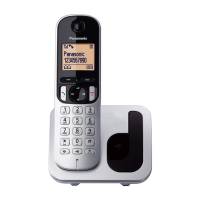
Identifies and explains the functions of buttons and components on the handset.
Explains soft keys and navigator key functions for handset operation.
Identifies and explains the components and charge contacts on the base unit.
Explanation and operation of the one-touch eco mode for power saving.
Step-by-step guide on how to make phone calls using the device.
Instructions for using the speakerphone function during calls.
How to adjust the audio volume during a call.
Guide on redialing previously called numbers from the list.
Steps to remove numbers from the redial list.
Explanation of how to use the pause function for specific call types.
Instructions on how to answer incoming phone calls.
How to answer calls by pressing any dial key.
Enabling automatic answering by lifting the handset.
How to temporarily silence the handset ringer.
How to adjust the incoming call ringer volume for handset and base unit.
Overview of additional call management features.
How to place an ongoing call on hold.
How to resume a call that was placed on hold.
How to mute the microphone during a call.
Using the recall/flash function for PBX services.
How to use call waiting and view caller ID information.
Functionality for sharing calls between handsets.
Instructions for transferring calls and setting up conference calls.
How to make intercom calls between handsets.
Steps to initiate an intercom call to another handset.
How to answer an incoming intercom call.
How to lock and unlock the handset keypad to prevent accidental changes.
Steps to add new contacts with names and numbers to the phonebook.
How to save numbers from the redial list into the phonebook.
Saving incoming call information directly into the phonebook.
How to locate and dial contacts stored in the phonebook.
How to modify existing contact names and numbers in the phonebook.
How to delete contacts from the phonebook.
Feature for dialing numbers from the phonebook during an active call.
How to assign phone numbers to speed dial keys.
How to edit existing speed dial entries.
How to delete a specific speed dial entry.
How to view speed dial entries and make calls using them.
Overview of accessing features via menus or direct command codes.
Configuration options for rings, recording time, remote code, and call screening.
Settings for date, time, memo alarm, and time adjustment.
Operation settings for intercom functionality.
Settings related to Ringer Setup, including volume, tone, and first ring.
Option to assign custom names to handsets for easy identification.
Features for blocking unwanted calls by number or range.
Configuration for speed dial functionality.
Settings for eco mode, including transmission power.
Options for adjusting display backlight and contrast.
Settings related to keypad tones.
Functionality to restrict certain handsets from making calls.
Setting for automatically answering calls.
Settings for recall/flash times for line services.
Feature to prevent eavesdropping on conversations.
Setting and managing the base unit's Personal Identification Number.
Configuration for using a DECT repeater to extend range.
Registering new handsets to the base unit.
Setting the display language for the unit.
Viewing and managing the list of incoming calls.
Customizing ringer volume, tones, and first ring behavior.
Setting up single, daily, or weekly alarms with text memos and tones.
Adding specific numbers or ranges to block unwanted calls.
Adding individual phone numbers to the block list.
Adding number ranges (e.g., prefixes) to the block list.
Setting to reject calls with no caller ID information.
Managing entries in the call block list.
Clearing the entire call block list.
Assigning custom names to handsets for intercom identification.
Restricting handsets from dialing certain numbers or area codes.
How to change the base unit's Personal Identification Number.
Using a DECT repeater to extend the base unit's signal range.
Enabling or disabling the repeater mode on the base unit.
Pairing the DECT repeater with the base unit.
How to use the Caller ID feature and subscription requirements.
Information displayed for incoming calls, including out-of-area and private callers.
How missed calls are indicated and viewed.
How stored phonebook names appear with caller information.
Managing the list of incoming calls and their details.
Navigating the caller list and redialing numbers.
Modifying the phone number associated with a caller list entry.
Deleting individual entries from the caller list.
Instructions for activating and deactivating the answering system.
Explanation of greeting messages played to callers.
Steps to record a personalized greeting for the answering system.
Information on the unit's built-in pre-recorded greeting messages.
How to revert to a pre-recorded greeting after recording your own.
How to listen to the greeting message.
How to listen to new and all recorded messages.
How to delete all recorded messages.
Accessing messages and settings from an external phone.
Setting and using a remote access code for security.
Steps to disable remote operation.
How to access messages and settings from an external phone.
Explanation of the voice prompts during remote operation.
Steps to activate the answering system remotely.
Option to listen to callers while they leave messages.
Setting how many rings before the answering system activates.
Notes for users with voice mail services from their provider.
Information about external voice mail services and their interaction with the unit.
How to use dial keys to enter characters and numbers for various modes.
Overview of available character input modes (Alphabet, Numeric, Greek, etc.).
Table showing characters assigned to dial keys in Alphabet mode.
Table showing characters assigned to dial keys in Numeric mode.
Table showing characters assigned to dial keys in Greek mode.
Table showing characters assigned to dial keys in Extended 1 mode.
Table showing characters assigned to dial keys in Extended 2 mode.
Lists common error messages and their corresponding causes and solutions.
 General
| Handset Frequency | 1.9 GHz |
|---|---|
| Answering Machine | Yes |
| Answering Machine Recording Time | 18 minutes |
| Number of Handsets | 1 |
| Caller ID | Yes |
| Phonebook Capacity | 50 entries |
| Eco Mode | Yes |
| GAP Compatible | Yes |
| Call Transfer | Yes |
| Intercom | Yes |
| Conference Call | Yes |
| Redial Memory | 10 numbers |
| Call Waiting | Yes |
| Speakerphone | Yes |
| Power Source | AC Adapter |
| Frequency | DECT |
| Display | LCD |
| Multiple Handsets Capability | Yes |
| Battery Type | Ni-MH |
| Range | 50 meters indoors, 300 meters outdoors |


 To Next Page