EasyManua.ls Logo

Panasonic KX-TGC223E - User Manual

Panasonic KX-TGC223E
48 pages
Print Icon
To Next Page IconTo Next Page
Loading...
Operating Instructions
Digital Cordless Phone
Model No.
KX-TGC210E
KX-TGC212E
KX-TGC213E
Digital Cordless Answering System
Model No.
KX-TGC220E
KX-TGC222E
KX-TGC223E
KX-TGC224E
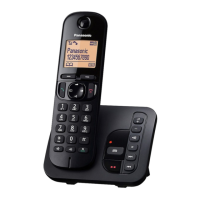
Model shown is KX-TGC210.
Before initial use, see “Getting Started”
on page 10.
Thank you for purchasing a Panasonic product.
Please read these operating instructions before using the unit and save them for
future reference.
TGC21x_22xE_OI_(en-en)_ver211.pdf 1 3/7/2016 10:42:18 AM
Question and Answer IconNeed help?

Do you have a question about the Panasonic KX-TGC223E and is the answer not in the manual?

Summary

Introduction

Model Composition

Details the base unit and handset models within the series.

Accessory Information

Lists supplied accessories for different unit configurations.

Additional;Replacement Accessories

Information on ordering spare parts and accessories for the unit.

Sales and Support Information

Contact details for customer support and online accessory ordering.

General Information

Details on product design, conformity, and environmental information.

For Your Future Reference

Fields to record serial number, purchase date, and dealer for warranty purposes.

Important Information

For Your Safety

Crucial safety warnings to prevent injury and property damage during operation.

Power Connection and Installation Safety

Guidelines for safe AC adaptor use, power outlets, and product installation.

Operating Safeguards and Medical Advice

Precautions for cleaning, disassembly, and RF energy effects on medical devices.

Battery Safety and Handling

Instructions for safe use, charging, and handling of rechargeable batteries.

Important Safety Instructions

General safety precautions to reduce fire, shock, and injury risks.

Best Performance Tips

Guidance on base unit placement and environmental factors for optimal performance.

Routine Care and Disposal Guidance

Tips for cleaning the unit and guidance on responsible product and battery disposal.

Specifications

Technical Standards and Power Details

Specifications for DECT standard, frequency, power, and operating conditions.

Getting Started

Setting Up Connections

Step-by-step guide for connecting the base unit, charger, and telephone line.

Battery Installation

Instructions for correctly installing rechargeable batteries into the handset.

Battery Charging and Maintenance

Procedures for charging batteries and cleaning charge contacts for optimal performance.

Setup Notes and Power Failure Handling

Important notes on AC adaptor connection and unit behaviour during power outages.

Handset and Base Unit Controls

Identifies buttons and functions on both the handset and base unit.

Navigator Key Functions

Explains the operation of the navigator key for scrolling and selection.

Display Icons Guide

Explains various icons displayed on the handset for status and notifications.

Power On;Off and Language Setting

Instructions for turning the unit on/off and changing the display language.

Date, Time, and Greeting Setup

Steps to set the date, time, and record a custom greeting message.

One Touch Eco Mode

How to activate and use the eco mode to reduce transmission power.

Making and Answering Calls

Making Calls and Using Speakerphone

Steps for initiating calls, using speakerphone, and adjusting volume during calls.

Redial, Pause, and Call Answering Features

Features for redialing, inserting pauses, answering calls, and auto-talk.

Call Features: Hold and Mute

How to put calls on hold and mute the microphone during conversations.

Call Waiting, Caller ID, and Call Share

Managing call waiting, caller ID display, and sharing calls between handsets.

Call Transfer, Conference, and Intercom

Features for transferring calls, setting up conferences, and making intercom calls.

Key Lock Functionality

Instructions for locking and unlocking the handset keypad to prevent accidental use.

Phonebook and Speed Dial

Adding and Storing Phonebook Entries

Steps to add new contacts, store redial or caller ID information.

Editing and Erasing Phonebook Entries

Procedures for modifying existing entries or deleting them from the phonebook.

Finding and Calling from Phonebook

How to search for and initiate calls to contacts stored in the phonebook.

Speed Dial Setup and Management

Assigning phone numbers to speed dial keys and editing/erasing entries.

Programming

Menu List Navigation and Command Codes

Methods to access features via display menus or direct command codes.

General Settings Configuration

Configuring ring counts, date/time, alarms, ringer volumes, and intercom.

Ringer and Initial Setup Options

Adjusting ringer volumes, tones, and initial setup for intercom.

Handset, Call Restriction, and Display Settings

Customizing handset names, blocking calls, and setting display contrast.

PIN, Repeater, and Eco Mode Settings

Managing base unit PIN, repeater mode, and eco setup options.

Registering and Managing Handsets

Procedures for registering, cancelling, and displaying handsets.

Nuisance Call Block Configuration

Configuring settings to block unwanted calls by number or range.

Alarm Setup and Snooze Function

Setting alarms with options for once, daily, weekly, and configuring snooze.

Nuisance Call Block Management

Storing specific numbers, ranges, or blocking calls with no number.

Editing and Erasing Call Block Numbers

Procedures for managing entries in the call block list.

Handset Name, Call Restriction, and PIN Change

Customizing handset names, restricting dialling, and changing the base unit PIN.

Repeater Mode and Registration

Setting up a DECT repeater for extended range and registering it to the base unit.

Caller ID Service

Using Caller ID Features

Understanding how Caller ID displays information and handles missed calls.

Caller List Management

Viewing, editing, and erasing entries from the caller list.

Erasing All Caller Information

Procedure to clear all stored caller information from the list.

Answering System

Turning Answering System On;Off

How to activate or deactivate the answering system on the base unit and handset.

Greeting Message Setup and Usage

Recording or selecting a greeting message for callers.

Playing Back and Managing Greetings

Playing, resetting, and erasing greeting messages.

Listening to and Erasing Messages

Procedures for listening to new/all messages and erasing them.

Remote Access Code and Operation

Setting and using a remote access code to manage the answering system remotely.

Calling Back and Erasing Messages Remotely

How to call back numbers and erase messages using remote access.

Remote Commands and System Settings

Using dial keys for remote commands and configuring call screening and ring counts.

Voice Mail Service Interaction

Notes on coordinating the unit's answering system with service provider voice mail.

Caller Recording Time and Greeting Only Mode

Adjusting message recording time and selecting the "Greeting Only" option.

Useful Information

Voice Mail Service Details

Explains voice mail as an alternative to the unit's answering system.

Character Entry Guide

Instructions for entering characters and numbers using dial keys.

Character Entry Tables

Reference tables for alphabet, numeric, Greek, and extended character sets.

Error Messages and Troubleshooting

Common error messages displayed and their corresponding troubleshooting steps.

General Use Troubleshooting

Resolving issues with blank displays, no dial tone, intercom, and eco mode.

Menu List and PIN Troubleshooting

Handling display language issues and recovering forgotten base unit PINs.

Battery Recharge and Call Issues

Troubleshooting low battery beeps, short operating time, and call quality problems.

Ringer and Caller ID Issues

Solutions for no ringing, restricted calls, and missing caller ID information.

Answering System and Liquid Damage Issues

Troubleshooting answering system functions and handling liquid damage to the unit.

Handset Registration and Deregistration

Steps to add new handsets or remove existing ones from the base unit.

Conditions of Guarantee

Details of the product's warranty terms, coverage, and limitations.

Summary

Introduction

Model Composition

Details the base unit and handset models within the series.

Accessory Information

Lists supplied accessories for different unit configurations.

Additional;Replacement Accessories

Information on ordering spare parts and accessories for the unit.

Sales and Support Information

Contact details for customer support and online accessory ordering.

General Information

Details on product design, conformity, and environmental information.

For Your Future Reference

Fields to record serial number, purchase date, and dealer for warranty purposes.

Important Information

For Your Safety

Crucial safety warnings to prevent injury and property damage during operation.

Power Connection and Installation Safety

Guidelines for safe AC adaptor use, power outlets, and product installation.

Operating Safeguards and Medical Advice

Precautions for cleaning, disassembly, and RF energy effects on medical devices.

Battery Safety and Handling

Instructions for safe use, charging, and handling of rechargeable batteries.

Important Safety Instructions

General safety precautions to reduce fire, shock, and injury risks.

Best Performance Tips

Guidance on base unit placement and environmental factors for optimal performance.

Routine Care and Disposal Guidance

Tips for cleaning the unit and guidance on responsible product and battery disposal.

Specifications

Technical Standards and Power Details

Specifications for DECT standard, frequency, power, and operating conditions.

Getting Started

Setting Up Connections

Step-by-step guide for connecting the base unit, charger, and telephone line.

Battery Installation

Instructions for correctly installing rechargeable batteries into the handset.

Battery Charging and Maintenance

Procedures for charging batteries and cleaning charge contacts for optimal performance.

Setup Notes and Power Failure Handling

Important notes on AC adaptor connection and unit behaviour during power outages.

Handset and Base Unit Controls

Identifies buttons and functions on both the handset and base unit.

Navigator Key Functions

Explains the operation of the navigator key for scrolling and selection.

Display Icons Guide

Explains various icons displayed on the handset for status and notifications.

Power On;Off and Language Setting

Instructions for turning the unit on/off and changing the display language.

Date, Time, and Greeting Setup

Steps to set the date, time, and record a custom greeting message.

One Touch Eco Mode

How to activate and use the eco mode to reduce transmission power.

Making and Answering Calls

Making Calls and Using Speakerphone

Steps for initiating calls, using speakerphone, and adjusting volume during calls.

Redial, Pause, and Call Answering Features

Features for redialing, inserting pauses, answering calls, and auto-talk.

Call Features: Hold and Mute

How to put calls on hold and mute the microphone during conversations.

Call Waiting, Caller ID, and Call Share

Managing call waiting, caller ID display, and sharing calls between handsets.

Call Transfer, Conference, and Intercom

Features for transferring calls, setting up conferences, and making intercom calls.

Key Lock Functionality

Instructions for locking and unlocking the handset keypad to prevent accidental use.

Phonebook and Speed Dial

Adding and Storing Phonebook Entries

Steps to add new contacts, store redial or caller ID information.

Editing and Erasing Phonebook Entries

Procedures for modifying existing entries or deleting them from the phonebook.

Finding and Calling from Phonebook

How to search for and initiate calls to contacts stored in the phonebook.

Speed Dial Setup and Management

Assigning phone numbers to speed dial keys and editing/erasing entries.

Programming

Menu List Navigation and Command Codes

Methods to access features via display menus or direct command codes.

General Settings Configuration

Configuring ring counts, date/time, alarms, ringer volumes, and intercom.

Ringer and Initial Setup Options

Adjusting ringer volumes, tones, and initial setup for intercom.

Handset, Call Restriction, and Display Settings

Customizing handset names, blocking calls, and setting display contrast.

PIN, Repeater, and Eco Mode Settings

Managing base unit PIN, repeater mode, and eco setup options.

Registering and Managing Handsets

Procedures for registering, cancelling, and displaying handsets.

Nuisance Call Block Configuration

Configuring settings to block unwanted calls by number or range.

Alarm Setup and Snooze Function

Setting alarms with options for once, daily, weekly, and configuring snooze.

Nuisance Call Block Management

Storing specific numbers, ranges, or blocking calls with no number.

Editing and Erasing Call Block Numbers

Procedures for managing entries in the call block list.

Handset Name, Call Restriction, and PIN Change

Customizing handset names, restricting dialling, and changing the base unit PIN.

Repeater Mode and Registration

Setting up a DECT repeater for extended range and registering it to the base unit.

Caller ID Service

Using Caller ID Features

Understanding how Caller ID displays information and handles missed calls.

Caller List Management

Viewing, editing, and erasing entries from the caller list.

Erasing All Caller Information

Procedure to clear all stored caller information from the list.

Answering System

Turning Answering System On;Off

How to activate or deactivate the answering system on the base unit and handset.

Greeting Message Setup and Usage

Recording or selecting a greeting message for callers.

Playing Back and Managing Greetings

Playing, resetting, and erasing greeting messages.

Listening to and Erasing Messages

Procedures for listening to new/all messages and erasing them.

Remote Access Code and Operation

Setting and using a remote access code to manage the answering system remotely.

Calling Back and Erasing Messages Remotely

How to call back numbers and erase messages using remote access.

Remote Commands and System Settings

Using dial keys for remote commands and configuring call screening and ring counts.

Voice Mail Service Interaction

Notes on coordinating the unit's answering system with service provider voice mail.

Caller Recording Time and Greeting Only Mode

Adjusting message recording time and selecting the "Greeting Only" option.

Useful Information

Voice Mail Service Details

Explains voice mail as an alternative to the unit's answering system.

Character Entry Guide

Instructions for entering characters and numbers using dial keys.

Character Entry Tables

Reference tables for alphabet, numeric, Greek, and extended character sets.

Error Messages and Troubleshooting

Common error messages displayed and their corresponding troubleshooting steps.

General Use Troubleshooting

Resolving issues with blank displays, no dial tone, intercom, and eco mode.

Menu List and PIN Troubleshooting

Handling display language issues and recovering forgotten base unit PINs.

Battery Recharge and Call Issues

Troubleshooting low battery beeps, short operating time, and call quality problems.

Ringer and Caller ID Issues

Solutions for no ringing, restricted calls, and missing caller ID information.

Answering System and Liquid Damage Issues

Troubleshooting answering system functions and handling liquid damage to the unit.

Handset Registration and Deregistration

Steps to add new handsets or remove existing ones from the base unit.

Conditions of Guarantee

Details of the product's warranty terms, coverage, and limitations.

Panasonic KX-TGC223E Specifications

General IconGeneral
BrandPanasonic
ModelKX-TGC223E
CategoryCordless Telephone
LanguageEnglish

Related product manuals