EasyManua.ls Logo

Panasonic KX-TGE632 - User Manual

Panasonic KX-TGE632
72 pages
Print Icon
To Next Page IconTo Next Page
Loading...
Operating Instructions
Cordless Telephone with Digital Answering Machine
Model No.
KX-TGE632
KX-TGE633
KX-TG3834
KX-TGE645
KX-TG3845
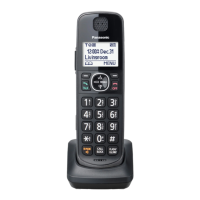
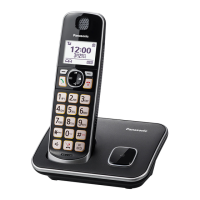
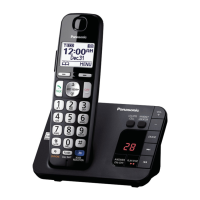
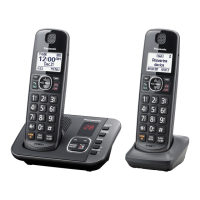
Model shown is KX-TGE632.
Before initial use, see “Getting Started”
on page 10.
Thank you for purchasing a Panasonic product.
Please read these operating instructions before using the unit and save them for
future reference.
Consulte “Guía Rápida Española”, página 63.
For assistance, visit our Web site: http://shop.panasonic.com/support for
customers in the U.S.A.
Please register your product: http://shop.panasonic.com/support
KX-TGE63x_64xUSA_(en)_1213_ver031.pdf 1 13/12/2017 4:29:16 PM

Questions and Answers

  • J
    jsmithSep 18, 2025
    Why I cannot dial the phone number edited in the caller list on my Panasonic KX-TGE632 Cordless Telephone?
    • J
      Joel FoxSep 18, 2025
      If you cannot dial the phone number edited in the caller list, the phone number you dialed might have been edited incorrectly (for example, the long distance “1” or the area code is missing). Edit the phone number with another pattern.
  • B
    Benjamin MyersAug 25, 2025
    Why does my Panasonic Cordless Telephone handset beep and/or flash?
    • L
      Lisa ParkAug 25, 2025
      If your Panasonic Cordless Telephone handset is beeping and/or flashing, it likely indicates that the battery charge is low. Fully charge the batteries to resolve this issue.
  • M
    meyerdanielleAug 25, 2025
    What to do if my Panasonic KX-TGE632 does not work?
    • A
      Andrew LongAug 26, 2025
      If your Panasonic Cordless Telephone isn't working, ensure the batteries are installed correctly. Fully charge the batteries. Check the connections. Unplug the base unit’s AC adaptor to reset the unit, then reconnect it. Also, the handset may not be registered to the base unit; register the handset.
  • X
    Xavier FrancisAug 27, 2025
    Why does my Panasonic Cordless Telephone still flash or have short operating time after fully charging the batteries?
    • K
      khandebraAug 27, 2025
      If your Panasonic Cordless Telephone still flashes, displays , or has a shorter operating time after a full charge, clean the battery ends and the charge contacts with a dry cloth and charge again. If the problem persists, it may be time to replace the batteries.
  • S
    Suzanne YoungSep 22, 2025
    Why has the time on my Panasonic KX-TGE632 Cordless Telephone shifted?
    • R
      Rachel ShepherdSep 22, 2025
      If the time on your Panasonic Cordless Telephone has shifted, incorrect time information from incoming Caller ID may be changing the time. Set the time adjustment to “Manual” (off).
  • M
    Mark ReeseSep 23, 2025
    What to do if liquid entered my Panasonic Cordless Telephone handset/base unit?
    • T
      terrellmicheleSep 23, 2025
      Disconnect the AC adaptor and telephone line cord from the base unit. Remove the batteries from the handset and leave to dry for at least 3 days. After the handset/base unit are completely dry, reconnect the AC adaptor and telephone line cord. Insert the batteries and charge fully before use. If the unit does not work properly, contact an authorized service center.
  • L
    lisa00Sep 9, 2025
    Why does my Panasonic KX-TGE632 Cordless Telephone base unit beep?
    • K
      Kevin Kane MDSep 9, 2025
      If the base unit of your Panasonic Cordless Telephone is beeping, listen to the new messages.
  • P
    Paul DoyleSep 12, 2025
    Why I cannot make a call on my Panasonic KX-TGE632 Cordless Telephone?
    • R
      Richard SmithSep 12, 2025
      If you cannot make a call on your Panasonic Cordless Telephone, the dialing mode may be set incorrectly. Change the setting.
  • E
    Erika HowellSep 3, 2025
    What does it mean when is displayed on my Panasonic KX-TGE632?
    • E
      Evan PattersonSep 3, 2025
      If you see displayed on your Panasonic Cordless Telephone, the handset is too far from the base unit; move closer. The base unit’s AC adaptor may not be properly connected; reconnect it. The handset may not be registered to the base unit; register it.
  • D
    Dustin CrossSep 1, 2025
    Why is caller information not displayed on my Panasonic KX-TGE632 Cordless Telephone?
    • A
      Ashley JacksonSep 1, 2025
      If caller information isn't displayed on your Panasonic Cordless Telephone, ensure that you subscribe to Caller ID service with your phone service provider. If additional telephone equipment is connected, plug the unit directly into the wall jack. If you use a DSL/ADSL service, connect a DSL/ADSL filter between the base unit and the telephone line jack. Note that the name display service may not be available in some areas, so contact your phone service provider for details. Also, other telephone equipment may be interfering; disconnect it and try again.

Summary

Introduction

Model Composition

Details the different phone models and their included components.

Accessory Information

Lists the supplied accessories and their quantities for various configurations.

Expanding Your Phone System

Explains how to register additional optional handsets to the base unit.

Graphical Symbols Explained

Provides explanations for symbols used on the equipment and in the manual.

Important Information

For Your Safety

Crucial safety warnings and precautions for using the product correctly.

Important Safety Instructions

Detailed safety precautions to reduce risks of fire, shock, and injury.

Environment and Routine Care

Guidelines for optimal operating environment and cleaning procedures.

Specifications

Technical details including standard, frequency range, power, and operating conditions.

Getting Started

Setting Up

Initial steps for connecting the base unit, charger, and installing batteries.

Controls Overview

Explains the buttons and functions on the handset and base unit.

Display & Language Settings

Covers display icons, setting display/voice languages, and configuring date/time.

Greeting Message & Alerts

Instructions for recording greetings and setting up low battery alerts.

Making and Answering Calls

Making Calls

How to initiate calls using the handset and base unit, including redialing.

Answering Calls

Procedures for receiving and answering incoming calls on handset and base unit.

Call Features During Conversation

Explains call hold, mute, volume adjustment, and other call-related functions.

Power Backup Operation

How the phone operates during a power outage using handset battery backup.

Call Block Features

Call Block Overview

Introduction to blocking unwanted calls and managing the block list.

Storing Unwanted Callers

Methods for adding specific numbers or number ranges to the block list.

Blocking Calls Without Phone Numbers

How to block calls identified as 'unknown CID' or 'private caller'.

Call Block Management

Managing block lists, ring settings for blocked calls, and blocked call counts.

Automated Call Block

Automated Call Block Overview

How the system screens and blocks calls automatically based on caller identification.

Allowed Number Database

Information on the database for storing unblocked numbers to bypass screening.

Setting Automated Call Block

Steps to activate, deactivate, and change the access code for the feature.

Recording a Greeting Message

How to record a custom greeting message for automated call block.

Phonebook and Contacts

Phonebook Overview

Adding and managing contacts, phone numbers, and assigning them to groups.

Adding and Editing Contacts

Detailed steps for adding new entries, editing existing ones, and entering characters.

Groups

How to organize contacts into groups for easier searching and caller ID ring assignment.

Speed Dial

Setting up and using speed dial keys for quick access to frequently called numbers.

Programming Features

Menu List and Navigation

How to navigate the device's menu system using display menus or direct codes.

Alarm Setup

Instructions for setting and managing up to three separate alarm times.

Silent Mode and Baby Monitor

Setting quiet periods and using the feature to monitor a room remotely.

Handset Registration

Process for registering or deregistering handsets to the base unit.

Caller ID Service

Using Caller ID Service

Requirements and basic usage of the Caller ID feature for identifying callers.

Talking Caller ID and Announcements

How the device announces caller information and names without looking at the display.

Caller List Management

Viewing the history of incoming calls and editing caller phone numbers.

Caller ID Number Auto Edit

Feature that automatically edits phone numbers based on area code for local calls.

Answering System

Answering System Overview

Introduction to the answering system's capabilities for answering and recording calls.

System On;Off and Greeting Messages

Instructions for turning the system on/off and recording or using pre-recorded greetings.

Listening to and Managing Messages

How to access recorded messages, control playback, and erase messages.

Advanced Message Alerts

Features for audible alerts and call notifications when new messages are recorded.

Useful Information

Voicemail Service

Information on using voicemail services provided by the phone service provider.

Wall Mounting and Installation

Step-by-step instructions for mounting the base unit on a wall.

Error Messages and Troubleshooting

Guide to understanding common error messages and resolving operational issues.

FCC and Compliance Information

Regulatory information, FCC compliance, and hearing aid compatibility details.

Appendix

Customer Services

Information on accessing customer support, product information, and accessories.

Limited Warranty (USA)

Details of the product's limited warranty coverage for purchases in the United States.

Warranty Limits and Exclusions

Specific conditions, limitations, and exclusions pertaining to the product warranty.

Panasonic KX-TGE632 Specifications

General IconGeneral
BrandPanasonic
ModelKX-TGE632
CategoryCordless Telephone
LanguageEnglish

Related product manuals