EasyManua.ls Logo

Panasonic KX-TGE633 - User Manual

Panasonic KX-TGE633
72 pages
Print Icon
To Next Page IconTo Next Page
Loading...
Operating Instructions
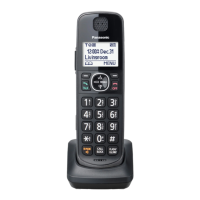
Cordless Telephone with Digital Answering Machine
Model No.
KX-TGE632
KX-TGE633
KX-TG3834
KX-TGE645
KX-TG3845
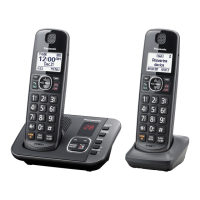
Model shown is KX-TGE632.
Before initial use, see “Getting Started”
on page 10.
Thank you for purchasing a Panasonic product.
Please read these operating instructions before using the unit and save them for
future reference.
Consulte “Guía Rápida Española”, página 63.
For assistance, visit our Web site: http://shop.panasonic.com/support for
customers in the U.S.A.
Please register your product: http://shop.panasonic.com/support
KX-TGE63x_64xUSA_(en)_1213_ver031.pdf 1 13/12/2017 4:29:16 PM

Questions and Answers

  • J
    jonesfrankSep 6, 2025
    What does it mean when the indicator on my Panasonic Cordless Telephone handset flashes slowly?
    • L
      Louis JacksonSep 6, 2025
      If the indicator on your Panasonic Cordless Telephone handset flashes slowly, listen to the new messages or listen to the new voicemail messages.
  • H
    holiverAug 25, 2025
    Why does my Panasonic KX-TGE633 handset beep and/or flash?
    • G
      ghicksAug 25, 2025
      If your Panasonic Cordless Telephone handset is beeping and/or flashing, it likely indicates that the battery charge is low. Fully charge the batteries to resolve this issue.
  • A
    apughAug 25, 2025
    What to do if my Panasonic Cordless Telephone does not work?
    • D
      Debra MyersAug 26, 2025
      If your Panasonic Cordless Telephone isn't working, ensure the batteries are installed correctly. Fully charge the batteries. Check the connections. Unplug the base unit’s AC adaptor to reset the unit, then reconnect it. Also, the handset may not be registered to the base unit; register the handset.
  • A
    Adam JacksonSep 14, 2025
    Why is displayed on my Panasonic KX-TGE633?
    • J
      james42Sep 14, 2025
      The symbol indicates that the handset is too far from the base unit; move closer. Also, the base unit’s AC adapter may not be properly connected; reconnect it to the base unit. The handset may not be registered to the base unit; register it.
  • M
    Mary MolinaSep 23, 2025
    Why do I hear an error sound when pressing keys on my Panasonic KX-TGE633 Cordless Telephone base unit?
    • M
      Megan CummingsSep 23, 2025
      If you hear an error sound when pressing keys on the base unit, automated call block is being screened. Try again later.
  • P
    Patricia RyanSep 10, 2025
    Why is there an error sound when I press some keys on my Panasonic Cordless Telephone base unit?
    • H
      heather02Sep 10, 2025
      If you hear an error sound when pressing keys on the base unit of your Panasonic Cordless Telephone, automated call block is being screened. Try again later.
  • Y
    ykingSep 1, 2025
    What to do if my Panasonic KX-TGE633 Cordless Telephone does not record new messages?
    • H
      holderalexanderSep 2, 2025
      If your Panasonic Cordless Telephone isn't recording new messages, several factors could be at play. First, check if the answering system is turned off and turn it on. Also, the message memory might be full, so try erasing unnecessary messages. Ensure the recording time isn't set to “Greeting only”; change it if it is. Your phone service provider’s voicemail could be intercepting calls, so adjust the unit’s number of rings to a lower value. Finally, the answering system will not answer incoming calls while other devices such as handsets are engaged in a call.
  • R
    Richard PetersonSep 2, 2025
    How to remove 'Voicemail msg. via phone co.' message on Panasonic KX-TGE633 Cordless Telephone?
    • C
      Carol SmithSep 2, 2025
      The message 'Voicemail msg. via phone co.' appears when your phone service provider's voicemail service has a message for you, not your Panasonic Cordless Telephone's answering system. To remove this notification, dial the voicemail number provided by your phone service provider (usually your own phone number) and follow the voice instructions to listen to your messages. You might need to clear all messages from your voice mailbox. Alternatively, you can try pressing and holding the # key until the unit beeps.
  • E
    Eric CainSep 18, 2025
    Why do I hear an error sound when pressing keys on my Panasonic Cordless Telephone?
    • A
      Amber BartlettSep 18, 2025
      Automated call block is being screened. Try again later.
  • A
    Austin SmithAug 28, 2025
    Why is my Panasonic KX-TGE633 base unit beeping?
    • L
      Lauren SmithAug 28, 2025
      If the base unit is beeping, listen to the new messages.

Summary

Important Information

For Your Safety

Essential safety precautions to prevent injury and property loss during product use.

Important Safety Instructions

Lists basic safety precautions to reduce the risk of fire, electric shock, and injury.

Getting Started

Initial Setup: Connections and Battery Installation

Guides through connecting the base unit, charger, and installing the handset batteries.

Battery Charging and Care

Details battery charging duration, level indicators, and maintenance for battery contacts.

Making and Answering Calls

Making Calls

Guides on initiating calls using handset/base unit, redialing, and adjusting volume.

Call Features During a Call

Details features like Hold, Mute, Ringer Off, Flash, and Call Waiting.

Auto Intercom and Power Backup

Covers automatic intercom answering and how the unit operates during a power failure.

Making and Answering Calls During Power Failure

Provides instructions for making and answering calls when the unit is in power backup mode.

Call Block

Managing Blocked Callers

Covers blocking single numbers, ranges, unknown CID, and adding numbers from the caller list.

Automated Call Block

Phonebook

Programming

Menu Navigation and Codes

Explains how to access features via menus or direct command codes, and provides a menu tree.

Caller ID, Call Block, and Automated Block Settings

Covers talking Caller ID, low battery alerts, key detectors, and call blocking configurations.

Caller ID Service

Using Caller ID Features

Explains Caller ID requirements, talking Caller ID, phonebook name announcements, and missed call indicators.

Answering System

Basic Answering System Operation

Covers turning the system on/off, greeting messages, and recording custom greetings.

Listening to Messages and Playback Controls

Guides on listening to messages via handset/base unit and using playback controls.

Remote Operation and Access Codes

Explains remote access codes, using the system remotely, voice guidance, and turning the system on remotely.

Answering System Configuration Options

Details call screening, ring counts, recording time, greeting-only mode, and handset message indicators.

Useful Information

Error Messages and General Troubleshooting

Lists error messages and provides solutions for common handset, unit operation, and dial tone issues.

Panasonic KX-TGE633 Specifications

General IconGeneral
Display diagonal1.88 \
Backlight displayYes
Display resolution103 x 65 pixels
Display number of lines1 lines
Display number of colorsMonochrome
Battery typeAAA
Standby time120 h
Battery technologyNickel-Metal Hydride (NiMH)
Battery recharge time7 h
Number of batteries supported2
SpeakerphoneNo
Phonebook capacity100 entries
Number of handsets included1
Frequency range1.92 GHz - 1.93 GHz
Mounting typeDesk
Product colorBlack
TypeDECT telephone
Ringer typePolyphonic
Handset typeWireless handset
Number of ringer volume levels6
Weight and Dimensions IconWeight and Dimensions
Handset weight150 g
Base dimensions138 x 59 x 91 mm
Handset dimensions (WxDxH)54 x 171 x 32 mm

Related product manuals