EasyManua.ls Logo

Panasonic KX-TGE645 - User Manual

Panasonic KX-TGE645
72 pages
Print Icon
To Next Page IconTo Next Page
Loading...
Operating Instructions
Cordless Telephone with Digital Answering Machine
Model No.
KX-TGE632
KX-TGE633
KX-TG3834
KX-TGE645
KX-TG3845
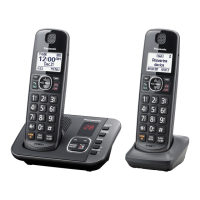
Model shown is KX-TGE632.
Before initial use, see “Getting Started”
on page 10.
Thank you for purchasing a Panasonic product.
Please read these operating instructions before using the unit and save them for
future reference.
Consulte “Guía Rápida Española”, página 63.
For assistance, visit our Web site: http://shop.panasonic.com/support for
customers in the U.S.A.
Please register your product: http://shop.panasonic.com/support
KX-TGE63x_64xUSA_(en)_1213_ver031.pdf 1 13/12/2017 4:29:16 PM


Questions and Answers

  • B
    Brenda StoneSep 6, 2025
    What does it mean when the indicator on my Panasonic Cordless Telephone handset flashes slowly?
    • K
      kevinbrockSep 6, 2025
      If the indicator on your Panasonic Cordless Telephone handset flashes slowly, listen to the new messages or listen to the new voicemail messages.
  • Y
    Yvonne HamiltonAug 25, 2025
    Why does my Panasonic KX-TGE645 handset beep and/or flash?
    • J
      Jeanette PenningtonAug 25, 2025
      If your Panasonic Cordless Telephone handset is beeping and/or flashing, it likely indicates that the battery charge is low. Fully charge the batteries to resolve this issue.
  • S
    Steven ProctorAug 25, 2025
    What to do if my Panasonic KX-TGE645 Cordless Telephone does not work?
    • S
      Sara MillerAug 26, 2025
      If your Panasonic Cordless Telephone isn't working, ensure the batteries are installed correctly. Fully charge the batteries. Check the connections. Unplug the base unit’s AC adaptor to reset the unit, then reconnect it. Also, the handset may not be registered to the base unit; register the handset.
  • D
    Dustin OrozcoSep 14, 2025
    Why is displayed on my Panasonic KX-TGE645?
    • T
      Thomas WilliamsSep 14, 2025
      The symbol indicates that the handset is too far from the base unit; move closer. Also, the base unit’s AC adapter may not be properly connected; reconnect it to the base unit. The handset may not be registered to the base unit; register it.
  • T
    Timothy HarperSep 23, 2025
    Why do I hear an error sound when pressing keys on my Panasonic Cordless Telephone base unit?
    • J
      James WilliamsSep 23, 2025
      If you hear an error sound when pressing keys on the base unit, automated call block is being screened. Try again later.
  • N
    nelsonbrianSep 10, 2025
    Why is there an error sound when I press some keys on my Panasonic Cordless Telephone base unit?
    • R
      Rebecca SwansonSep 10, 2025
      If you hear an error sound when pressing keys on the base unit of your Panasonic Cordless Telephone, automated call block is being screened. Try again later.
  • A
    amyweaverSep 1, 2025
    What to do if my Panasonic Cordless Telephone does not record new messages?
    • T
      tweberSep 2, 2025
      If your Panasonic Cordless Telephone isn't recording new messages, several factors could be at play. First, check if the answering system is turned off and turn it on. Also, the message memory might be full, so try erasing unnecessary messages. Ensure the recording time isn't set to “Greeting only”; change it if it is. Your phone service provider’s voicemail could be intercepting calls, so adjust the unit’s number of rings to a lower value. Finally, the answering system will not answer incoming calls while other devices such as handsets are engaged in a call.
  • E
    ewuSep 2, 2025
    How to remove 'Voicemail msg. via phone co.' message on Panasonic Cordless Telephone?
    • S
      Stephanie PageSep 2, 2025
      The message 'Voicemail msg. via phone co.' appears when your phone service provider's voicemail service has a message for you, not your Panasonic Cordless Telephone's answering system. To remove this notification, dial the voicemail number provided by your phone service provider (usually your own phone number) and follow the voice instructions to listen to your messages. You might need to clear all messages from your voice mailbox. Alternatively, you can try pressing and holding the # key until the unit beeps.
  • S
    Scott WolfSep 18, 2025
    Why do I hear an error sound when pressing keys on my Panasonic Cordless Telephone?
    • S
      Sarah DorseySep 18, 2025
      Automated call block is being screened. Try again later.
  • B
    Brian CoxAug 28, 2025
    Why is my Panasonic KX-TGE645 Cordless Telephone base unit beeping?
    • D
      Dean WilkinsAug 28, 2025
      If the base unit is beeping, listen to the new messages.

Summary

Important Information

For Your Safety

Essential safety precautions to prevent injury, fire, and property loss.

Important Safety Instructions

Detailed safety guidelines including warnings about water, storms, and battery disposal.

Getting Started

Setting Up Connections

Step-by-step guide to connecting the base unit and charger.

Battery Installation

Instructions for correctly installing rechargeable batteries into the handset.

Removing the Battery

Procedure for safely removing batteries from the handset.

Battery Charging

Details on how to charge the handset batteries and indicators.

Controls

Settings and Configuration

Making;Answering Calls

Making Calls

Procedures for making calls using the handset, redial list, and adjusting volume.

Answering Calls

How to answer incoming calls using the handset or base unit and adjust ringer volume.

Unit Location and Intercom

Power Backup Operation

How the unit operates during a power failure using handset battery backup.

Calls During Power Failure

Making Calls During Power Failure

How to make calls using the handset or phonebook during a power outage.

Answering Calls During Power Failure

How to answer calls using the handset during a power outage.

Call Block

Managing Call Blocking

Overview of call blocking features, including storing unwanted callers and blocking options.

Storing Phone Numbers for Blocking

Methods to add numbers to the call block list, either manually or from caller ID.

Automated Call Block

Automated Call Blocking Setup

How to activate, configure, and manage the automated call blocking feature.

Automated Call Block Greeting

Setting up a greeting message for callers when automated call block is active.

Phonebook

Phonebook Overview and Entries

Adding new contacts, entering characters, and managing phonebook entries.

Managing Phonebook Entries

Editing, erasing, and finding entries within the phonebook.

Speed Dial

Speed Dial Configuration

Assigning, editing, and erasing phone numbers for quick speed dial access.

Programming

Accessing Features via Menu

Navigating menus by scrolling or using direct command codes.

Call Management Programming

Settings for ring adjustments, silent mode, and telephone line configuration.

Alarm Function Programming

How to set, configure, and manage alarm times, options, and tones.

Caller ID Service

Using Caller ID Service

Overview of Caller ID compatibility, features, missed calls, and phonebook display.

Answering System

Answering System Overview

Functionality, memory capacity, and turning the system on/off.

Greeting Messages

Recording custom greetings and using pre-recorded messages.

Managing Answering System Messages

How to listen to new and all messages, controls for playback, and managing greetings.

Advanced Answering System Features

Setting up new message alerts, remote access, and call-back features.

Remote Operation of Answering System

How to operate the answering system remotely using a touch-tone phone.

Answering System Settings

Configuring call screening, ring count, recording time, greeting-only mode, and message indicators.

Useful Information

Error Message Solutions

Explains common error messages and their corresponding solutions.

General Use Troubleshooting

Solutions for common issues like handset not turning on or unit not working.

Call and Intercom Issues

Solutions for problems related to making/answering calls, intercom, and ringers.

Caller Information Display Issues

Troubleshooting issues with caller information display, announcement timing, and list editing.

Answering System Functionality

Solutions for problems with recording messages and remote operation.

Panasonic KX-TGE645 Specifications

General IconGeneral
Answering SystemYes
Caller IDYes
Call WaitingYes
Talking Caller IDYes
Ringer Volume ControlYes
IntercomYes
TypeCordless Telephone
TechnologyDECT 6.0
Answering System Recording Time18 minutes
Call BlockYes
SpeakerphoneYes
DisplayLCD
Power BackupYes
Hearing Aid CompatibleYes
Headset JackYes
Battery Life7 days standby
Power SourceAC Adapter
ColorBlack

Related product manuals