EasyManua.ls Logo

Panasonic KX-TGFA51 - User Manual

Panasonic KX-TGFA51
104 pages
Print Icon
To Next Page IconTo Next Page
Loading...
Operating Instructions
Link2Cell Cordless Telephone with
Digital Answering Machine
Model No.
KX-TGF572
KX-TGF573
KX-TGF574
KX-TGF575
KX-TG785SK
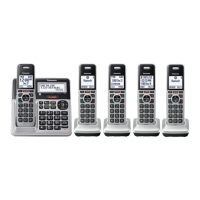
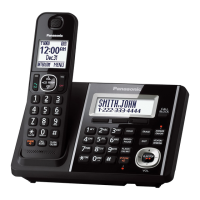
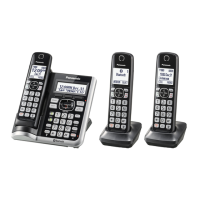
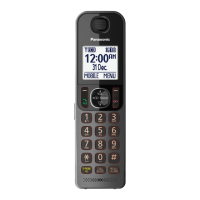
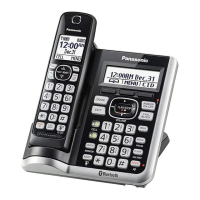
Model shown is KX-TGF572.
Before initial use, see “Getting Started”
on page 12.
Thank you for purchasing a Panasonic product.
Please read these operating instructions before using the unit and save them for
future reference.
Consulte “Guía Rápida Española”, página 88.
For assistance, visit our Web site: http://shop.panasonic.com/support for
customers in the U.S.A.
Please register your product: http://shop.panasonic.com/support
TGF57xUSA(en)_1201_ver031.pdf 1 1/12/2016 6:41:04 PM

Table of Contents

Other manuals for Panasonic KX-TGFA51

Questions and Answers

  • N
    Nicholas SnyderAug 16, 2025
    What to do if my Panasonic KX-TGFA51 unit does not work?
    • R
      Richard RussellAug 16, 2025
      There are several reasons why your Panasonic Cordless Telephone unit might not be working. First, ensure the batteries are correctly installed. Second, fully charge the batteries. Third, check all connections to ensure they are secure. Fourth, try resetting the unit by unplugging the base unit’s AC adaptor, then reconnecting it. Finally, the handset may not be registered to the base unit; in this case, you should register the handset.
  • K
    kellymichaelAug 18, 2025
    Why can't I pair my phone to my Panasonic KX-TGFA51?
    • R
      Robert DavisAug 18, 2025
      If you're having trouble pairing your cellular phone to the Panasonic Cordless Telephone base unit, there could be several reasons: * First, confirm that your cellular phone supports the hands-free profile (HFP) specification, as compatibility issues may arise. * Second, ensure that the Bluetooth feature on your cellular phone is turned on. * Third, if the Bluetooth technology on your cellular phone is not functioning correctly, try turning your cellular phone off and then on again. * Fourth, if your cellular phone is already connected to another Bluetooth device, such as a Bluetooth headset, disconnect it. * Fifth, some cellular phones may require you to enter the Bluetooth PIN for pairing; confirm that you have entered the correct PIN.
  • J
    Joseph SandersAug 22, 2025
    What to do if my Panasonic KX-TGFA51 Cordless Telephone does not work?
    • C
      Christopher NunezAug 22, 2025
      If your Panasonic Cordless Telephone is not working, ensure the batteries are correctly installed and fully charged. Check all connections. Try resetting the unit by unplugging the base unit’s AC adapter, then reconnecting it. Also, ensure the handset is registered to the base unit.
  • R
    Randy ThompsonAug 25, 2025
    Why I cannot hear a dial tone on my Panasonic KX-TGFA51?
    • D
      david09Aug 26, 2025
      If you cannot hear a dial tone on your Panasonic Cordless Telephone, check that the base unit’s AC adapter and telephone line cord are properly connected. If the connections are correct, disconnect the base unit from the telephone line and connect the line to a known working telephone. If the working telephone operates properly, contact service personnel to have the unit repaired. If the working telephone does not operate properly, contact your phone service provider.
  • T
    Taylor BishopAug 28, 2025
    How to turn on Panasonic KX-TGFA51 Cordless Telephone handset?
    • D
      Daniel MendozaAug 28, 2025
      If your Panasonic Cordless Telephone handset does not turn on even after installing charged batteries, place the handset on the base unit or charger to turn it on.
  • J
    Julie BrownAug 31, 2025
    Why does my Panasonic KX-TGFA51 handset beep and/or flash?
    • C
      Christina DelgadoAug 31, 2025
      If your Panasonic Cordless Telephone handset is beeping and/or flashing, it indicates that the battery charge is low. Fully charge the batteries.
  • R
    Roberto ThompsonSep 2, 2025
    Why does my Panasonic KX-TGFA51 Cordless Telephone base unit beep?
    • M
      Mitchell MiddletonSep 3, 2025
      If your Panasonic Cordless Telephone base unit is beeping, it indicates that new messages have been recorded. Listen to the new messages.
  • R
    Richard KimSep 6, 2025
    Why I cannot register a handset to a Panasonic KX-TGFA51 Cordless Telephone base unit?
    • K
      kayla77Sep 6, 2025
      If you cannot register a handset to the Panasonic Cordless Telephone base unit, it may be because the maximum number of handsets (6) is already registered to the base unit. Cancel unused handset registrations from the base unit.
  • V
    Vincent AllenSep 8, 2025
    What to do if my Panasonic Cordless Telephone batteries still flash after fully charging?
    • J
      Jennifer LeSep 8, 2025
      If your Panasonic Cordless Telephone batteries still flash, the display shows a battery symbol, or the operating time seems shorter after a full charge, clean the battery ends and the charge contacts with a dry cloth and charge again. If the problem persists, it may be time to replace the batteries.
  • R
    Richard GuerraSep 12, 2025
    What to do if Panasonic Cordless Telephone handset does not turn on?
    • M
      Mrs. Melanie BrooksSep 12, 2025
      If the Panasonic Cordless Telephone handset does not turn on even after installing charged batteries, place the handset on the base unit or charger to turn it on.

Summary

Important Information

For Your Safety

Provides crucial safety warnings regarding power, installation, and general usage to prevent injury and loss.

Operating Safeguards

Lists precautions for safe operation, including cleaning, disassembly, and handling of cords.

Medical

Advises consulting medical device manufacturers regarding RF energy exposure.

Installation and Location

Gives advice on safe installation practices, avoiding electrical storms and wet locations.

Important Safety Instructions

Provides essential safety precautions when using the product to reduce risks of fire, shock, and injury.

Getting Started

Setting Up

Guides through the initial connections for the base unit and charger, including DSL/ADSL filter requirements.

Battery Installation

Instructs on inserting rechargeable Ni-MH batteries, confirming polarity and following display prompts.

Battery Charging

Explains the charging process, duration, and indicators for full charge.

Link to Cell

Link to Cell Feature

Explains the benefits of using the Link to Cell feature, such as cordless calls and better reception.

Pairing a Cellular Phone

Provides step-by-step instructions for pairing a cellular phone to the base unit.

Making;Answering Calls Using the Handset

Transferring a Cellular Call Between the Handset and a Cellular Phone

How to transfer a cellular call between the handset and the phone.

Transferring a Cellular Call from a Cellular Phone to the Handset

How to transfer a call from the cellular phone to the handset.

Power Backup Operation for Landline

Explains how the handset provides power during a power failure.

Making Calls During a Power Failure

Guides on making calls using the handset during a power outage.

Answering Calls During a Power Failure

Guides on answering calls during a power outage.

Making;Answering Calls Using the Base Unit

Making Cellular Calls

Instructions for making cellular calls using the base unit.

Making Landline Calls

Guides on making landline calls from the base unit.

Answering Calls

How to answer landline and cellular calls on the base unit.

Hold

How to place and release a call on hold using the base unit.

Transferring Calls, Conference Calls

How to transfer and set up conference calls via the base unit.

Transferring a Cellular Call Between the Base Unit and a Cellular Phone

Transferring cellular calls between the base unit and the phone.

Answering a 2 nd Call

How to answer a second incoming call on the base unit.

Answering a 2 nd Call During a Landline Call

Steps to answer a second call while on a landline using the base unit.

Answering a 2 nd Call During a Cellular Call

Steps to answer a second call while on a cellular line using the base unit.

Intercom

Making an Intercom Call

Provides instructions for initiating an intercom call from handset or base.

Answering an Intercom Call

How to answer an intercom call on handset or base unit.

Call Block

Call Block

Describes using the Call Block button to disconnect calls and add numbers.

Storing Unwanted Callers

Options for blocking single numbers, number ranges, or unknown callers.

Blocking Incoming Calls That Have No Phone Number

How to block calls from unknown or private numbers.

Phonebook

Adding Phonebook Entries

Step-by-step guide to add new contact details to the phonebook.

Speed Dial

Setting up speed dial numbers for quick dialing.

Adding Phone Numbers to Speed Dial Keys

Guides on assigning phone numbers to speed dial keys.

Programming

Bluetooth Settings

Configuration for Link to Cell, Ringer volume/tone, Alert settings, and Bluetooth pairing.

Call Block Settings

Configuration for blocking numbers, ranges, unknown callers, and first ring behavior.

Power Failure Settings

Configuration for power failure backup operation.

Baby Monitor

Setting up and using the baby monitor feature.

Call Block Configuration

Settings for blocking numbers, ranges, and unknown callers.

Alarm

Setting up to three separate alarms with options for once, daily, or weekly.

Turning Silent Mode On;Off

Guides on activating or deactivating silent mode for specific periods.

Baby Monitor

Allows listening to a room remotely via handset or base unit.

Setting the Baby Monitor

Instructions for configuring the baby monitor feature.

To Monitor From Outside

How to monitor remotely by calling a pre-programmed number.

Registering a Unit

Adding new units like handsets or headsets to the base unit.

Registering a Handset to the Base Unit

Step-by-step guide for registering a handset.

Caller ID Service

Using Caller ID Service

Requirements and general usage of Caller ID.

Using Bluetooth Devices

Copying Phonebook from a Cellular Phone (Phonebook Transfer)

Guides on transferring phonebook entries from a cellular phone.

Link to Cell App

Introduces the Link to Cell app for Android phones to integrate with the DECT phone.

Text Message (SMS) Alert

How to receive SMS alerts on the DECT phone from iPhone/BlackBerry.

Remote Voice Assist

Using handset/base unit to operate the phone's voice recognition feature.

Activating Remote Voice Assist

Step-by-step guide to activate remote voice commands.

Using a Bluetooth Headset (Optional)

Instructions for pairing and using a Bluetooth headset.

Important

Key requirements for headset usage, like HSP support and device limits.

Pairing a Bluetooth Headset to the Base Unit

Step-by-step guide to pair a Bluetooth headset.

Making Landline Calls with Your Headset

How to make landline calls using the headset.

Answering System for Landline

Turning the Answering System On;Off

How to activate or deactivate the answering system.

Recording Your Greeting Message

Step-by-step guide to record a custom greeting.

Listening to Messages

How to play back new or all recorded messages.

New Message Alert by a Call

Setting up the unit to call a specified number when new messages arrive.

Activating;Inactivating the Remote Access Code to Play Messages

Securing message access with a remote code.

Remote Operation

Controlling the answering system remotely via phone.

Using the Answering System Remotely

Steps to operate the answering system from an external phone.

Turning On the Answering System Remotely

Steps to activate the answering system from an external phone.

Useful Information

Error Messages

Lists common display messages and their corresponding causes and solutions.

Display Message

Troubleshooting common display messages like "Invalid", "Requires subscription", and "Use rechargeable battery".

Troubleshooting

General troubleshooting steps if issues persist.

General Use

Common problems and solutions related to handset and unit operation.

The Handset Does Not Turn On Even After Installing Charged Batteries.

Troubleshooting steps if the handset doesn't power on.

The Unit Does Not Work.

Steps to resolve issues when the entire unit is unresponsive.

I Cannot Pair a Cellular Phone to the Base Unit.

Solutions for problems encountered during cellular phone pairing.

I Cannot Connect a Cellular Phone to the Base Unit.

Troubleshooting steps for cellular phone connection failures.

I Cannot Hear a Dial Tone.

Solutions for issues related to missing dial tone.

Battery Recharge

Troubleshooting for handset battery issues like beeping or short operating time.

I Fully Charged the Batteries, But...

Solutions for battery issues like persistent flashing or short operation time.

Making;Answering Calls, Intercom

Troubleshooting common problems during calls and intercom use.

Noise Is Heard, Sound Cuts In and Out.

Troubleshooting steps for audio interference and signal loss.

The Handset or Base Unit Does Not Ring.

Solutions for issues where the unit fails to ring.

I Cannot Make or Answer Cellular Calls With the Handset or Base Unit.

Troubleshooting for failure to make or receive cellular calls.

I Can Make and Answer Cellular Calls but Cannot Hear a Sound.

Troubleshooting for audio issues during cellular calls.

I Cannot Make a Call Using a Landline.

Troubleshooting for issues making landline calls.

Caller ID;Talking Caller ID

Troubleshooting issues related to caller ID display and announcements.

Caller Information Is Not Displayed.

Solutions for when caller ID information is missing.

Caller Information Is Not Announced.

Solutions for when caller information is not announced.

The 2 nd Caller’s Information Is Not Displayed During an Outside Call.

Solutions for missing second caller ID information.

Using Bluetooth Devices

Troubleshooting common Bluetooth device issues.

I Cannot Copy Phonebook Entries from a Cellular Phone.

Solutions for problems copying phonebook data.

Noise Is Heard During a Call on the Headset.

Solutions for audio interference during headset calls.

Your Cellular Phones Voice Recognition Feature Does Not Start After Pressing M N.

Solutions for issues with activating voice recognition.

The Desired App Does Not Start When You Try to Start the App Using Remote Voice Assist.

Troubleshooting problems launching apps via remote voice assist.

Answering System

Troubleshooting issues related to the answering system.

The Unit Does Not Record New Messages.

Solutions for the unit failing to record new messages.

I Cannot Operate the Answering System Remotely.

Troubleshooting remote operation of the answering system.

Bluetooth PIN

Troubleshooting issues with the Bluetooth PIN.

I Cannot Remember the PIN.

Steps to change the Bluetooth PIN if forgotten.

Liquid Damage

Instructions for handling liquid damage to the unit.

Panasonic KX-TGFA51 Specifications

General IconGeneral
TypeCordless Telephone
Number of Handsets1
Frequency1.9 GHz
Talk TimeUp to 10 hours
Caller IDYes
SpeakerphoneYes
DECT TechnologyYes
Call WaitingYes
IntercomYes
Answering MachineNo
RedialYes
Call BlockYes
Standby TimeUp to 120 hours
DisplayLCD
Phonebook Capacity50 names
Power SourceBattery

Related product manuals