EasyManua.ls Logo

Panasonic KX-TGF572 - User Manual

Panasonic KX-TGF572
104 pages
Print Icon
To Next Page IconTo Next Page
Loading...
Operating Instructions
Link2Cell Cordless Telephone with
Digital Answering Machine
Model No.
KX-TGF572
KX-TGF573
KX-TGF574
KX-TGF575
KX-TG785SK
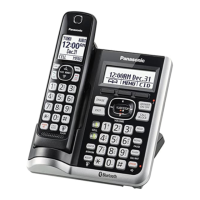
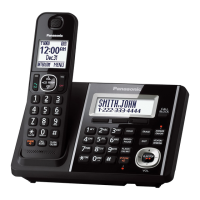
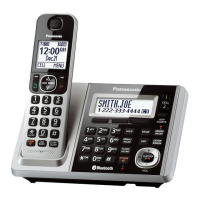
Model shown is KX-TGF572.
Before initial use, see “Getting Started”
on page 12.
Thank you for purchasing a Panasonic product.
Please read these operating instructions before using the unit and save them for
future reference.
Consulte “Guía Rápida Española”, página 88.
For assistance, visit our Web site: http://shop.panasonic.com/support for
customers in the U.S.A.
Please register your product: http://shop.panasonic.com/support
TGF57xUSA(en)_1201_ver031.pdf 1 1/12/2016 6:41:04 PM

Table of Contents

Other manuals for Panasonic KX-TGF572

Questions and Answers

  • J
    julierochaAug 15, 2025
    What to do if my Panasonic KX-TGF572 unit does not work?
    • L
      Lee WallerAug 15, 2025
      There are several reasons why your Panasonic Cordless Telephone unit might not be working. First, ensure the batteries are correctly installed. Second, fully charge the batteries. Third, check all connections to ensure they are secure. Fourth, try resetting the unit by unplugging the base unit’s AC adaptor, then reconnecting it. Finally, the handset may not be registered to the base unit; in this case, you should register the handset.
  • J
    Jennifer HouseAug 18, 2025
    Why can't I pair my phone to my Panasonic KX-TGF572?
    • H
      Holly SnyderAug 18, 2025
      If you're having trouble pairing your cellular phone to the Panasonic Cordless Telephone base unit, there could be several reasons: * First, confirm that your cellular phone supports the hands-free profile (HFP) specification, as compatibility issues may arise. * Second, ensure that the Bluetooth feature on your cellular phone is turned on. * Third, if the Bluetooth technology on your cellular phone is not functioning correctly, try turning your cellular phone off and then on again. * Fourth, if your cellular phone is already connected to another Bluetooth device, such as a Bluetooth headset, disconnect it. * Fifth, some cellular phones may require you to enter the Bluetooth PIN for pairing; confirm that you have entered the correct PIN.
  • E
    Elizabeth KimAug 21, 2025
    What to do if my Panasonic KX-TGF572 does not work?
    • R
      Robert MartinezAug 21, 2025
      If your Panasonic Cordless Telephone is not working, ensure the batteries are correctly installed and fully charged. Check all connections. Try resetting the unit by unplugging the base unit’s AC adapter, then reconnecting it. Also, ensure the handset is registered to the base unit.
  • A
    Alfred MillerAug 25, 2025
    Why I cannot hear a dial tone on my Panasonic Cordless Telephone?
    • R
      Renee MendezAug 25, 2025
      If you cannot hear a dial tone on your Panasonic Cordless Telephone, check that the base unit’s AC adapter and telephone line cord are properly connected. If the connections are correct, disconnect the base unit from the telephone line and connect the line to a known working telephone. If the working telephone operates properly, contact service personnel to have the unit repaired. If the working telephone does not operate properly, contact your phone service provider.
  • S
    Stephanie CamposAug 27, 2025
    How to turn on Panasonic KX-TGF572 handset?
    • L
      Lindsay ReedAug 27, 2025
      If your Panasonic Cordless Telephone handset does not turn on even after installing charged batteries, place the handset on the base unit or charger to turn it on.
  • T
    tommy01Aug 30, 2025
    Why does my Panasonic KX-TGF572 Cordless Telephone handset beep and/or flash?
    • L
      Lance OrtizAug 30, 2025
      If your Panasonic Cordless Telephone handset is beeping and/or flashing, it indicates that the battery charge is low. Fully charge the batteries.
  • E
    Emily WelchSep 2, 2025
    Why does my Panasonic KX-TGF572 base unit beep?
    • N
      Nicole WelchSep 2, 2025
      If your Panasonic Cordless Telephone base unit is beeping, it indicates that new messages have been recorded. Listen to the new messages.
  • J
    Jacob FarmerSep 5, 2025
    Why I cannot register a handset to a Panasonic KX-TGF572 Cordless Telephone base unit?
    • L
      Louis SheppardSep 5, 2025
      If you cannot register a handset to the Panasonic Cordless Telephone base unit, it may be because the maximum number of handsets (6) is already registered to the base unit. Cancel unused handset registrations from the base unit.
  • B
    bakerstephanieSep 8, 2025
    What to do if my Panasonic KX-TGF572 Cordless Telephone batteries still flash after fully charging?
    • W
      wallmichaelSep 8, 2025
      If your Panasonic Cordless Telephone batteries still flash, the display shows a battery symbol, or the operating time seems shorter after a full charge, clean the battery ends and the charge contacts with a dry cloth and charge again. If the problem persists, it may be time to replace the batteries.
  • F
    francothomasSep 12, 2025
    What to do if Panasonic Cordless Telephone handset does not turn on?
    • W
      William NelsonSep 12, 2025
      If the Panasonic Cordless Telephone handset does not turn on even after installing charged batteries, place the handset on the base unit or charger to turn it on.

Summary

Introduction

Model Composition

Details the different models and their corresponding base unit and handset part numbers and quantities.

Accessory Information

Lists the supplied accessories for different unit configurations and their quantities.

Additional;Replacement Accessories

Information on optional accessories like rechargeable batteries, headsets, range extenders, and key detectors.

Expanding Phone System

Describes how to expand the phone system with optional handsets and Bluetooth devices.

Graphical Symbols

Explains the meaning of various symbols used on the equipment and in the manual.

Important Information

For Your Safety

Provides crucial safety precautions regarding power connection, installation, and general usage.

Important Safety Instructions

Details basic safety precautions to reduce the risk of fire, electric shock, and injury.

Base Unit Location and Noise Avoidance

Guides on optimal base unit placement for maximum coverage and noise-free communication.

Environment and Routine Care

Covers product placement considerations and cleaning instructions for optimal performance.

Specifications

Lists the technical specifications of the device, including standards, frequency ranges, and power.

Getting Started

Setting Up

Step-by-step instructions for connecting the base unit, charger, and installing batteries.

Controls

Identifies and explains the functions of the handset and base unit controls.

Display Icons;Indicators

Explains the meaning of various icons and indicators shown on the handset and base unit displays.

Language Settings

Instructions for changing the display language and voice announcement language.

Other Settings

Covers date/time setting, greeting message recording, dialing mode, and battery alerts.

Link to Cell

Link to Cell Feature

Explains how to connect a cellular phone via Bluetooth for making/answering calls.

Pairing a Cellular Phone

Step-by-step guide for pairing a cellular phone to the base unit using Bluetooth.

Link to Cell Settings

Configuration options for selecting which unit receives cellular calls and ring as cell mode.

Auto Connection to Bluetooth Devices

Details automatic reconnection of Bluetooth devices when they return within range.

Cellular Line Only Mode

Instructions for setting the unit to use only cellular lines, disabling landline features.

Storing Area Code

How to store an area code for automatic dialing of local 7-digit numbers.

Changing Bluetooth PIN

Guide to changing the default Bluetooth PIN for security purposes.

Making;Answering Calls Using the Handset

Making Cellular Calls

Instructions for making calls using paired cellular phones.

Making Landline Calls

Instructions for making calls using the landline connection.

Answering Calls

How to answer incoming landline or cellular calls using the handset.

Useful Features During a Call

Covers features like Mute, Flash, Clarity Booster, Noise Reduction, Equalizer, Call Share, and Transfers.

Power Backup Operation for Landline

Explains how the handset provides power to the base unit during a power failure.

Making;Answering Calls Using the Base Unit

Making Cellular Calls

Instructions for making calls using paired cellular phones via the base unit.

Making Landline Calls

Instructions for making calls using the landline connection via the base unit.

Answering Calls

How to answer incoming landline or cellular calls using the base unit.

Useful Features During a Call

Covers base unit features like Hold, Mute, Flash, Call Waiting, Call Share, and Transfers.

Intercom

Making an Intercom Call

Instructions for initiating an intercom call between handsets or with the base unit.

Answering an Intercom Call

How to answer an incoming intercom call on either the handset or base unit.

Turning Auto Intercom On;Off

Enables or disables automatic answering of intercom calls.

Call Block

Call Block Functionality

Details on blocking calls, storing unwanted callers, and adding numbers from the caller list.

Storing a Range of Number

Instructions for blocking calls based on number ranges or prefixes.

Blocking Unknown CID

How to block incoming calls that do not provide a phone number (CID).

Turning the First Ring On;Off

Option to control whether the first ring is heard for incoming calls.

Viewing;Editing;Erasing Call Block Numbers

Procedures for managing numbers stored in the call block list.

Phonebook

Adding Phonebook Entries

Guide to adding new contacts, including name, number, and group assignment.

Entering Characters

Explains how to input characters for names and numbers using the dial pad.

Storing Redial List Number

How to save numbers from the redial list into the phonebook.

Storing Caller Information

Instructions on saving incoming call information directly to the phonebook.

Groups and Ringer ID

Organizing contacts into groups and assigning unique ringers for identification.

Finding and Calling from Phonebook Entry

Methods for locating and initiating calls from stored phonebook entries.

Speed Dial

Setting up speed dial keys for quick access to frequently called numbers.

Programming

Menu List

Overview of accessing features via menu navigation and direct command codes.

Display Menu Tree & Command Codes

Tables detailing menu structure and corresponding codes for various functions.

Greeting Settings

Configuration options for greeting messages, including recording and pre-recorded options.

New Message Alert

Setting up alerts for new messages, including audible alerts and call notifications.

Bluetooth Settings

Covers Link to Cell, Ringer Volume/Tone, Alert Settings, Pairing, and Phonebook Transfer.

Silent Mode

Instructions for setting periods of quiet operation, excluding calls and alarms.

Baby Monitor

Features for monitoring a room remotely, including setting up and sensitivity adjustments.

Registering Units

Procedures for registering and deregistering handsets and other units to the base unit.

Caller ID Service

Using Caller ID Service

Requirements and benefits of subscribing to a Caller ID service.

Caller ID Features

Details on displaying caller information, missed calls, and interpreting specific call statuses.

Phonebook Name Display & Talking Caller ID

How caller information displays names from the phonebook and announces callers.

Caller List and Editing

Managing the caller list, including viewing entries and editing phone numbers.

Erasing Caller Information

Steps for deleting selected or all entries from the caller list.

Using Bluetooth Devices

Phonebook Transfer

Copying phonebook entries from a cellular phone to the unit's phonebook.

Link to Cell App

Using the app to integrate Android phones for alerts and phone settings.

Text Message (SMS) Alert

Setting up alerts for SMS messages received on iPhone and BlackBerry phones.

Remote Voice Assist

Operating the cellular phone's voice recognition feature via the handset or base unit.

Using a Bluetooth Headset

Pairing, connecting, and operating a Bluetooth headset for landline calls.

Answering System for Landline

Answering System Basics

Covers turning the system on/off, greeting messages, and memory capacity.

Listening to Messages

Instructions for playing new or all messages using the base unit or handset.

Answering System Settings

Configures Call Screening, Ring Count, Recording Time, and Greeting Only options.

Remote Operation

Accessing messages and settings remotely via phone using a touch-tone phone.

Useful Information

Voicemail Service

Information on using voicemail service provided by the phone service provider.

Wall Mounting and Desk Stand

Instructions for mounting the base unit on a wall or setting it up on a desk.

Error Messages

Lists common display messages and their corresponding causes and solutions.

Troubleshooting

Provides solutions for common problems like handset not turning on or pairing issues.

FCC and Other Information

Includes FCC compliance, regulatory information, and hearing aid compatibility.

FCC RF Exposure Warning

Details RF exposure limits and safe operating distances for the product.

Compliance with TIA-1083 Standard

Information regarding hearing aid compatibility and reduced noise interference.

Guía Rápida Española

Connections

Instrucciones para conectar la unidad base y el cargador.

Battery Installation and Charging

Guía para instalar y cargar las baterías del teléfono.

Basic Operations

Resumen de operaciones básicas como hacer/contestar llamadas y usar el directorio.

Using Bluetooth Devices

Instrucciones para copiar contactos y usar dispositivos Bluetooth.

Appendix

Customer Services

Information on where to find accessories, product support, and customer service.

Limited Warranty

Details the warranty coverage, terms, conditions, and repair request process for US customers.

Panasonic KX-TGF572 Specifications

General IconGeneral
BrandPanasonic
ModelKX-TGF572
CategoryCordless Telephone
LanguageEnglish

Related product manuals