EasyManua.ls Logo

Panasonic KX-TGF573S - User Manual

Panasonic KX-TGF573S
104 pages
Print Icon
To Next Page IconTo Next Page
Loading...
Operating Instructions
Link2Cell Cordless Telephone with
Digital Answering Machine
Model No.
KX-TGF572
KX-TGF573
KX-TGF574
KX-TGF575
KX-TG785SK
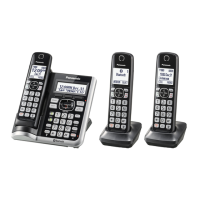
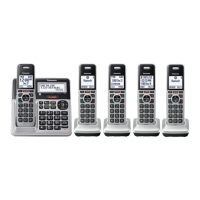
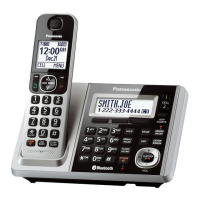
Model shown is KX-TGF572.
Before initial use, see “Getting Started”
on page 12.
Thank you for purchasing a Panasonic product.
Please read these operating instructions before using the unit and save them for
future reference.
Consulte “Guía Rápida Española”, página 88.
For assistance, visit our Web site: http://shop.panasonic.com/support for
customers in the U.S.A.
Please register your product: http://shop.panasonic.com/support
TGF57xUSA(en)_1201_ver031.pdf 1 1/12/2016 6:41:04 PM

Table of Contents

Other manuals for Panasonic KX-TGF573S

Questions and Answers

  • S
    Sara PerezAug 6, 2025
    What to do if my Panasonic KX-TGF573S Cordless Telephone does not work?
    • B
      branchnatalieAug 6, 2025
      If your Panasonic Cordless Telephone is not working, ensure the batteries are correctly installed and fully charged. Check all connections. Try resetting the unit by unplugging the base unit’s AC adapter, then reconnecting it. Also, ensure the handset is registered to the base unit.
  • T
    Travis MartinezAug 10, 2025
    Why I cannot hear a dial tone on my Panasonic KX-TGF573S?
    • J
      Joshua ScottAug 10, 2025
      If you cannot hear a dial tone on your Panasonic Cordless Telephone, check that the base unit’s AC adapter and telephone line cord are properly connected. If the connections are correct, disconnect the base unit from the telephone line and connect the line to a known working telephone. If the working telephone operates properly, contact service personnel to have the unit repaired. If the working telephone does not operate properly, contact your phone service provider.
  • D
    Donna BlakeAug 14, 2025
    Why does my Panasonic KX-TGF573S handset beep and/or flash?
    • S
      Stephen JacobsAug 15, 2025
      If your Panasonic Cordless Telephone handset is beeping and/or flashing, it indicates that the battery charge is low. Fully charge the batteries.
  • B
    Brent WhitneyAug 18, 2025
    Why does my Panasonic KX-TGF573S base unit beep?
    • H
      hermanchristopherAug 18, 2025
      If your Panasonic Cordless Telephone base unit is beeping, it indicates that new messages have been recorded. Listen to the new messages.
  • P
    Patrick MedinaAug 23, 2025
    Why I cannot register a handset to a Panasonic KX-TGF573S Cordless Telephone base unit?
    • A
      alejandralopezAug 23, 2025
      If you cannot register a handset to the Panasonic Cordless Telephone base unit, it may be because the maximum number of handsets (6) is already registered to the base unit. Cancel unused handset registrations from the base unit.
  • D
    dianaingramAug 27, 2025
    What to do if my Panasonic Cordless Telephone batteries still flash after fully charging?
    • A
      Angel WilliamsAug 27, 2025
      If your Panasonic Cordless Telephone batteries still flash, the display shows a battery symbol, or the operating time seems shorter after a full charge, clean the battery ends and the charge contacts with a dry cloth and charge again. If the problem persists, it may be time to replace the batteries.
  • R
    Rose GomezAug 31, 2025
    What to do if Panasonic KX-TGF573S handset does not turn on?
    • J
      Jeremy LopezAug 31, 2025
      If the Panasonic Cordless Telephone handset does not turn on even after installing charged batteries, place the handset on the base unit or charger to turn it on.

Summary

Important Information

For Your Safety

Provides crucial safety precautions regarding power connection, installation, and operating safeguards.

Getting Started

Setting Up

Explains the initial connections for the base unit and charger, and battery installation.

Link to Cell

Link to Cell Feature

Describes how to connect a cellular phone via Bluetooth for making/answering calls.

Pairing a Cellular Phone

Step-by-step instructions for pairing a Bluetooth-enabled cellular phone to the base unit.

Making;Answering Calls Using the Handset

Making;Answering Calls Using the Base Unit

Making Cellular Calls

Guide on how to make cellular calls using the base unit, including redial and phonebook options.

Call Block

Call Block

Functionality to disconnect calls and add numbers to a block list.

Storing Unwanted Callers

Methods for blocking specific numbers, number ranges, or unknown callers.

Phonebook

Caller ID Service

Using Caller ID Service

Requirements and basic functionality of the Caller ID service for displaying caller information.

Using Bluetooth Devices

Copying Phonebook from a Cellular Phone (Phonebook Transfer)

Guide on transferring contacts from a mobile phone to the unit's phonebook.

Answering System for Landline

Answering System for Landline

Basic setup and functionality of the answering system for landline calls.

Useful Information

Error Messages

Troubleshooting guide for common display messages and their solutions.

Troubleshooting

Cannot Pair a Cellular Phone to the Base Unit

Steps to resolve issues when pairing a mobile phone fails.

Panasonic KX-TGF573S Specifications

General IconGeneral
Colorsilver
Speakerphoneyes
Expandableyes
Volume Controlyes
Intercomyes
Incoming Lines1
Dialing Modetone
Record Time18 minutes
Display Typelcd
Caller IDyes
Call Waitingyes
Answering Systemyes
Flash Functionyes
Redial Functionyes
Conference Callyes
Conference Call Capability3-way
Muteyes
Hold Buttonyes
Handsetsyes
Expansion Base Stations1
Expansion Handsets3, 6
Backlit Keypadyes
Bluetoothyes
Frequency1.9ghz, dect 6.0 digital

Related product manuals