Setting up
Connections
n
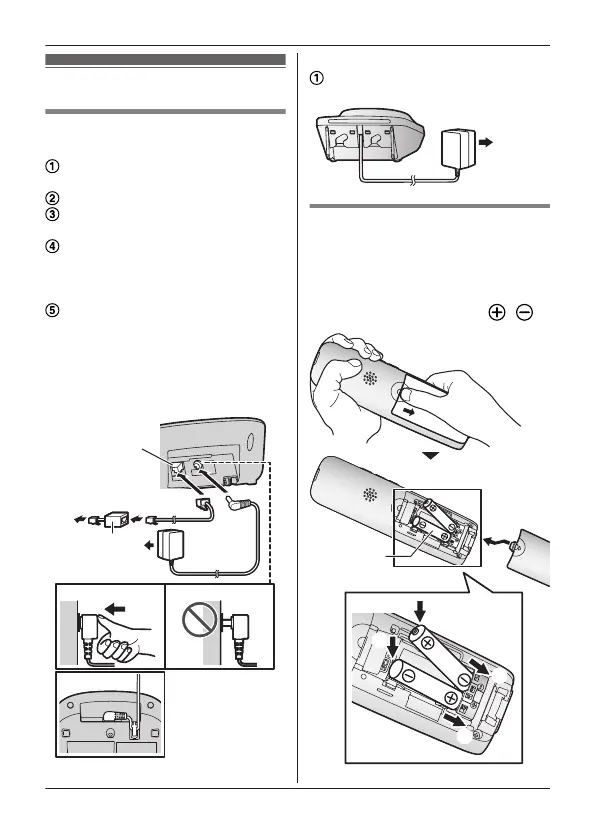
Base unit
Connect the AC adaptor to the unit
b
y pressing the plug firmly.
Fasten the cord by hooking it.
Connect the AC adaptor to the
p
ower outlet.
Connect the telephone line cord to
t
he unit, then to the single-line
telephone jack (RJ11C) until you
hear a click.
A DSL/ADSL filter (not supplied) is
r
equired if you have a DSL/ADSL
service.
Note:
R Use only the supplied Panasonic AC
adaptor PNLV226.
n
Charger
Connect the AC adaptor to the
p
ower outlet.
Battery installation
R U
SE ONLY rechargeable Ni-MH
batteries AAA (R03) size (
).
R D
o NOT use alkaline/manganese/
Ni-Cd batteries.
R Confirm correct polarities (
, ).
For assistance, please visit https://shop.panasonic.com/support
9
Getting Started
TGU43x(en)_Basic OI_1227_ver025.pdf 9 2023/12/27 9:42:53









 To Next Page