3 Set the DIALING MODE selector to TONE.
≥If you cannot dial, set to PULSE.
4 Set the RINGER selector to HIGH, LOW or
OFF.
(Ex. “HIGH” is selected.)
≥When set to OFF, the unit will not ring.
1 When the unit rings, lift the handset.
2 When finished talking, hang up.
2-A Making Calls
2-B Answering Calls
1
Lift the handset.
2 Dial a telephone number.
≥If you misdial, hang up and start again from step 1.
3 When finished talking, hang up.
2 Making/Answering Calls
3 Speed Dialer
“
Speed Dialer 4 One-Touch Dialer
“
One-Touch Dialer
3-A Storing Phone Numbers in Memory
You can store up to 10 phone numbers in the
memory stations. The dialing buttons (
(0) to (9))
function as memory station numbers. Do not
press any memory stations before storing to
prevent misoperation.
1 Lift the handset.
2 Press (PROGRAM).
3 Press (AUTO).
4 Press a memory station number ((0) to (9)).
5 Enter a phone number up to 21 digits.
6 Press (PROGRAM).
7 When finished, hang up.
≥To store other numbers, repeat steps 1 through 7.
≥If a pause is required for dialing, press (PAUSE) in
step 5. A pause stored in a phone number counts as
one digit (5-C).
3-B Dialing a Stored Number
If you misprogram
Hang up.¤ Restart from step 1.
To erase a stored number
Lift the handset.¤ Press
(PROGRAM) ¤
¤
(AUTO)
¤ the memory station number
(
(0) to (9)) of the phone number to be erased ¤
¤
(PAUSE) ¤ (PROGRAM).¤ Hang up.
Speed Dial Card
Remove the speed dial card and use it as a name
or phone number index for the stored numbers.
1 Lift the handset.
2 Press (AUTO).
3 Press the memory station number ((0) to (9)).
≥The stored number is dialed.
≥The (REDIAL) button does not work for Speed Dialer.
To dial the number again, hang up and repeat steps 1
to 3.
≥If the telephone line cord is disconnected more than
3 days, the stored numbers may be erased. Store
phone numbers again, if necessary.
4-A Storing Phone Numbers in Memory
You can store up to 3 phone numbers in the
one-touch auto dial buttons ((M1), (M2) or
(EMERGENCY)).
Do not press any one-touch auto dial buttons
before storing to prevent misoperation.
It is recommended that you program an
emergency number in the (EMERGENCY) button.
1 Lift the handset.
2 Press (PROGRAM).
3
Press a one-touch auto dial button
((M1), (M2)
or (EMERGENCY))
.
4 Enter a phone number up to 21 digits.
5 Press (PROGRAM).
6 When finished, hang up.
≥To store other numbers, repeat steps 1 through 6.
4-B Dialing a Stored Number
1
Lift the handset.
2
Press the one-touch auto dial button
((M1),
(M2) or (EMERGENCY)).
≥The stored number is dialed.
≥The (REDIAL) button does not work for One-Touch
Dialer. To dial the number again, hang up and repeat
steps 1 and 2.
≥If the telephone line cord is disconnected more than
3 days, the stored numbers may be erased. Store
phone numbers again, if necessary.
Panasonic Consumer Electronics Company,
Division of Matsushita Electric Corporation of
America
One Panasonic Way, Secaucus, New Jersey 07094
Panasonic Sales Company,
Division of Matsushita Electric of Puerto Rico, Inc.
Ave. 65 de Infantería, Km. 9.5, San Gabriel Industrial
Park Carolina, Puerto Rico 00985
Printed in Mexico PQQX13992ZA F0803-0 D
For your future reference
Serial No.
(found on the bottom of the unit)
Date of purchase
Name and address of dealer
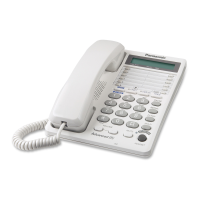
Integrated Telephone System
Operating Instructions
Model No. KX-TS550B
KX-TS550W
Pulse-or-tone dialing capability
PLEASE READ BEFORE USE AND SAVE.
(PROGRAM) Button (3-A, 4-A)
One-Touch Auto Dial
Buttons ((M1), (M2)
and
(EMERGENCY)
)
(4-A, 4-B)
DIALING MODE Selector (1-B)
RINGER Selector (1-B)
(AUTO) Button
(3-A)
(PAUSE) Button
(5-C)
($) (TONE) Button (5-B)
(REDIAL) Button (2-A)
(FLASH) Button (5-A)
VOLUME (_), (^)
Buttons (2-A)
KX-TS550W
Attach your purchase receipt here.
If you need assistance with the set-up or
operation,
please call 1-800-211-PANA(7262)
Panasonic World Wide Web:
http://www.panasonic.com
for customers in the USA or Puerto Rico
For assistance, please call: 1-800-211-PANA(7262) For assistance, please call: 1-800-211-PANA(7262) For assistance, please call: 1-800-211-PANA(7262)
∑ Handset . . . . . . . one
Order No.
PQJXE0401Z (Black)
PQJXE0411Z (White)
∑ Handset Cord. . . one
Order No.
PQJA212N (Black)
PQJA212M (White)
∑ Telephone Line Cord
. . . . . . . . . . . . . one
Order No.
PQJA10075Z
Accessories (included)
≥For extra orders, call 1-800-332-5368.
≥If a pause is required for dialing, press (PAUSE) in
step 4. A pause stored in a phone number counts as
one digit (5-C).
≥WHEN PROGRAMMING EMERGENCY NUMBERS
AND(OR) MAKING TEST CALLS TO EMERGENCY
NUMBERS:
1) Remain on the line and briefly explain to the
dispatcher the reason for the call.
2) Perform such activities in the off-peak hours, such
as early morning or late evenings.
To redial the last number dialed
Lift the handset. ¤ Press (REDIAL).
≥(REDIAL) will dial the last number you called
manually, not a Speed Dialer number (3-B) or
One-Touch Dialer number (4-B).
To adjust the receiver volume (6 levels) while
talking
To increase, press (^).
To decrease, press (_).
≥Each time you press the button, the volume level will
change.
≥After hanging up, the volume level will be saved.

 Need help?
 General







 To Next Page