EasyManua.ls Logo

Panasonic KX-TS580MX - User Manual

Panasonic KX-TS580MX
28 pages
Print Icon
To Next Page IconTo Next Page
Loading...
Operating Instructions
Integrated Telephone System
Model No. KX-TS560MX
KX-TS580MX
This unit is compatible with Caller ID. You must subscribe to the appropriate service offered
by your service provider/telephone company.
Please read these operating instructions before using the unit and save them for future
reference.
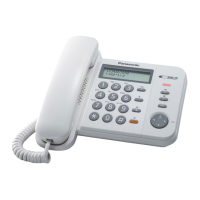
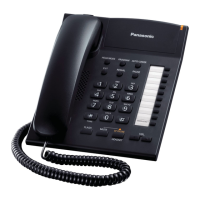
Model shown is KX-TS580MX
KX-TS580MX.book Page 1 Friday, August 1, 2008 3:34 PM

Questions and Answers

  • S
    Stacy FloresAug 18, 2025
    Why I cannot program items on my Panasonic KX-TS580MX Telephone System?
    • A
      andrewsantosAug 18, 2025
      You cannot program items on your Panasonic Telephone System when the handset is off the cradle, when viewing caller information, or when “ ” is displayed (KX-TS580MX). Also, do not pause for over 60 seconds while programming.
  • D
    David WalkerAug 20, 2025
    Why is caller information not displayed on my Panasonic Telephone System?
    • F
      fsullivanAug 20, 2025
      Caller information may not be displayed on your Panasonic Telephone System for several reasons. You may need to subscribe to a Caller ID service, so consult your service provider/telephone company for details. Also, ensure that you install or replace the batteries and plug the unit directly into the wall jack. If you are using DSL/ADSL, consider connecting a filter between the unit and the telephone line jack. Finally, try disconnecting any other devices connected to the line and try again.
  • A
    aorrAug 22, 2025
    What to do if my Panasonic Telephone System does not work?
    • I
      Isaiah WilliamsAug 23, 2025
      If your Panasonic Telephone System is not working, start by checking the connections. If that doesn't resolve the issue, remove the batteries and reinstall them to reset the unit.
  • F
    Felicia JacksonAug 26, 2025
    What to do if I cannot dial on my Panasonic KX-TS580MX Telephone System?
    • P
      Patrick DeckerAug 26, 2025
      If you cannot dial on your Panasonic Telephone System, first check for a dial tone. If there is no dial tone, check the connections. If there is a dial tone, try changing the settings. Check if the unit is turned off or the call is cancelled.
  • D
    Daniel WalkerAug 28, 2025
    What to do if the display is blank on my Panasonic KX-TS580MX Telephone System?
    • T
      Tracy RiveraAug 28, 2025
      If the display on your Panasonic Telephone System is blank, install new batteries.
  • K
    Kyle ChenAug 30, 2025
    What to do if the other party cannot hear my voice on Panasonic KX-TS580MX Telephone System?
    • M
      Mary JonesAug 30, 2025
      If the other party suddenly cannot hear your voice during a conversation on your Panasonic Telephone System, press {HANDSET MUTE} or {MUTE} again to cancel.
  • D
    Dennis FreemanSep 1, 2025
    What to do if liquid entered my Panasonic KX-TS580MX Telephone System?
    • L
      Lori LopezSep 1, 2025
      If liquid or other form of moisture has entered your Panasonic Telephone System, disconnect the telephone line cord from the unit. Remove the batteries from the unit and leave to dry for at least 3 days. After the unit is completely dry, reconnect the telephone line cord and insert the batteries.
  • C
    Candice GallegosSep 4, 2025
    What to do if my Panasonic KX-TS580MX does not ring?
    • M
      martinderekSep 4, 2025
      If your Panasonic Telephone System does not ring, set the ringer to HIGH or LOW.
  • W
    William TrujilloSep 7, 2025
    Why number of missed calls does not display during standby mode on Panasonic KX-TS580MX Telephone System?
    • K
      keith04Sep 7, 2025
      If there are unviewed missed calls, the number of missed calls will be displayed when you enter the caller list on your Panasonic Telephone System.
  • D
    dramirezSep 9, 2025
    What happens if I get a call while programming my Panasonic KX-TS580MX Telephone System?
    • J
      Jessica MitchellSep 9, 2025
      If, while programming or searching on your Panasonic Telephone System, the unit starts to ring and stops the program/search, answer the call and start again after hanging up.

Summary

Preparation

Phone Controls Overview

Identifies and explains buttons and indicators for both KX-TS560MX and KX-TS580MX models.

Battery Installation and Replacement

Step-by-step guide for installing and replacing batteries, including precautions.

Connecting the Phone

Instructions for connecting the handset, line cord, and DSL/ADSL filter.

Initial Unit Setup

Steps for setting date, time, dialing mode, and area code before using the unit.

Programming

Call Restriction and Password Management

Instructions for setting call restrictions and changing the unit password.

Making and Answering Calls

Making Calls

Steps for making calls, using speakerphone, and adjusting volume.

Phonebook Management

Adding Phonebook Entries

Step-by-step guide to add, edit, and store names and numbers.

Caller ID Service

Using the Caller ID Service

Requirements and basic information for utilizing Caller ID.

Voice Mail Service

Useful Information

Troubleshooting Guide

Solutions for common problems like unit malfunction, no dial tone, or display errors.

Panasonic KX-TS580MX Specifications

General IconGeneral
TypeCorded Phone
Number of Lines1
Caller IDYes
SpeakerphoneYes
DisplayLCD
Phonebook Capacity50
Wall MountableYes
RingerAdjustable
Power SourceAC

Related product manuals