To Next Page
K
KonstantinJun 4, 2026
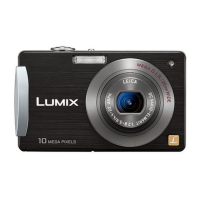
How to activate MEGA O. I. S. On Panasonic DMC-FX35 lumix

How to activate MEGA O. I. S. On Panasonic DMC-FX35 lumix
Step-by-step guide to charging the camera battery.
Guide to automatic shooting for ease of use.
Guide to shooting with custom settings.
How to view, zoom, and delete pictures.
Guide to recording videos with audio.
Transferring pictures to a computer via USB.
Direct printing via PictBridge.
Viewing pictures on a TV via AV or component cables.
Provides solutions for common camera problems.
 General
| Megapixel | 10.1 MP |
|---|---|
| Camera type | Compact camera |
| Sensor type | CCD |
| Image sensor size | 1/2.33 \ |
| Supported aspect ratios | 3:2, 4:3, 16:9 |
| Maximum image resolution | 3648 x 2736 pixels |
| Digital zoom | 4 x |
| Focal length range | 4.4 - 17.6 mm |
| Interface | USB 2.0 |
| Digital SLR | No |
| Built-in flash | Yes |
| Camera shutter speed | 8 - 1/2000 s |
| Focal length (35mm film equivalent) | 25 - 100 mm |
| Focus adjustment | Auto |
| Normal focusing range | 0.5 - ∞ m |
| Auto focusing (AF) modes | Multi Point Auto Focus |
| Macro focusing range (wide) | 0.05 - ∞ m |
| Flash modes | Red-eye reduction, Slow synchronization |
| Flash range (tele) | 0.3 - 3.1 m |
| Flash range (wide) | 0.6 - 6.3 m |
| Internal memory | 50 MB |
| Compatible memory cards | mmc, sd |
| Motion JPEG frame rate | 30 fps |
| Maximum video resolution | 1280 x 720 pixels |
| Display diagonal | 2.5 \ |
| I/O ports | AV HD AV |
| USB version | 2.0 |
| Scene modes | beach, Candlelight, Children, Close-up (macro), Cuisine, Fireworks, Night landscape, Night portrait, party (indoor), Portrait, self-portrait, Sports, Sunset, Landscape (scenery) |
| Image editing | resizing, rotating, trimming |
| Photo effects | black&white, Neutral, Sepia, Vivid |
| White balance | auto, Cloudy, custom modes, daylight, Shade |
| Camera playback | single image, slide show, thumbnails |
| Product color | Black |
| Battery type | 3.6V |
| Battery capacity | 1000 mAh |
| Number of batteries supported | 1 |
| Bundled software | PhotofunStudio ArcSoft MediaImpression ArcSoft Panorama Maker QuickTime, Adobe Reader |
 Weight and Dimensions
| Depth | 22 mm |
|---|---|
| Width | 95 mm |
| Height | 52 mm |
| Weight | 125 g |