(ENG) VQT4J01 17
Taking pictures
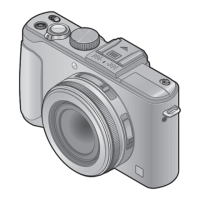
Before using the camera, remove the lens cap.
Turn the camera on ( )
Shutter button
Motion picture button
Rotate the mode dial to select
the recording mode ( )
■
Recording mode
Take pictures with automatic settings.
Take pictures with automatic shutter speed and aperture value settings.
The shutter speed is automatically determined by the aperture value
you set.
The aperture value is automatically determined by the shutter speed
you set.
The exposure is adjusted by the shutter speed and the aperture value
that are manually adjusted.
Record motion pictures with manual operations.
Use this mode to take pictures with previously registered setting.
Take pictures according to the scene.
Take pictures using your preferred picture effects such as [Dynamic
Monochrome] or [Miniature Effect].
Take pictures
■
Taking still pictures
(Shutter button)
Press halfway
(press lightly
and focus)
Press fully
(press the button all
the way to record)
■
Recording motion pictures
(Motion picture button)
Press
(Start recording)
Press
(End recording)


 To Next Page
 Loading...