EasyManua.ls Logo

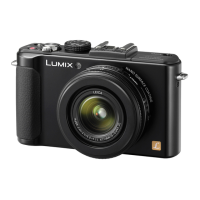
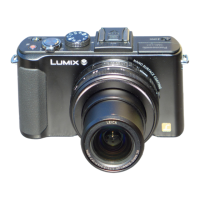
Panasonic Lumix LX7 - User Manual

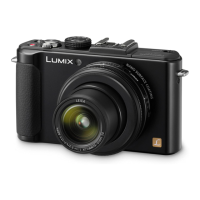
Panasonic Lumix LX7
226 pages
Print Icon
To Next Page IconTo Next Page
Loading...
VQT4J15
M0712KZ0
Operating Instructions
for advanced features
Digital Camera
Model No. DMC-LX7
Before use, please read these instructions completely.

Table of Contents

Questions and Answers

  • F
    fordrachelSep 9, 2025
    Why is my Panasonic Lumix LX7 switching off as soon as power is turned on?
    • C
      Caitlyn LopezSep 9, 2025
      If your Panasonic Digital Camera switches off as soon as the power is turned on, the Live View Finder (optional) display may be selected. Press the [LVF/LCD] button of the Live View Finder (optional) to switch to the LCD monitor display.
  • S
    ssolomonAug 23, 2025
    What to do if my Panasonic Lumix LX7 does not work even if power is turned on?
    • A
      Amanda RamseyAug 23, 2025
      If your Panasonic Digital Camera does not work even when the power is on, the battery may not be inserted correctly or needs recharging. Check the battery installation and recharge it if necessary.
  • D
    Daniel PattersonAug 25, 2025
    Why is my Panasonic Lumix LX7 turning off automatically?
    • T
      todd97Aug 25, 2025
      Your Panasonic Digital Camera might be turning off automatically because it is connected to a TV compatible with VIERA Link (HDMI) via an HDMI mini cable, and the TV's power is being turned off with its remote. If you're not using VIERA Link (HDMI), set the [VIERA Link] setting to [OFF].
  • K
    Katherine WoodsAug 26, 2025
    Why can't my Panasonic Digital Camera communicate with the computer?
    • M
      Melissa DuranAug 27, 2025
      If your Panasonic Digital Camera cannot communicate with the computer, it may not be connected correctly. Check whether the computer has recognised the camera.
  • R
    Ross TaylorAug 27, 2025
    Why does panorama picture recording stop before finishing on my Panasonic Lumix LX7?
    • D
      Devin TuckerAug 27, 2025
      If panorama picture recording stops before finishing, it may be because the pan motion of the camera is too slow, causing the camera to assume the operation has been aborted. To record panorama pictures, pan the camera in a small circular motion parallel to the recording direction at a speed of approximately 8 seconds per revolution.
  • A
    Anna ThomasAug 29, 2025
    Why is the zoom not functioning normally on my Panasonic Lumix LX7 Digital Camera?
    • S
      Sara TaylorAug 29, 2025
      If the zoom does not function normally on your Panasonic Digital Camera, and operates in steps, set [Step Zoom] to [OFF].
  • S
    Sherri PattersonSep 18, 2025
    Why is there no sound output from the camera speaker of my Panasonic Digital Camera?
    • K
      Kimberly JonesSep 18, 2025
      If no sound is output from the camera speaker, it may be because the AV cable (optional) or HDMI mini cable (optional) is connected to the camera. Disconnect the AV cable or HDMI mini cable to enable sound output.
  • C
    Carrie FryeSep 18, 2025
    Why is the clock incorrect on my Panasonic Lumix LX7?
    • J
      jocelynmartinezSep 18, 2025
      If the clock is incorrect on your Panasonic Digital Camera, it may be because the camera has been left for a long period. Reset the clock.
  • S
    suarezrobertSep 7, 2025
    Why is there no picture displayed on the LCD monitor of my Panasonic Digital Camera?
    • T
      Tyler ScottSep 7, 2025
      If no picture is displayed on the LCD monitor of your Panasonic Digital Camera, [Opt. Viewfinder] may be set to [ON]. Press the [DISP.] button to switch to the LCD monitor display.
  • M
    Michael SmithSep 4, 2025
    Why are my recorded pictures blurred on my Panasonic Digital Camera and the Optical Image Stabiliser ineffective?
    • J
      Jessica VillegasSep 5, 2025
      If your recorded pictures are blurred and the Optical Image Stabiliser is ineffective, it may be because the shutter speed is slower in dark locations, reducing the effectiveness of the Optical Image Stabiliser. Hold the camera firmly with both hands, keeping your arms close to your body.

Summary

Preparations

Before Use

Guidance on safe camera handling, environmental precautions, and general advice before initial operation.

Battery Charging and Management

Detailed steps for charging the battery, battery types, and managing battery life indicators.

Clock and Menu Settings

Procedures for setting the camera clock and navigating/using the camera's menu system.

Application (Record)

Sequence of Operations

Guides users through the basic steps of turning on the camera and taking pictures.

Intelligent Auto Mode Features

Details automatic scene detection, backlight compensation, autofocus, and adjustments in IA mode.

Recording Motion Pictures

Instructions for recording videos, including starting, stopping, zoom, and audio.

Using Zoom and Focus Functions

Details zoom capabilities and auto/manual focus modes, including face recognition.

Flash Photography

Covers opening, closing, and setting modes for the camera's internal flash unit, including adjustments.

ISO Sensitivity and White Balance

Guides users on adjusting ISO sensitivity and white balance for optimal exposure and color.

Face Recognition and Rec Menu Settings

Explains face recognition features and various settings available in the Rec menu.

Application (View)

Others

Q&A Troubleshooting Guide

Provides solutions for common problems related to battery, recording, LCD, playback, and connectivity.

Panasonic Lumix LX7 Specifications

General IconGeneral
Sensor TypeMOS
Sensor Size1/1.7-inch
Effective Pixels10.1 MP
LensLeica DC Vario-Summilux
Optical Zoom3.8x
Aperturef/1.4 - f/2.3
Shutter Speed60 - 1/4000 sec
Display3.0-inch LCD
LCD Screen Resolution920, 000 dots
Video RecordingFull HD 1920 x 1080
Video FormatAVCHD, MP4
Storage MediaSD/SDHC/SDXC Memory Card
Dimensions110.5 x 67.1 x 45.6 mm
Focal Length4.7 - 17.7 mm
ISO Sensitivity80 - 6400 (Extended: 80-12800)
Image StabilizationOptical Image Stabilization
Battery TypeLithium-Ion Battery Pack
Battery LifeApprox. 330 images
Weight298 g (including battery and memory card)

Related product manuals