EasyManua.ls Logo

Panasonic MC-E3002-WP47 - User Manual

Panasonic MC-E3002-WP47
15 pages
Print Icon
To Next Page IconTo Next Page
Loading...
© 2007 Matsushita Electric Industrial Co., Ltd. All
rights reserved. Unauthorized copying and distribu-
tion is a violation of law.
Order No.VCB0704009CE
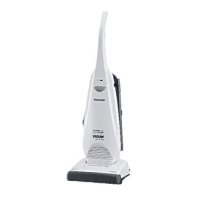
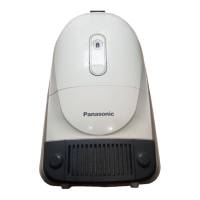
Vacuum Cleaner
MC-E3002-WP47
Product Color : White
Destination : UK
TABLE OF CONTENTS
PAGE PAGE
1 Specifications ----------------------------------------------------- 2
2 Location of Controls and Components ------------------- 3
3 Troubleshooting Guide ----------------------------------------- 5
4 Disassembly and Assembly Instructions ---------------- 6
4.1. BELT (Beater bar belt), BELT B (Motor shaft
belt) ----------------------------------------------------------- 6
4.2. BEATER BAR UNIT--------------------------------------- 7
4.3. IDLER PULLEY UNlT ------------------------------------ 7
4.4. FAN MOTOR UNIT---------------------------------------- 8
4.5. PC board w/component, ON/OFF Switch,
Fuse unit and Power cord (Mains lead)-------------- 9
4.6. ON/OFF SWITCH ----------------------------------------11
5 Wiring Connection Diagram ---------------------------------11
6 Exploded View and Replacement Parts List -----------12
6.1. EXPLODED VIEW (BODY UNIT) --------------------12
6.2. PARTS LIST (BODY UNIT) ----------------------------13
6.3. PACKING INSTRUCTIONS --------------------------- 15
6.4. PACKING LIST ------------------------------------------- 15


Questions and Answers

  • C
    Cody PattonAug 1, 2025
    What to do if my Panasonic Vacuum Cleaner motor runs but doesn't pick up dust?
    • G
      Gabrielle FordAug 2, 2025
      If your Panasonic Vacuum Cleaner's motor is running, but it's not effectively picking up dust, there are a few possible causes. The dust bag may be clogged with dust, in which case you should replace it. Also, the suction inlet packing (central filter) could be stained; try cleaning or replacing it. Finally, check if anything is clogged with dust and remove it.
  • R
    Rachel MeltonAug 9, 2025
    How to fix a Panasonic Vacuum Cleaner when the fan motor doesn't rotate?
    • M
      Michael JonesAug 10, 2025
      If the fan motor in your Panasonic Vacuum Cleaner isn't rotating, there are several potential reasons. Check if the fuse has blown and replace it if necessary. Inspect the power cord for breaks and replace it if damaged. If the motor components are not conductive, replace the motor. Also, check whether or not the carbon brushes have worn out and replace the fan motor unit. Finally, if there is no conduction through the switch, replace the switch.
  • C
    Christopher GonzalezAug 16, 2025
    What to do if the beater bar on my Panasonic Vacuum Cleaner won't rotate?
    • J
      Justin BrownAug 16, 2025
      If the beater bar on your Panasonic Vacuum Cleaner isn't rotating, several issues could be the cause. The belt may have broken, so replace it. It's possible that the belt has come off, so fit it again. If the idler pulley can't be rotated smoothly, then replace it. Large rotation resistance could be the cause, in which case, replace the beater bar unit.
  • G
    Gregory SmithAug 25, 2025
    Why is my Panasonic MC-E3002-WP47 making abnormal noises or vibrating?
    • R
      rreynoldsAug 25, 2025
      Abnormal noise or vibration in your Panasonic Vacuum Cleaner can stem from several issues. Dust might have entered the fan motor, requiring replacement of the fan motor unit. Check the dust bag and replace it if needed. The two carbon brushes of the motor may have worn out evenly, also requiring replacement of the fan motor unit. A large rotation resistance could be present, in which case replace the beater bar unit.

Summary

Specifications

Location of Controls and Components

IDENTIFICATION OF MAIN PARTS

Identifies primary parts of the vacuum cleaner unit.

HOW TO ASSEMBLE

Provides instructions for assembling the handle, hose, and mains lead.

HOW TO OPERATE

MAINS LEAD (POWER CORD) RELEASE

Details the procedure for releasing and securing the power cord.

ON;OFF SWITCH

Explains how to turn the vacuum cleaner on and off.

HANDLE LOCK; RELEASE BY FOOT PEDAL

Describes how to adjust the handle position using the foot pedal.

Troubleshooting Guide

Disassembly and Assembly Instructions

BELT (Beater bar belt), BELT B (Motor shaft belt)

Instructions for replacing the beater bar belt and motor shaft belt.

BEATER BAR UNIT

Steps for removing and installing the beater bar unit.

IDLER PULLEY UNIT

Procedure for replacing the idler pulley unit.

FAN MOTOR UNIT

Guide for disassembling and replacing the fan motor unit.

PC board w;component, ON;OFF Switch, Fuse unit and Power cord (Mains lead)

Steps for accessing and replacing electronic components like PC board and switch.

ON;OFF SWITCH

Instructions for replacing the ON/OFF switch.

Wiring Connection Diagram

Exploded View and Replacement Parts List

EXPLODED VIEW (BODY UNIT)

Visual representation of vacuum cleaner parts with reference numbers.

PARTS LIST (BODY UNIT)

Detailed list of replacement parts with part numbers and descriptions.

PACKING INSTRUCTIONS

Visual guide on how to pack the vacuum cleaner.

PACKING LIST

List of items included in the packaging.

Panasonic MC-E3002-WP47 Specifications

General IconGeneral
ModelMC-E3002-WP47
CategoryVacuum Cleaner
Cord Length5 m
Filter TypeHEPA
ColorWhite

Related product manuals