14
CHAMBER TEMPERATURE SETTING
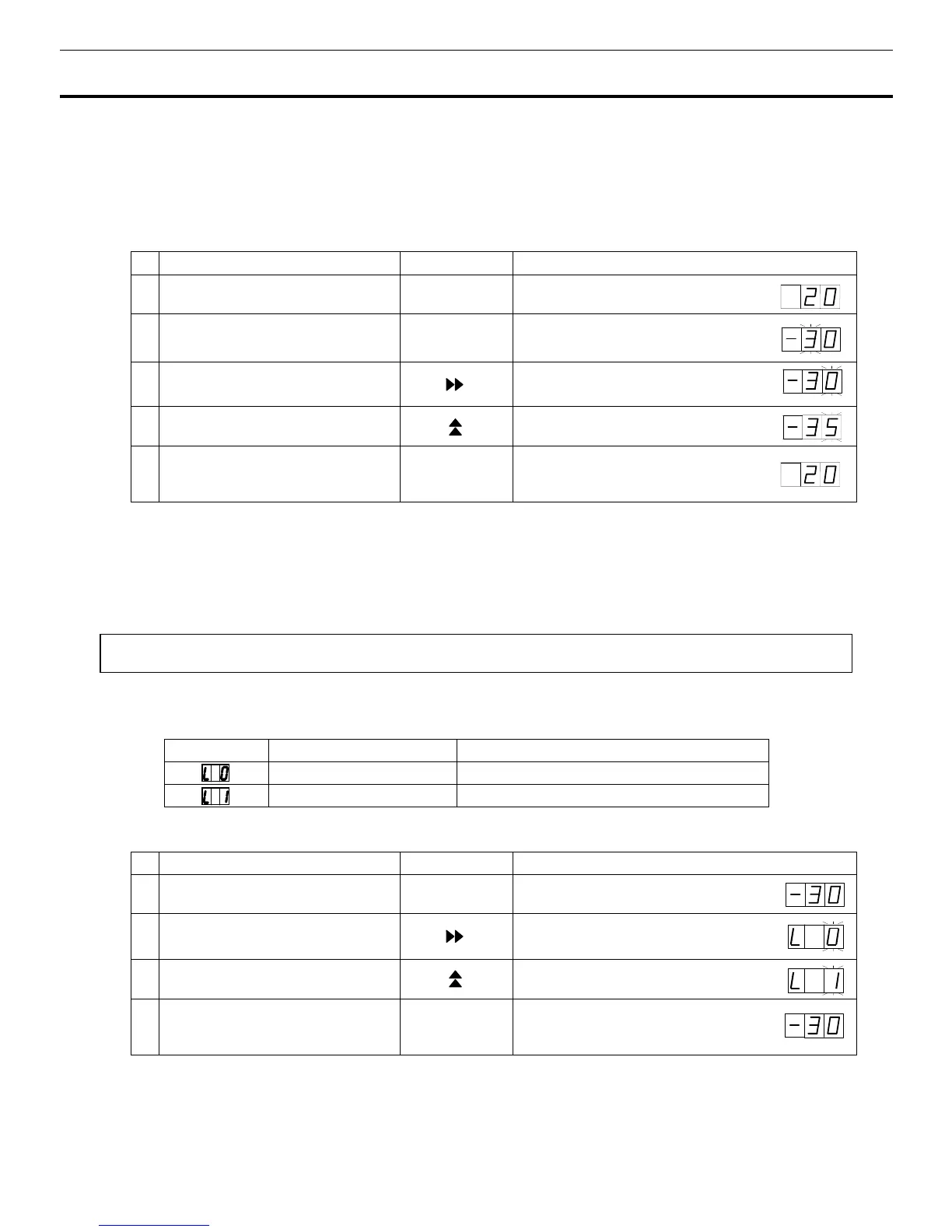
Table 1 shows the basic procedure for setting the chamber temperature. Perform key operations in the
sequence indicated in the table. The example in the table is based on the assumption that the desired
temperature is -35
o
C.
Note:
The unit is set at the factory that the set temperature -30
o
C.
Table 1. Basic operation sequence (Example: Chamber temperature -35
o
C)
Description of operation Key operated Indication after operation
1 Switch on the freezer. ----
The current chamber temperature is
displayed.
2 Press set key. SET The second digit is flashed.
3 Press digit shift key.
When pressed, the settable
digit moves.
4
Press numerical value shift key and
scroll the figure to 5.
When pressed, the figure of settable
digit changes.
5 Press set key. SET
Set temperature is memorized and the
current chamber temperature is
displayed.
Note:
• The temperature set mode returns to the temperature display mode automatically when 90 seconds has
passed without any key operation.
Although the value of the chamber temperature setting can range between -18
o
C and -35
o
C, the
guaranteed temperature without load is -30
o
C at ambient temperature of 35
o
C.
Key lock function
This unit is provided with the key lock function. When the key lock is ON, change of temperature setting
through the key pad is not available. The key lock is set in OFF at the factory.
Display Mode Function
Key lock is OFF Enable to change of temperature setting
Key lock is ON Disable to change of temperature setting
Table 2. Procedure for key lock setting (change from key lock OFF to key lock ON)
Description of operation Key operated Indication after operation
1
---- The current chamber temperature is
displayed.
2 Press digit shift key for 5 seconds.
The first digit is flashed.
3
Press numerical value shift key and
scroll the figure to 1.
When pressed, the figure of settable
digit changes.
4 Press set key. SET
The key lock is set to ON.
The current chamber temperature is
displayed.
• The key lock set mode returns to the temperature display mode automatically when 90 seconds has
passed without any key operation.



 To Next Page