27
TEMPERATURE RECORDER (OPTION)
WARNING
Always disconnect the power supply to the unit prior to attachment of a temperature recorder
in
order to prevent electric shock or injury.
If the warning is required for the internal temperature record or the interior temperature deviates from the
target temperature an optional temperature recorder (MTR-4015LH or MTR-G85C) is available. For the
attachment, the recorder fixing (MDF-S740 or MDF-S3040) is necessary. Consult our sales
representative or agent for the temperature recorder installation.
Setting of MTR-4015LH
Pull the knob on the upper part of the recorder forward to
change the recording paper or battery.
Setting of recording paper
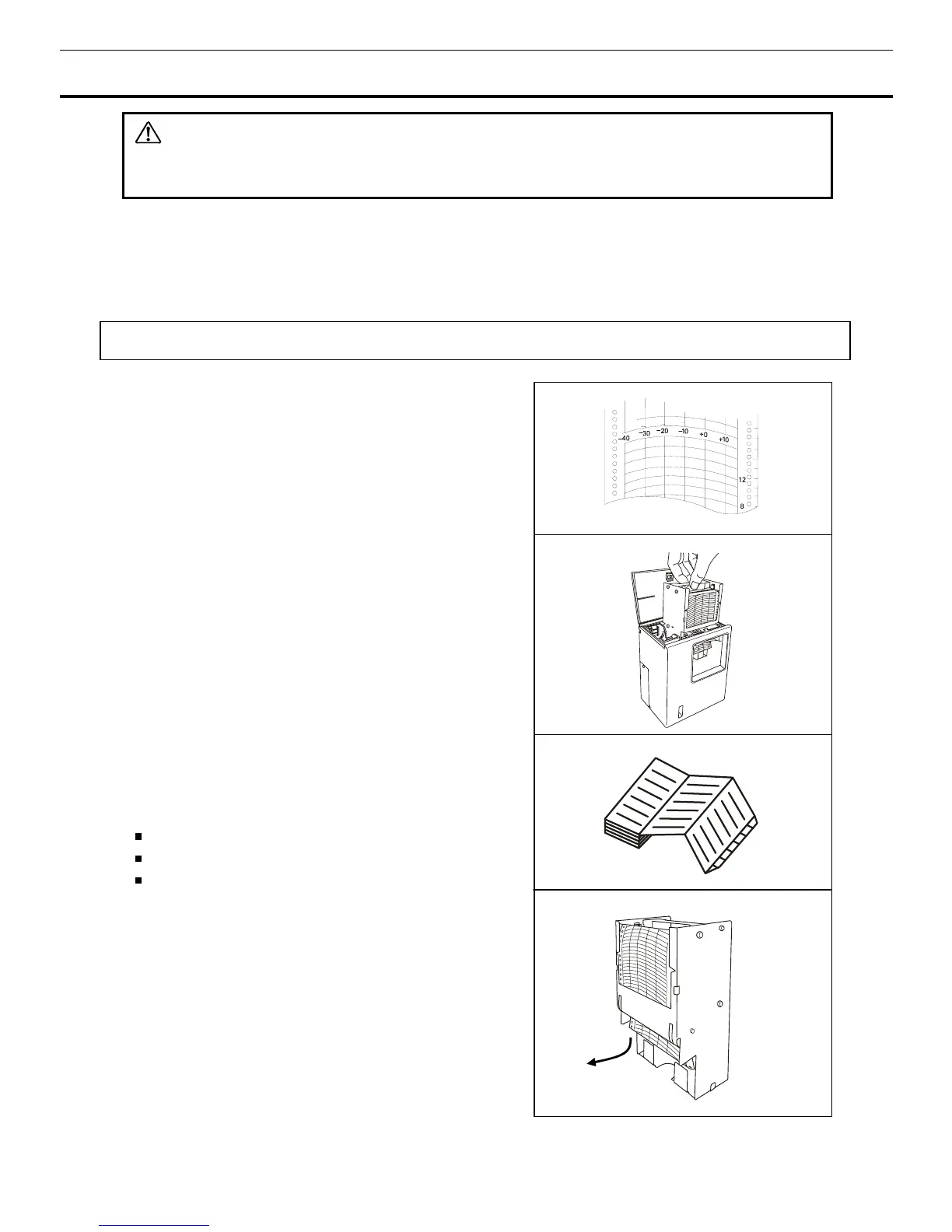
1.
The information on the recording paper is shown in
Fig. 1.
2.
Pull the cartridge up after opening the top lid. The lid
can be opened by turning the knob counterclockwise. See
Fig. 2.
3.
As shown in Fig. 3, insert the recording paper with the
“begin” tab placed in the cartridge. Check that the printed
side is facing out.
4.
Place the recording paper beneath the arm and between
the plate spring and guide plate in the direction of the
arrow.
Note:
Do not scratch or put pressure on the recording paper.
Do no bend the recording paper.
Do not reverse the recording paper manually.
The used paper left in the used recording paper
compartment can cause a malfunction. Be sure to
remove it. See Fig. 4.
Fig. 1
Fig. 2
Fig. 3
Fig. 4



 To Next Page