- 14 -
D. PROGRAMMING DOUBLE OR TRIPLE QUANTITY PAD
THE OVEN CAN NOT BE PROGRAMMED WHEN PROGRAM LOCK IS ACTIVATED! (See pages 14-15)
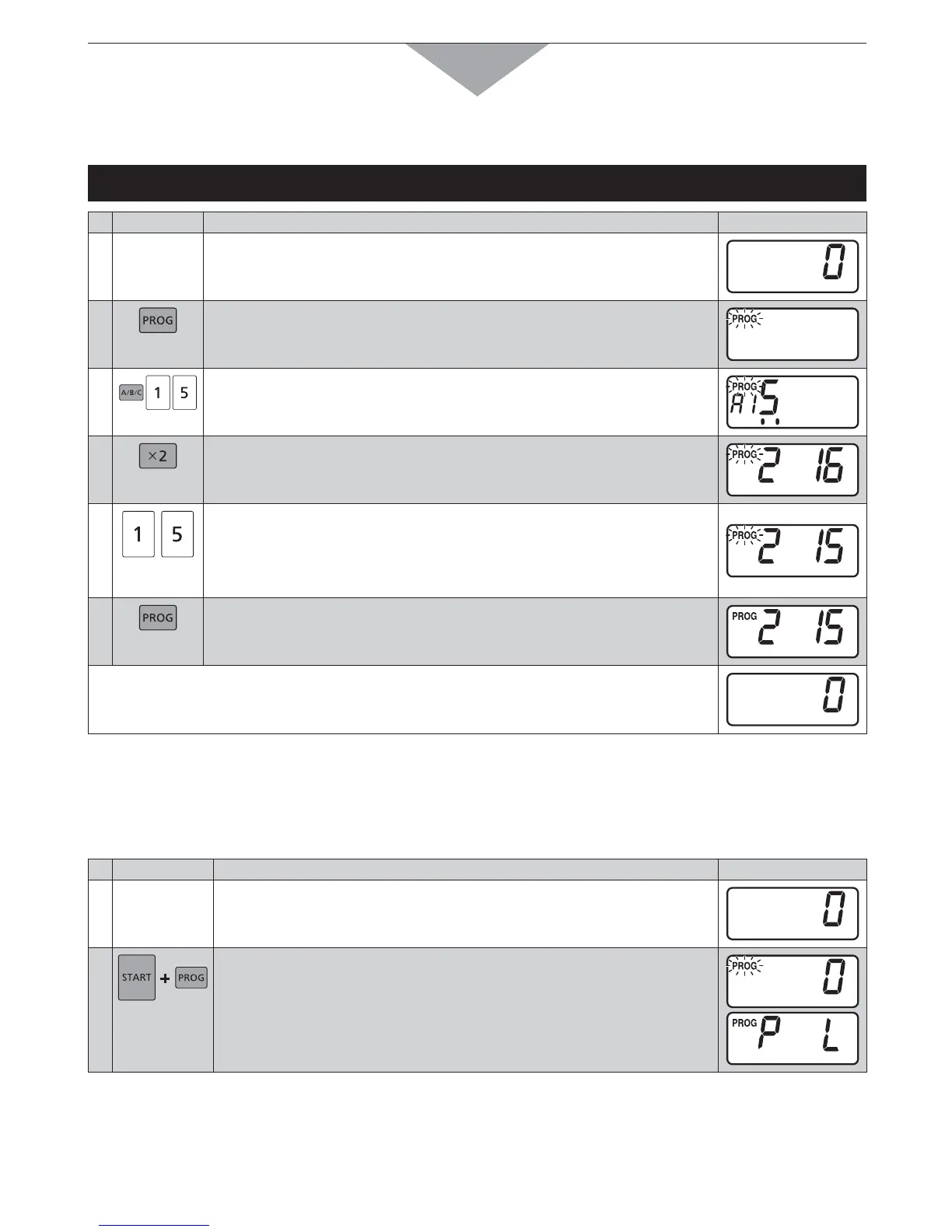
Example: To program 1.5 times of heating time for double quantity into Number/Memory pads “1” and
“5” at A side
PAD INSTRUCTION
DIGITAL DISPLAY WINDOW
1
Open the door and leave it open.
The oven lamp will turn on, and “0” will appear.
2
Press Prog pad.
“PROG” will start to blink.
3
Press Shift (A/B/C) pad, Number/Memory pads “1” and “5”.
The selected pad number will appear and currently programmed
information will be indicated.
4
Press Double Quantity pad.
The currently programmed magnification number will appear.
Note: 1.6 times is preset at factory.
5
Press Number/Memory pads “1” and “5” for 1.5 times.
The programmed magnification number will appear.
If A15 is programmed for 3 minutes, the time for the double quantity will
be 4 minutes and 30 seconds.
Available range is 0.1-3.0 times.
6
Press Prog pad.
“PROG” will stop blinking.
This means that you have completed programming.
s SECONDSLATERhvWILLAPPEAR
Note: If you want to program your desired magnification number for triple quantity, repeat as above, using Triple
Quantity pad instead of Double Quantity pad.
All models except Model No. NE-1772 also display the memory number in steps 4, 5, and 6.
E. PROGRAM LOCK
4O!CTIVATE0ROGRAM,OCK
PAD INSTRUCTION
DIGITAL DISPLAY WINDOW
1
Open the door and leave it open.
The oven lamp will turn on, and “0” will appear.
2
While pressing Start pad, press Prog pad until “PROG”, “P” and “L”
appear. (more than 2 seconds)
“PROG”, “P” and “L” will appear.
3 seconds later, “0” will appear.
In Program Lock mode:
s 4HEOVENISSTARTEDBYPRESSINGTHEDESIRED.UMBER-EMORYPAD4HEREISNONEEDTOPRESS3TARTPAD
s 4HEOVENCANNOTBEPROGRAMMEDORRUNMANUALLYUNTILTHEPROGRAMLOCKISRELEASED
How to Operate



 To Next Page